
はじめに
SWELLは、ユーザー→プロフィールの「プロフィール情報」を本文下の著者情報(「この記事を書いた人」)として表示できます。
また、「プロフィール」ウィジェットには別途文章を入力することも可能です。
一方、Cocoonでは、ユーザー→プロフィールの「プロフィール」ウィジェットに表示されますが、SWELLのように本文下に著者情報を表示する機能はありません。
さらに、「プロフィール」ウィジェットと本文下の著者情報を別々に入力することもできません。
そのため、次のような工夫をしている方もいます。
また、「プロフィール」ウィジェットとは別に、パターン機能を使って独自のプロフィールを作成・活用する方法があります。

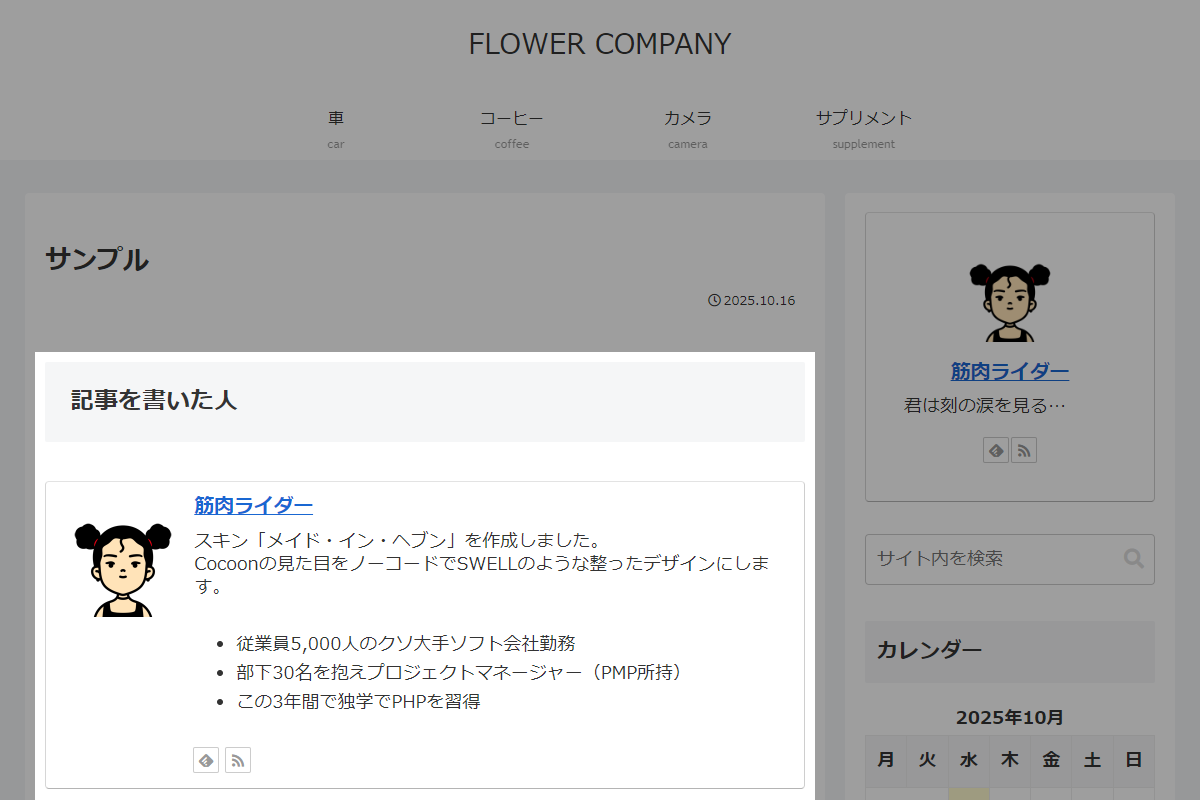
そこで、SWELLと同じように、著者情報をユーザー→プロフィールに新たに追加し、その内容を本文下に表示します。
未入力の場合は、従来のプロフィール情報を出力し、「プロフィール」ウィジェットと同じ形式で著者情報を反映します。
この記事では、この方法について説明します。
完成イメージ
実装手順
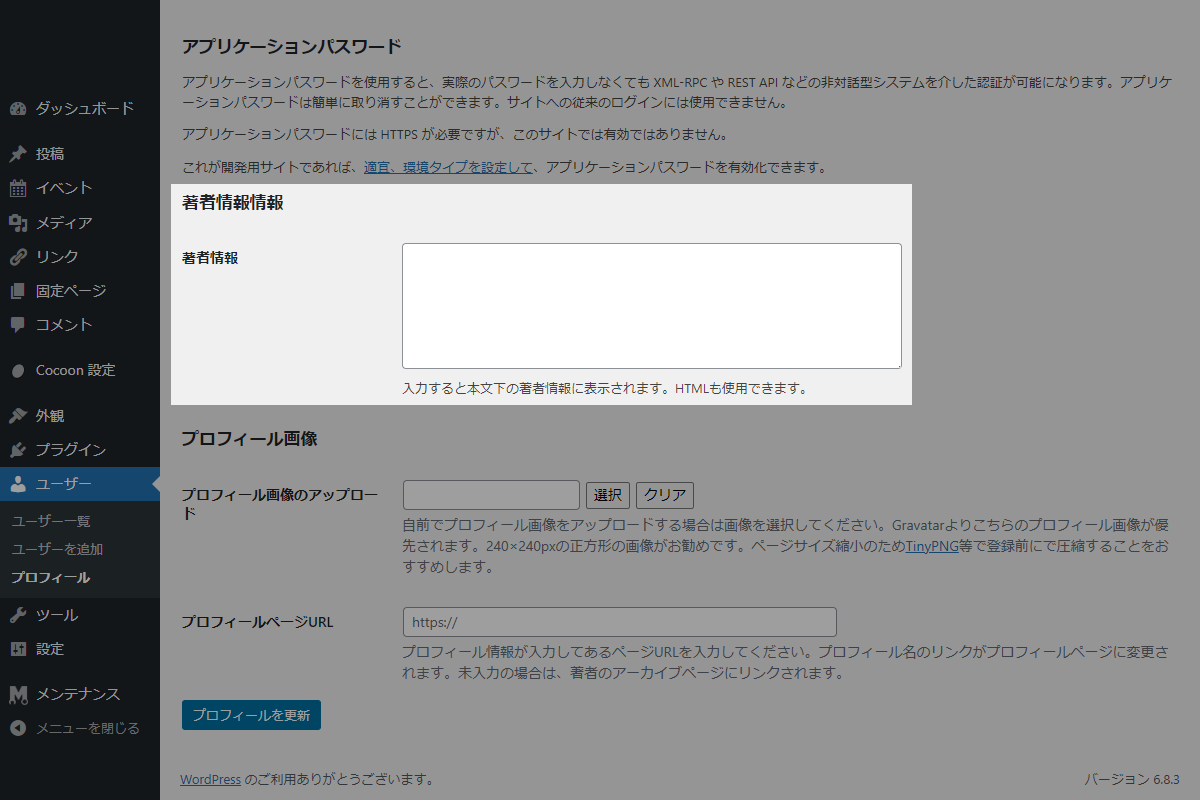
以下のコードをfunctions.phpに追加します。
- ラベルPHPを追加(プロフィール画面)
以下のコードをfunctions.phpに追加します。
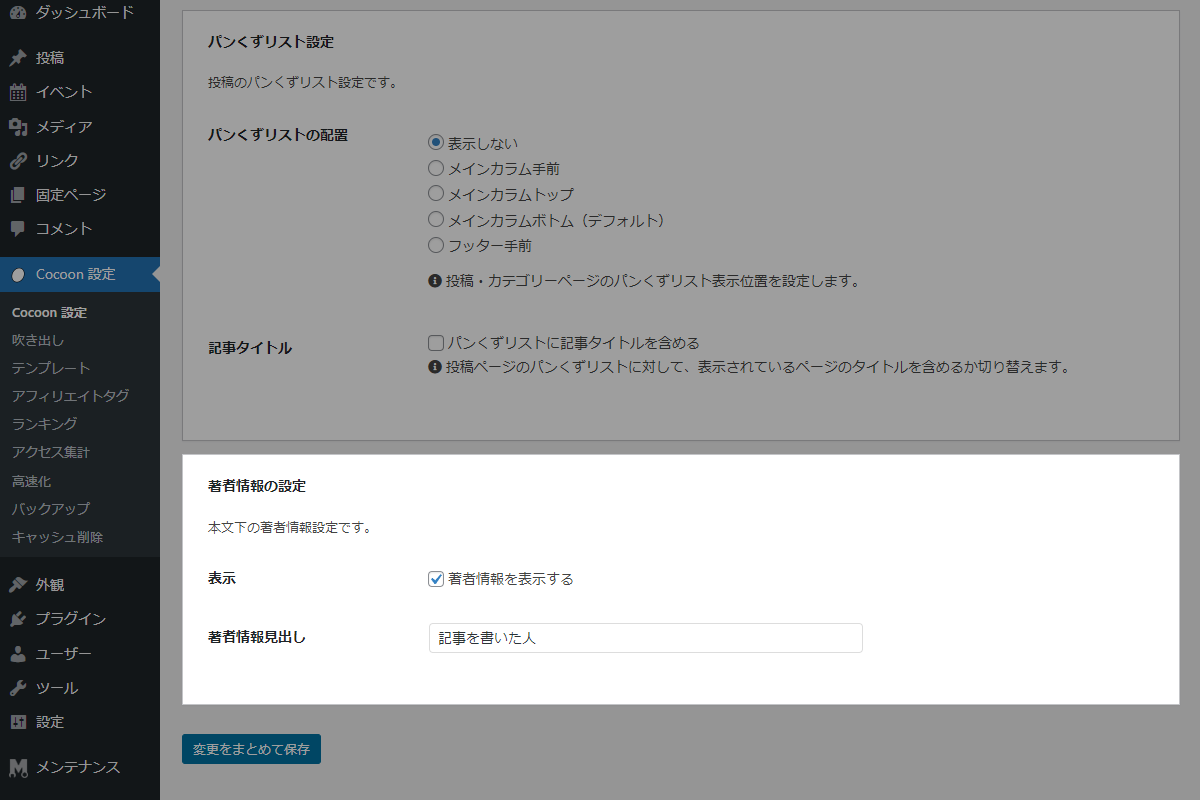
/** * プロフィール画面に「著者」フィールドを追加 * * @param WP_User $user 現在表示しているユーザーオブジェクト * @return void */ if (!function_exists('add_user_career_field')): function add_user_career_field($user) { ?> <!-- 著者情報フィールドの表示 --> <h2>著者情報情報</h2> <table class="form-table"> <tr> <th><label for="user_career">著者情報</label></th> <td> <!-- 既存のユーザーメタデータを取得して表示 --> <textarea name="user_career" id="user_career" rows="6" cols="60"><?php echo esc_textarea(get_the_author_meta('my_user_career', $user->ID)); ?></textarea><br/> <span class="description">入力すると本文下の著者情報に表示されます。HTMLも使用できます。</span> </td> </tr> </table> <?php } endif; // ユーザープロフィール画面に項目を追加 add_action('show_user_profile', 'add_user_career_field'); add_action('edit_user_profile', 'add_user_career_field'); /** * 「経歴」フィールドを保存 * * @param int $user_id 保存対象のユーザーID * @return void */ if (!function_exists('save_user_career_field')): function save_user_career_field($user_id) { // 編集権限の確認 if (!current_user_can('edit_user', $user_id)) { return; } // 入力値が存在する場合にサニタイズして保存 if (isset($_POST['user_career'])) { // 投稿で許可されているHTMLタグのみを抽出 $allowed_html = wp_kses_allowed_html('post'); $career = wp_kses($_POST['user_career'], $allowed_html); // ユーザーメタ情報の更新 update_user_meta($user_id, 'my_user_career', $career); } } endif; // ユーザープロフィールを更新 add_action('personal_options_update', 'save_user_career_field'); add_action('edit_user_profile_update', 'save_user_career_field'); - ラベルPHPを追加(Cocoon設定)
以下のコードをfunctions.phpに追加します。
/** * オプションを管理 * * @return array オプション設定の配列 */ if (!function_exists('my_cocoon_options')): function my_cocoon_options() { return [ 'author_profile_visible' => ['default' => 0, 'label' => '著者情報を表示する'], 'author_profile_heading' => ['default' => '記事を書いた人', 'label' => '著者情報見出し'], ]; } endif; /** * 設定値を取得 * * @param string $key オプションキー名 * @return mixed 設定値 */ if (!function_exists('get_my_cocoon_options')): function get_my_cocoon_options($key) { $options = my_cocoon_options(); if (!isset($options[$key])) { return ''; } $value = get_theme_option($key, $options[$key]['default']); if ($key === 'author_profile_heading') { return stripslashes_deep($value); } return $value; } endif; // Cocoon設定値を保存 add_action('cocoon_settings_after_save', function () { foreach (array_keys(my_cocoon_options()) as $key) { update_theme_option($key); } }); // Cocoon設定にメニューを追加 add_action('admin_menu', function () { $page_hook = get_plugin_page_hookname('theme-settings', ''); if ($page_hook) { add_action($page_hook, 'add_single_profile_settings'); } }, 99); /** * Cocoon設定(投稿)にメニューを追加 * * @return void */ if (!function_exists('add_single_profile_settings')): function add_single_profile_settings() { ob_start(); generate_checkbox_tag('author_profile_visible', get_my_cocoon_options('author_profile_visible'), '著者情報を表示する'); $checkbox_html = ob_get_clean(); // 著者情報見出しの入力欄を生成 ob_start(); generate_textbox_tag('author_profile_heading', get_my_cocoon_options('author_profile_heading')); $heading_html = ob_get_clean(); // 設定フォームを生成 ob_start(); ?> <div class="postbox author-profile-settings"> <h2 class="hndle">著者情報の設定</h2> <div class="inside"> <p>本文下の著者情報設定です。</p> <table class="form-table"> <tbody> <tr> <th scope="row">表示</th> <td><?= $checkbox_html; ?></td> </tr> <tr> <th scope="row">著者情報見出し</th> <td><?= $heading_html; ?></td> </tr> </tbody> </table> </div> </div> <?php $html = json_encode(ob_get_clean()); ?> <script> jQuery(function ($) { $('#tab-single-page-content .metabox-holder').append(<?= $html; ?>); }); </script> <?php } endif; - ラベルPHPを追加(著者情報)
以下のコードをfunctions.phpに追加します。
add_action('singular_entry_content_after', function () {
  if (!is_single() || !get_my_cocoon_options('author_profile_visible')) {
    return;
  }

  // 著者情報の見出しを取得
  $heading = get_my_cocoon_options('author_profile_heading');

  // ユーザーの経歴を著者ボックスの説明文に設定
  $filter = function ($description, $user_id) {
    $career = get_user_meta($user_id, 'my_user_career', true);
    return !empty($career) ? wpautop($career) : $description;
  };

  // 著者ボックスの説明文フィルターを登録
  add_filter('the_author_box_description', $filter, 10, 2);

  // 著者情報の見出しと著者ボックスを出力
  echo '<h2 class="author-box-heading">' . esc_html($heading) . '</h2>';
  generate_author_box_tag();

  // 著者ボックスの説明文フィルターを解除
  remove_filter('the_author_box_description', $filter, 10);
});
