はじめに
WordPressでサイトを制作する際、「お知らせ」など用途に合わせて「カスタム投稿タイプ」を追加することはよくあります。
しかし、多機能なプラグインを導入すると、設定項目が多すぎて迷ったり、サイトの動作が重くなったり、誤操作でURLが変わってしまうリスクがあります。
そこで、プラグイン「Custom Post Type UI」などを使用せずに、安全かつ軽量に一括管理できる仕組みを構築します。
この記事では、この方法について説明します。
プラグインと自作コードの比較
表1にプラグインと自作コードの比較を示します。
| 項目 | CPT UI | 自作コード |
|---|---|---|
| 入力項目・設定の手間 | 権限、リライトルール、ラベルなど数十個の項目があり、毎回設定に迷う。 | わずか4項目(スラッグと表示名のみ)。 マニュアル不要で誰でも迷わず登録できる。 |
| サイトの軽さ・負荷 | プラグイン自体の読み込みや、使わない大量の設定データが蓄積され、データベースや管理画面の負荷に。 | 必要なデータだけを1本の配列で保持。 数十行のPHPのみで動き、圧倒的に軽量・高速。 |
| 運用の安全性 | 後からいつでも設定を書き換えられるため、誤操作によるURL変更やデータ非表示のリスクが高い。 | 新規追加のみ・上書き完全禁止。 誤操作によるシステムの破壊やトラブルを物理的に防ぐ。 |
| 設計のブレなさ | 設定自由度が高すぎるため、作る人によって構成(階層の有無など)がバラバラになりやすい。 | 投稿は階層なし、タクソノミーは階層あり」に強制固定。 実務の王道パターンから絶対にブレない。 |
完成イメージ
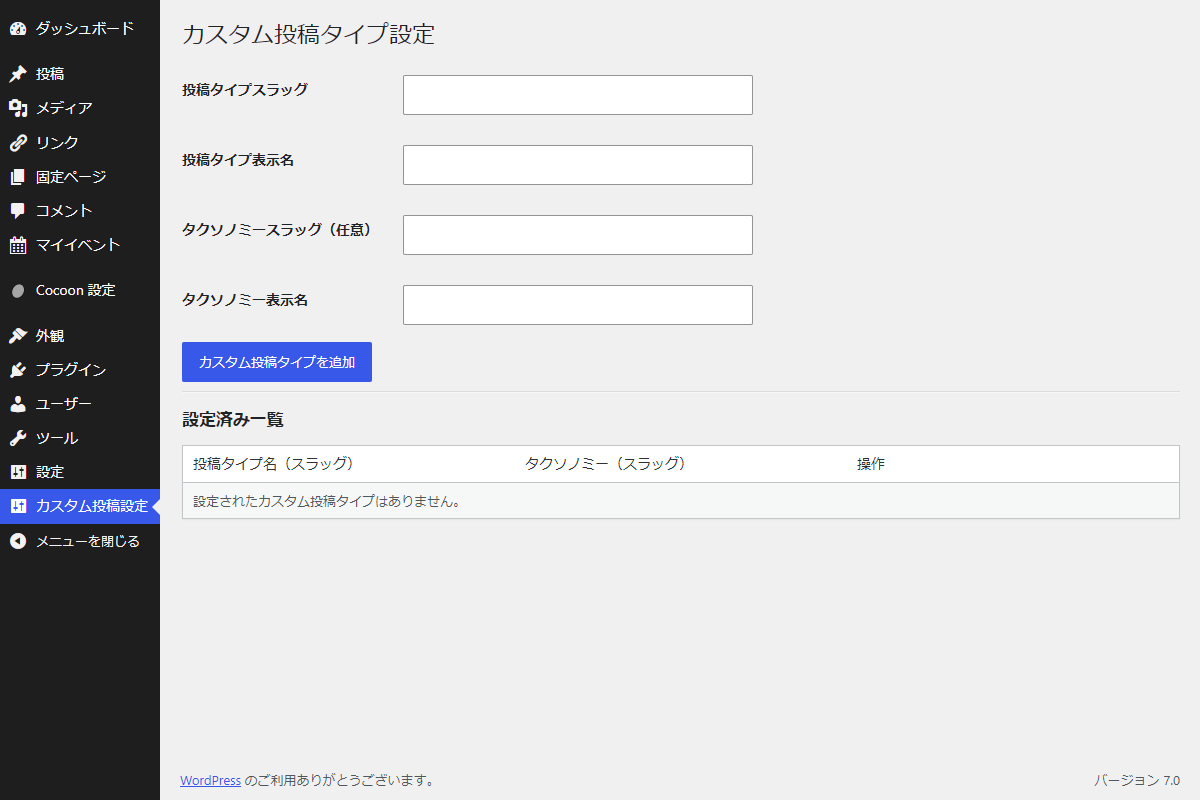
実装手順
以下のコードをfunctions.phpに追加します。
// 対象の処理を実行
add_action('init', function () {
  // 設定データを取得
  $cpts = get_option('my_cpt_manager', []);

  // パーマリンクを自動更新
  if (get_option('my_cpt_manager_flush_rewrite')) {
    flush_rewrite_rules();
    delete_option('my_cpt_manager_flush_rewrite');
  }

  // 設定データがない場合は終了
  if (empty($cpts)) {
    return;
  }

  // カスタム投稿タイプを登録
  foreach ($cpts as $slug => $data) {
    // 投稿タイプのラベルを設定
    $labels = [
      'name'         => $data['label'],
      'menu_name'    => $data['label'],
      'all_items'    => '投稿一覧',
      'add_new'      => '投稿を追加',
      'add_new_item' => '投稿を追加',
      'edit_item'    => '投稿を編集',
      'new_item'     => '新規投稿',
      'view_item'    => '投稿を表示',
      'search_items' => '投稿を検索',
    ];

    // 投稿タイプの引数を設定
    $args = [
      'labels'       => $labels,
      'public'       => true,
      'has_archive'  => true,
      'hierarchical' => false,
      'show_in_rest' => true,
      'supports'     => ['title', 'editor', 'thumbnail', 'excerpt'],
    ];

    register_post_type($slug, $args);

    // タクソノミーを登録
    if (!empty($data['tax_slug']) && !empty($data['tax_label'])) {
      $tax_args = [
        'label'        => $data['tax_label'],
        'hierarchical' => true,
        'show_in_rest' => true,
      ];

      register_taxonomy($data['tax_slug'], $slug, $tax_args);
    }
  }
}, 0);


// 管理画面からの設定データ更新
add_action('admin_init', function () {
  // nonceチェック
  if (isset($_POST['action']) && $_POST['action'] === 'add_cpt') {
    check_admin_referer('cpt_manager_action', 'cpt_manager_nonce');
  }

  if (isset($_GET['action']) && $_GET['action'] === 'delete_cpt') {
    check_admin_referer('cpt_manager_action', 'cpt_manager_nonce');
  }

  // 自動保存中を除外
  if (defined('DOING_AUTOSAVE') && DOING_AUTOSAVE) {
    return;
  }

  // リビジョンを除外
  if (wp_is_post_revision(get_the_ID())) {
    return;
  }

  // 権限チェック
  if (!current_user_can('manage_options')) {
    return;
  }

  // 新規データの保存処理
  if (isset($_POST['action']) && $_POST['action'] === 'add_cpt') {
    $cpts = get_option('my_cpt_manager', []);
    $slug = sanitize_key($_POST['cpt_slug']);

    if (!empty($slug)) {
      // 重複を確認
      if (isset($cpts[$slug])) {
        set_transient('my_admin_notice', [
          'type'    => 'error',
          'message' => '指定された投稿タイプスラッグはすでに登録されています。上書き変更はできません。',
        ], 30);

        wp_safe_redirect(admin_url('admin.php?page=cpt-manager'));
        exit;
      }

      // 入力値をサニタイズ
      $label     = sanitize_text_field($_POST['cpt_label']);
      $tax_slug  = sanitize_key($_POST['tax_slug']);
      $tax_label = sanitize_text_field($_POST['tax_label']);

      // 表示名を確認
      if (!empty($label)) {
        $cpts[$slug] = [
          'label'     => $label,
          'tax_slug'  => $tax_slug,
          'tax_label' => $tax_label,
        ];

        // Optionを更新
        update_option('my_cpt_manager', $cpts);

        // パーマリンク更新を予約
        update_option('my_cpt_manager_flush_rewrite', 1, false);

        set_transient('my_admin_notice', [
          'type'    => 'success',
          'message' => 'カスタム投稿タイプを新規追加しました。',
        ], 30);

        wp_safe_redirect(admin_url('admin.php?page=cpt-manager'));
        exit;
      }
    }
  }

  // 登録データの削除処理
  if (isset($_GET['action']) && $_GET['action'] === 'delete_cpt' && isset($_GET['slug'])) {
    $cpts = get_option('my_cpt_manager', []);
    $slug = sanitize_key($_GET['slug']);

    // スラッグの存在を確認
    if (isset($cpts[$slug])) {
      unset($cpts[$slug]);

      // Optionを更新
      update_option('my_cpt_manager', $cpts);

      // パーマリンク更新を予約
      update_option('my_cpt_manager_flush_rewrite', 1, false);

      set_transient('my_admin_notice', [
        'type'    => 'success',
        'message' => 'カスタム投稿タイプを削除しました。',
      ], 30);

      wp_safe_redirect(admin_url('admin.php?page=cpt-manager'));
      exit;
    }
  }
});


// 管理画面にメニューを追加
add_action('admin_menu', function () {
  add_menu_page(
    'カスタム投稿設定',
    'カスタム投稿設定',
    'manage_options',
    'cpt-manager',
    'render_cpt_manager',
    'dashicons-admin-settings',
    80
  );
});


// 通知メッセージを出力
add_action('admin_notices', function () {
  if ($notice = get_transient('my_admin_notice')) {
    echo '<div class="notice notice-' . esc_attr($notice['type']) . ' is-dismissible"><p>' . esc_html($notice['message']) . '</p></div>';
    delete_transient('my_admin_notice');
  }
});


/**
 * 管理画面ページを出力
 *
 * @return void
 */
if (!function_exists('render_cpt_manager')):
function render_cpt_manager() {
  // 権限チェック
  if (!current_user_can('manage_options')) {
    return;
  }

  // 保存済みデータを取得
  $cpts = get_option('my_cpt_manager', []);

  ?>
  <div class="wrap cpt-manager">
    <h1 class="cpt-manager__title">カスタム投稿タイプ設定</h1>

    <form method="post" action="" class="cpt-manager__form">
      <?php wp_nonce_field('cpt_manager_action', 'cpt_manager_nonce'); ?>

      <input type="hidden" name="action" value="add_cpt">

      <table class="form-table cpt-manager__table">
        <tr>
          <th scope="row">
            <label for="cpt_slug">投稿タイプスラッグ</label>
          </th>
          <td>
            <input type="text" name="cpt_slug" id="cpt_slug" class="regular-text" required pattern="[a-z0-9_-]+">
          </td>
        </tr>
        <tr>
          <th scope="row">
            <label for="cpt_label">投稿タイプ表示名</label>
          </th>
          <td>
            <input type="text" name="cpt_label" id="cpt_label" class="regular-text" required>
          </td>
        </tr>
        <tr>
          <th scope="row">
            <label for="tax_slug">タクソノミースラッグ(任意)</label>
          </th>
          <td>
            <input type="text" name="tax_slug" id="tax_slug" class="regular-text" pattern="[a-z0-9_-]+">
          </td>
        </tr>
        <tr>
          <th scope="row">
            <label for="tax_label">タクソノミー表示名</label>
          </th>
          <td>
            <input type="text" name="tax_label" id="tax_label" class="regular-text">
          </td>
        </tr>
      </table>

      <?php submit_button('カスタム投稿タイプを追加'); ?>
    </form>

    <hr />

    <h2 class="cpt-manager__heading">設定済み一覧</h2>

    <table class="wp-list-table widefat fixed striped cpt-manager__list">
      <thead>
        <tr>
          <th>投稿タイプ名(スラッグ)</th>
          <th>タクソノミー(スラッグ)</th>
          <th>操作</th>
        </tr>
      </thead>
      <tbody>
        <?php if (empty($cpts)) : ?>
          <tr>
            <td colspan="3">設定されたカスタム投稿タイプはありません。</td>
          </tr>
        <?php else : ?>
          <?php foreach ($cpts as $slug => $data) : ?>
            <tr>
              <td>
                <?= esc_html($data['label']); ?>(<?= esc_html($slug); ?>)
              </td>
              <td>
                <?php if (!empty($data['tax_slug'])) : ?>
                  <?= esc_html($data['tax_label']); ?>(<?= esc_html($data['tax_slug']); ?>)
                <?php else : ?>
                  -
                <?php endif; ?>
              </td>
              <td>
                <?php
                // 削除URLを生成
                $delete_url = wp_nonce_url(
                  admin_url('admin.php?page=cpt-manager&action=delete_cpt&slug=' . $slug),
                  'cpt_manager_action',
                  'cpt_manager_nonce'
                );
                ?>

                <a href="<?= esc_url($delete_url); ?>" class="button button-link-delete cpt-manager__delete" onclick="return confirm('本当に削除しますか?\n(※この投稿タイプに紐づく記事データは削除されませんが、管理画面から非表示になります)');">削除</a>
              </td>
            </tr>
          <?php endforeach; ?>
        <?php endif; ?>
      </tbody>
    </table>
  </div>
  <?php
}
endif;
さいごに
今回紹介した方法を使えば、プラグインを使わずに、管理画面から安全かつ直感的にカスタム投稿タイプを量産できるようになります。
無駄なデータを一切持たない仕組みのため、運用中のトラブルも未然に防ぐことが可能です。

2026年6月現在、Gutenbergedエディターの先行開発では、既に実験的機能として、管理画面内で直接カスタム投稿タイプやタクソノミーをノーコードで定義・追加できる「Content types」画面の実装テストが始まっています。