
はじめに
Gutenbergエディターで、例えば「段落」ブロックなど内容が長くなった場合、通常はページ全体が縦に伸びてしまいます。
スクロール表示にしたい場合、追加CSSクラスを設定して以下のようにCSSを追加する必要があります。
.my-scroll {
  border: 1px solid #ccc;
  box-sizing: border-box;
  height: 300px;
  overflow: auto;
  padding: 8px;
}
しかし、毎回クラスを追加してCSSを書くのは手間です。
そこで簡単にスクロール表示する独自のブロックを追加します。
この記事では、この方法について説明します。

完成イメージ
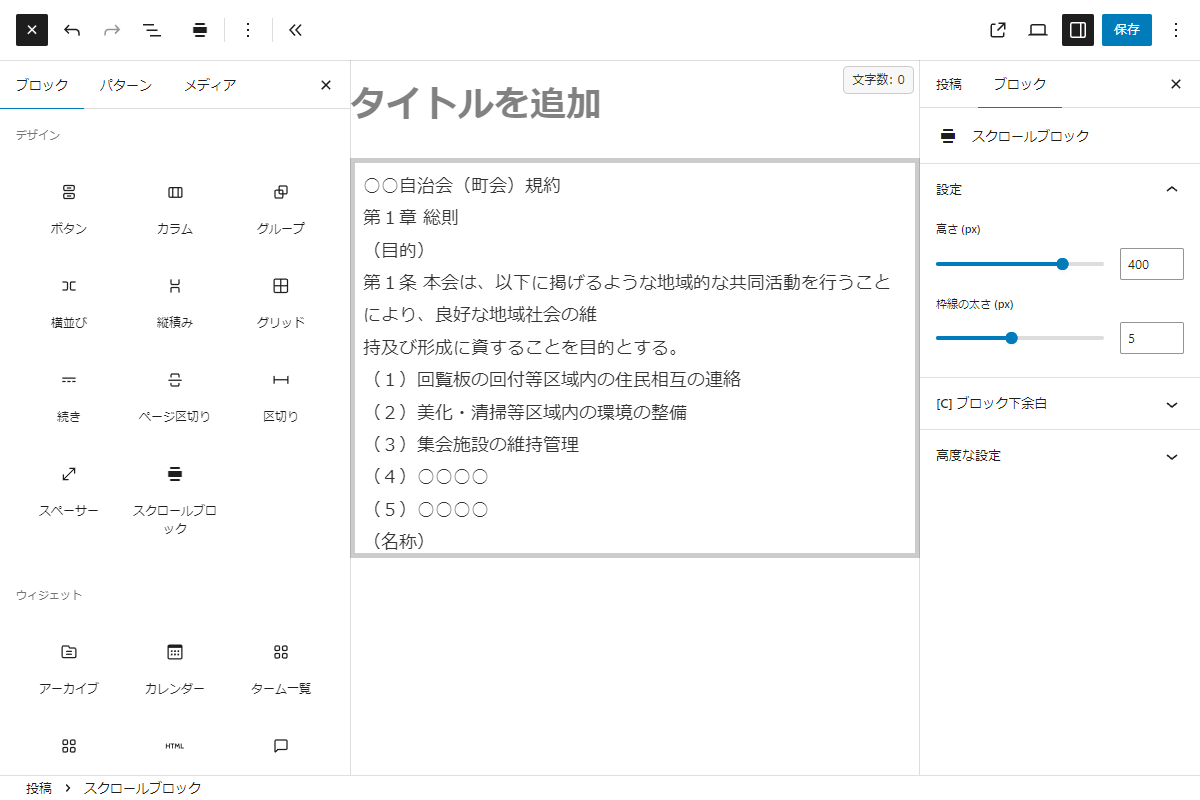
実装手順
以下のコードをfunctions.phpに追加します。
// ブロックを登録
add_action('init', function () {
  ob_start();
  ?>
  (function (wp) {
    const { registerBlockType } = wp.blocks;
    const { __ } = wp.i18n;
    const { InspectorControls, useBlockProps, InnerBlocks } = wp.blockEditor;
    const { PanelBody, RangeControl } = wp.components;
    const { createElement: el, Fragment } = wp.element;

    registerBlockType('custom/scroll-block', {
      title: __('スクロールブロック', 'scroll-block'),
      icon: 'align-wide',
      category: 'layout',
      attributes: {
        height:      { type: 'number', default: 300 },
        borderWidth: { type: 'number', default: 1 }
      },

      /**
       * エディター描画コンポーネント
       *
       * @param {Object} props ブロックのProps
       * @return {import('react').ReactElement} Reactエレメント
       */
      edit: function (props) {
        const { attributes, setAttributes } = props;
        const { height, borderWidth } = attributes;

        const blockProps = useBlockProps({
          style: {
            height: height + 'px',
            overflow: 'auto',
            border: borderWidth + 'px solid #ccc',
            padding: '8px',
            boxSizing: 'border-box'
          }
        });


        return el(Fragment, null,
          el(InspectorControls, null,
            el(PanelBody, { title: __('設定', 'scroll-block'), initialOpen: true },
              el(RangeControl, {
                label: __('高さ (px)', 'scroll-block'),
                value: height,
                onChange: (val) => setAttributes({ height: Number(val) }),
                min: 100,
                max: 500
              }),
              el(RangeControl, {
                label: __('枠線の太さ (px)', 'scroll-block'),
                value: borderWidth,
                onChange: (val) => setAttributes({ borderWidth: Number(val) }),
                min: 1,
                max: 10
              })
            )
          ),
          el('div', blockProps,
            el(InnerBlocks)
          )
        );
      },

      /**
       * 保存用コンポーネント
       *
       * @param {Object} props ブロックのProps
       * @return {import('react').ReactElement} Reactエレメント
       */
      save: function (props) {
        const { attributes } = props;
        const { height, borderWidth } = attributes;

        const blockProps = useBlockProps.save({
          style: {
            height: height + 'px',
            overflow: 'auto',
            border: borderWidth + 'px solid #ccc',
            padding: '8px',
            boxSizing: 'border-box'
          }
        });

        return el('div', blockProps,
          el(InnerBlocks.Content)
        );
      }
    });
  })(window.wp);
  <?php

  $handle = 'scroll-block';

  wp_register_script($handle, false, ['wp-blocks', 'wp-element', 'wp-i18n', 'wp-components', 'wp-block-editor'], false, true);
  wp_add_inline_script($handle, ob_get_clean());

  register_block_type('custom/scroll-block', [
    'editor_script' => $handle,
  ]);
});
