
はじめに
以下で紹介しているコードは、日本の都道府県ごとにリンクを付けて、インタラクティブなマップ形式で表示します。
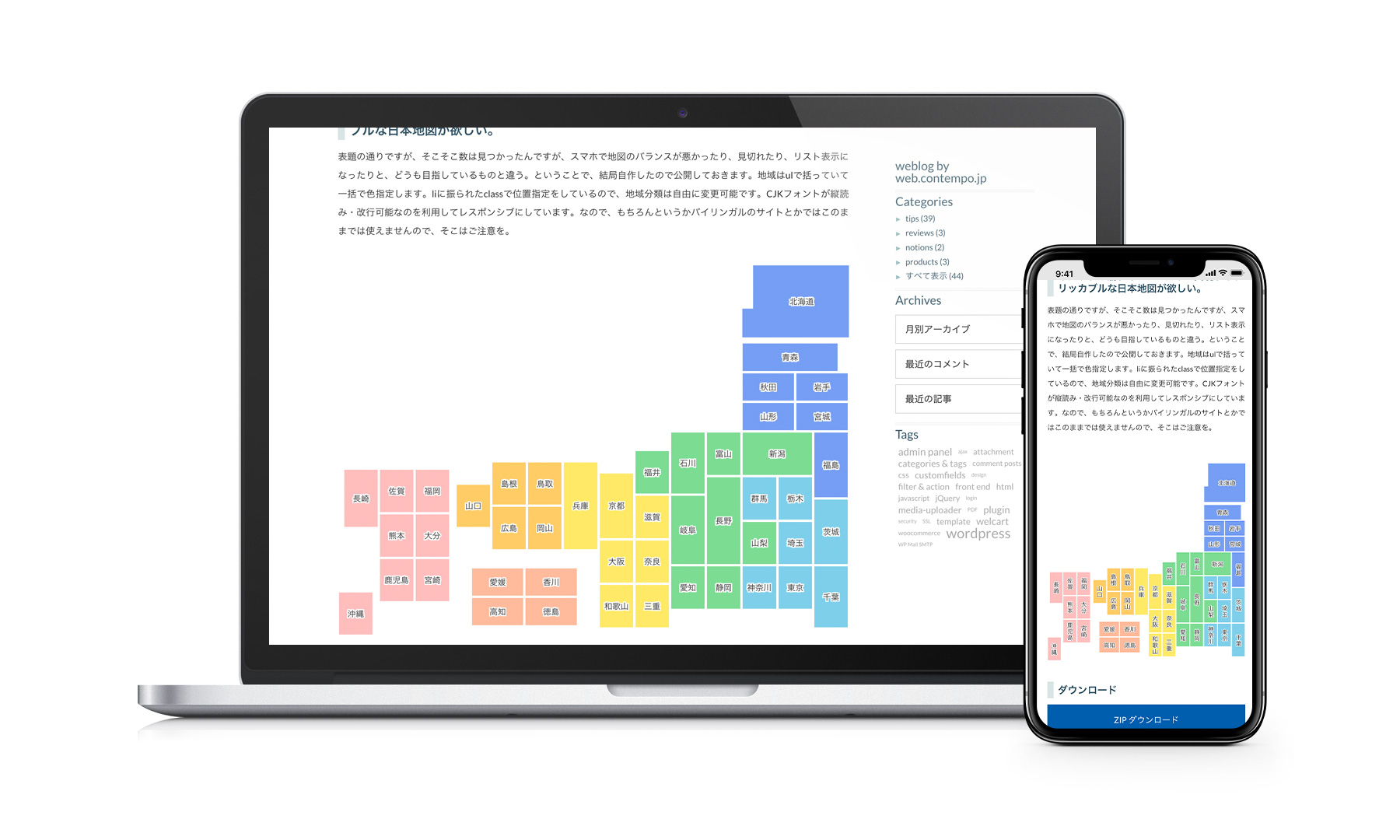
これを改善し、都道府県をタグとして設定した、タグに紐づく投稿数をマップ上に表示する独自のショートコードを追加します。
これにより、例えば旅行先の投稿が何件あるかなど、地域ごとの情報を分かりやすく閲覧できるようになります。
この記事では、この方法について説明します。
完成イメージ
北海道
(0) 青森
(0) 秋田
(0) 岩手
(0) 山形
(0) 宮城
(0) 福島
(0)
(0) 青森
(0) 秋田
(0) 岩手
(0) 山形
(0) 宮城
(0) 福島
(0)
千葉
(0) 栃木
(0) 埼玉
(0) 東京
(0) 群馬
(0) 神奈川
(0)
(0) 栃木
(0) 埼玉
(0) 東京
(0) 群馬
(0) 神奈川
(0)
山梨
(0) 新潟
(0) 長野
(0) 静岡
(0) 富山
(0) 岐阜
(0) 愛知
(0) 石川
(0) 福井
(0)
(0) 新潟
(0) 長野
(0) 静岡
(0) 富山
(0) 岐阜
(0) 愛知
(0) 石川
(0) 福井
(0)
滋賀
(0) 奈良
(0) 三重
(0) 京都
(0) 大阪
(0) 和歌山
(0) 兵庫
(0)
(0) 奈良
(0) 三重
(0) 京都
(0) 大阪
(0) 和歌山
(0) 兵庫
(0)
鳥取
(0) 岡山
(0) 島根
(0) 広島
(0) 山口
(0)
(0) 岡山
(0) 島根
(0) 広島
(0) 山口
(0)
香川
(0) 徳島
(0) 愛媛
(0) 高知
(0)
(0) 徳島
(0) 愛媛
(0) 高知
(0)
福岡
(0) 大分
(0) 宮崎
(0) 佐賀
(0) 熊本
(0) 鹿児島
(0) 長崎
(0) 沖縄
(0)
(0) 大分
(0) 宮崎
(0) 佐賀
(0) 熊本
(0) 鹿児島
(0) 長崎
(0) 沖縄
(0)
使用方法
以下にショートコードを示します。
[my_japan_map_tag]実装手順
以下の手順で実装します。
- ラベルGutenbergエディターでの設定
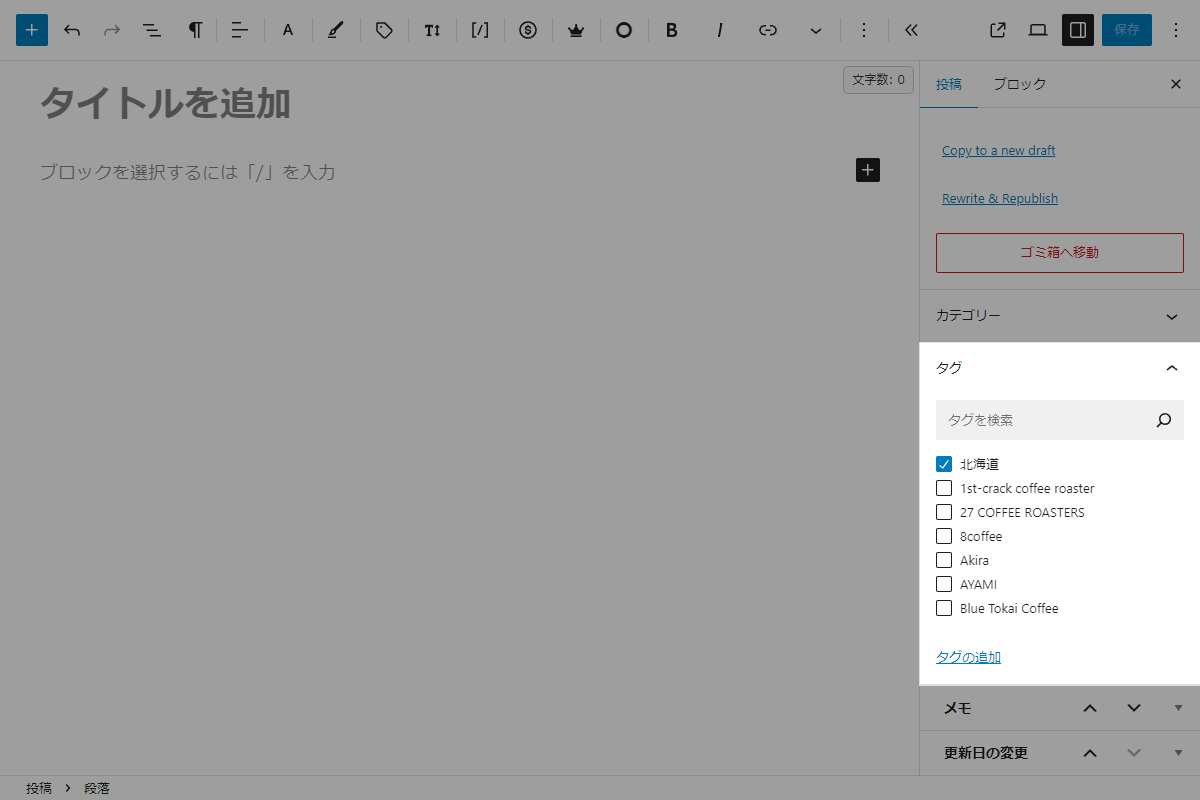
Gutenbergエディター 投稿を保存する際には、タグに都道府県名を設定します。
- ラベルPHPを追加
以下のコードをfunctions.phpに追加します。
// ショートコードを追加
add_shortcode('my_japan_map_tag', function () {
  $prefs = [
    'tohoku' => [
      ['class' => 'hokkaido',  'name' => '北海道', 'x' => 13, 'y' => 0,  'w' => 2, 'h' => 2],
      ['class' => 'aomori',    'name' => '青森',   'x' => 13, 'y' => 3,  'w' => 2, 'h' => 1],
      ['class' => 'akita',     'name' => '秋田',   'x' => 13, 'y' => 4,  'w' => 1, 'h' => 1],
      ['class' => 'iwate',     'name' => '岩手',   'x' => 14, 'y' => 4,  'w' => 1, 'h' => 1],
      ['class' => 'yamagata',  'name' => '山形',   'x' => 13, 'y' => 5,  'w' => 1, 'h' => 1],
      ['class' => 'miyagi',    'name' => '宮城',   'x' => 14, 'y' => 5,  'w' => 1, 'h' => 1],
      ['class' => 'fukushima', 'name' => '福島',   'x' => 13, 'y' => 6,  'w' => 2, 'h' => 1],
    ],
    'kanto' => [
      ['class' => 'ibaraki',  'name' => '茨城',   'x' => 14, 'y' => 7,  'w' => 1, 'h' => 2],
      ['class' => 'chiba',    'name' => '千葉',   'x' => 14, 'y' => 9,  'w' => 1, 'h' => 2],
      ['class' => 'tochigi',  'name' => '栃木',   'x' => 13, 'y' => 7,  'w' => 1, 'h' => 1],
      ['class' => 'saitama',  'name' => '埼玉',   'x' => 13, 'y' => 8,  'w' => 1, 'h' => 1],
      ['class' => 'tokyo',    'name' => '東京',   'x' => 13, 'y' => 9,  'w' => 1, 'h' => 1],
      ['class' => 'gunma',    'name' => '群馬',   'x' => 12, 'y' => 7,  'w' => 1, 'h' => 1],
      ['class' => 'kanagawa', 'name' => '神奈川', 'x' => 12, 'y' => 9,  'w' => 1, 'h' => 1],
    ],
    'chubu' => [
      ['class' => 'yamanashi', 'name' => '山梨', 'x' => 12, 'y' => 8,  'w' => 1, 'h' => 1],
      ['class' => 'niigata',   'name' => '新潟', 'x' => 11, 'y' => 6,  'w' => 2, 'h' => 1],
      ['class' => 'nagano',    'name' => '長野', 'x' => 11, 'y' => 7,  'w' => 1, 'h' => 2],
      ['class' => 'shizuoka',  'name' => '静岡', 'x' => 11, 'y' => 9,  'w' => 1, 'h' => 1],
      ['class' => 'toyama',    'name' => '富山', 'x' => 10, 'y' => 6,  'w' => 1, 'h' => 1],
      ['class' => 'gifu',      'name' => '岐阜', 'x' => 10, 'y' => 7,  'w' => 1, 'h' => 2],
      ['class' => 'aichi',     'name' => '愛知', 'x' => 10, 'y' => 9,  'w' => 1, 'h' => 1],
      ['class' => 'ishikawa',  'name' => '石川', 'x' => 9,  'y' => 5,  'w' => 1, 'h' => 2],
      ['class' => 'fukui',     'name' => '福井', 'x' => 9,  'y' => 7,  'w' => 1, 'h' => 1],
    ],
    'kansai' => [
      ['class' => 'shiga',    'name' => '滋賀',   'x' => 9, 'y' => 8,   'w' => 1, 'h' => 1],
      ['class' => 'nara',     'name' => '奈良',   'x' => 9, 'y' => 9,   'w' => 1, 'h' => 1],
      ['class' => 'mie',      'name' => '三重',   'x' => 9, 'y' => 10,  'w' => 1, 'h' => 1],
      ['class' => 'kyoto',    'name' => '京都',   'x' => 8, 'y' => 8,   'w' => 1, 'h' => 1],
      ['class' => 'osaka',    'name' => '大阪',   'x' => 8, 'y' => 9,   'w' => 1, 'h' => 1],
      ['class' => 'wakayama', 'name' => '和歌山', 'x' => 8, 'y' => 10,  'w' => 1, 'h' => 1],
      ['class' => 'hyogo',    'name' => '兵庫',   'x' => 7, 'y' => 8,   'w' => 1, 'h' => 2],
    ],
    'chugoku' => [
      ['class' => 'tottori',   'name' => '鳥取', 'x' => 6, 'y' => 8,  'w' => 1, 'h' => 1],
      ['class' => 'okayama',   'name' => '岡山', 'x' => 6, 'y' => 9,  'w' => 1, 'h' => 1],
      ['class' => 'shimane',   'name' => '島根', 'x' => 5, 'y' => 8,  'w' => 1, 'h' => 1],
      ['class' => 'hiroshima', 'name' => '広島', 'x' => 5, 'y' => 9,  'w' => 1, 'h' => 1],
      ['class' => 'yamaguchi', 'name' => '山口', 'x' => 4, 'y' => 8,  'w' => 1, 'h' => 2],
    ],
    'shikoku' => [
      ['class' => 'kagawa',    'name' => '香川', 'x' => 6, 'y' => 11, 'w' => 1, 'h' => 1],
      ['class' => 'tokushima', 'name' => '徳島', 'x' => 6, 'y' => 12, 'w' => 1, 'h' => 1],
      ['class' => 'ehime',     'name' => '愛媛', 'x' => 5, 'y' => 11, 'w' => 1, 'h' => 1],
      ['class' => 'kochi',     'name' => '高知', 'x' => 5, 'y' => 12, 'w' => 1, 'h' => 1],
    ],
    'kyushu' => [
      ['class' => 'fukuoka',   'name' => '福岡',   'x' => 2, 'y' => 8,  'w' => 1, 'h' => 1],
      ['class' => 'oita',      'name' => '大分',   'x' => 2, 'y' => 9,  'w' => 1, 'h' => 1],
      ['class' => 'miyazaki',  'name' => '宮崎',   'x' => 2, 'y' => 10, 'w' => 1, 'h' => 1],
      ['class' => 'saga',      'name' => '佐賀',   'x' => 1, 'y' => 8,  'w' => 1, 'h' => 1],
      ['class' => 'kumamoto',  'name' => '熊本',   'x' => 1, 'y' => 9,  'w' => 1, 'h' => 1],
      ['class' => 'kagoshima', 'name' => '鹿児島', 'x' => 1, 'y' => 10, 'w' => 1, 'h' => 1],
      ['class' => 'nagasaki',  'name' => '長崎',   'x' => 0, 'y' => 8,  'w' => 1, 'h' => 1],
      ['class' => 'okinawa',   'name' => '沖縄',   'x' => 0, 'y' => 12, 'w' => 1, 'h' => 1],
    ],
  ];

  ob_start();
  ?>
  <div id="jp_map_container">
    <div class="jp_map_select_wrapper">
      <select onchange="if (this.value) { window.location.href = this.value; }">
        <option value="">都道府県を選択</option>
        <?php
        $is_first_region = true;
        foreach ($prefs as $region => $prefectures):
          if (!$is_first_region) {
            echo '<hr>';
          }
          $is_first_region = false;

          foreach ($prefectures as $pref):
            $tag   = get_term_by('name', $pref['name'], 'post_tag');
            $count = $tag ? $tag->count : 0;

            $link = '';
            if ($tag && $count > 0) {
              $term_link = get_term_link($tag);
              if (!is_wp_error($term_link)) {
                $link = $term_link;
              }
            }
            ?>
            <option value="<?= esc_url($link); ?>" <?= empty($link) ? 'disabled' : ''; ?>>
              <?= esc_html($pref['name']); ?> (<?= esc_html($count); ?>)
            </option>
          <?php endforeach; ?>
        <?php endforeach; ?>
      </select>
    </div>

    <div id="jp_map">
      <?php foreach ($prefs as $region => $prefectures): ?>
        <div class="<?= esc_attr($region); ?>">
          <?php foreach ($prefectures as $pref): ?>
            <?php
            $tag   = get_term_by('name', $pref['name'], 'post_tag');
            $count = $tag ? $tag->count : 0;
            $link  = '';

            if ($tag && $count > 0) {
              $term_link = get_term_link($tag);
              if (!is_wp_error($term_link)) {
                $link = $term_link;
              }
            }

            $style = sprintf('--x:%d; --y:%d; --w:%d; --h:%d', $pref['x'], $pref['y'], $pref['w'], $pref['h']);
            ?>
            <?php if (!empty($link)): ?>
              <a href="<?= esc_url($link); ?>" class="<?= esc_attr($pref['class']); ?>" style="<?= esc_attr($style); ?>">
                <?= esc_html($pref['name']); ?><br>(<?= esc_html($count); ?>)
              </a>
            <?php else: ?>
              <span class="<?= esc_attr($pref['class']); ?> is-disabled" style="<?= esc_attr($style); ?>">
                <?= esc_html($pref['name']); ?><br>(<?= esc_html($count); ?>)
              </span>
            <?php endif; ?>
          <?php endforeach; ?>
        </div>
      <?php endforeach; ?>
    </div>
  </div>
  <?php
  return ob_get_clean();
});


// フロント用JS・CSSを追加
add_action('wp_enqueue_scripts', function () {
  ob_start();
  ?>
  .jp_map_select_wrapper select {
    margin: 0 auto 30px;
    max-width: 300px;
  }

  .jp_map_select_wrapper select hr {
    border-top: 1px solid #ccc;
  }

  #jp_map {
    --height: 7.7%;
    --width: 6.67%;
    height: 600px;
    position: relative;
  }

  #jp_map a,
  #jp_map .is-disabled {
    align-content: center;
    border: 2px solid #fff;
    color: #333;
    display: block;
    font-size: clamp(11px, 2.3vw, 14px);
    height: calc(var(--h) * var(--height));
    left: calc(var(--x) * var(--width));
    line-height: 1.3;
    position: absolute;
    text-decoration: none;
    text-align: center;
    paint-order: stroke fill;
    top: calc(var(--y) * var(--height));
    width: calc(var(--w) * var(--width));
    -webkit-text-stroke: 2px #fff;
  }

  #jp_map a:hover {
    opacity: 0.8;
  }

  #jp_map .is-disabled {
    cursor: default;
    opacity: 0.5;
  }

  #jp_map .tohoku   a, #jp_map .tohoku   .is-disabled { background-color: #759ef4; }
  #jp_map .kanto    a, #jp_map .kanto    .is-disabled { background-color: #7ecfea; }
  #jp_map .chubu    a, #jp_map .chubu    .is-disabled { background-color: #7cdc92; }
  #jp_map .tokai    a, #jp_map .tokai    .is-disabled { background-color: #7cdc92; }
  #jp_map .hokuriku a, #jp_map .hokuriku .is-disabled { background-color: #c7b2de; }
  #jp_map .kansai   a, #jp_map .kansai   .is-disabled { background-color: #ffe966; }
  #jp_map .chugoku  a, #jp_map .chugoku  .is-disabled { background-color: #ffcc66; }
  #jp_map .shikoku  a, #jp_map .shikoku  .is-disabled { background-color: #ffbb9c; }
  #jp_map .kyushu   a, #jp_map .kyushu   .is-disabled { background-color: #ffbdbd; }
  <?php

  $handle = 'japan-map';

  wp_register_style($handle, false);
  wp_enqueue_style($handle);
  wp_add_inline_style($handle, ob_get_clean());
});
さいごに
今回紹介した方法を使えば、日本の都道府県ごとにタグを紐づけた投稿件数をインタラクティブな地図形式で簡単に表示できます。
これにより、地域ごとの投稿数を視覚的に把握でき、旅行や地域情報の紹介サイトにおいてユーザーにとってわかりやすい情報提供が可能になります。

