はじめに
独自のショートコードを使用して、1つの特定カテゴリーに属するタグのみを取得し、リスト形式またはドロップダウン形式で表示します。
この記事では、この方法について説明します。
完成イメージ
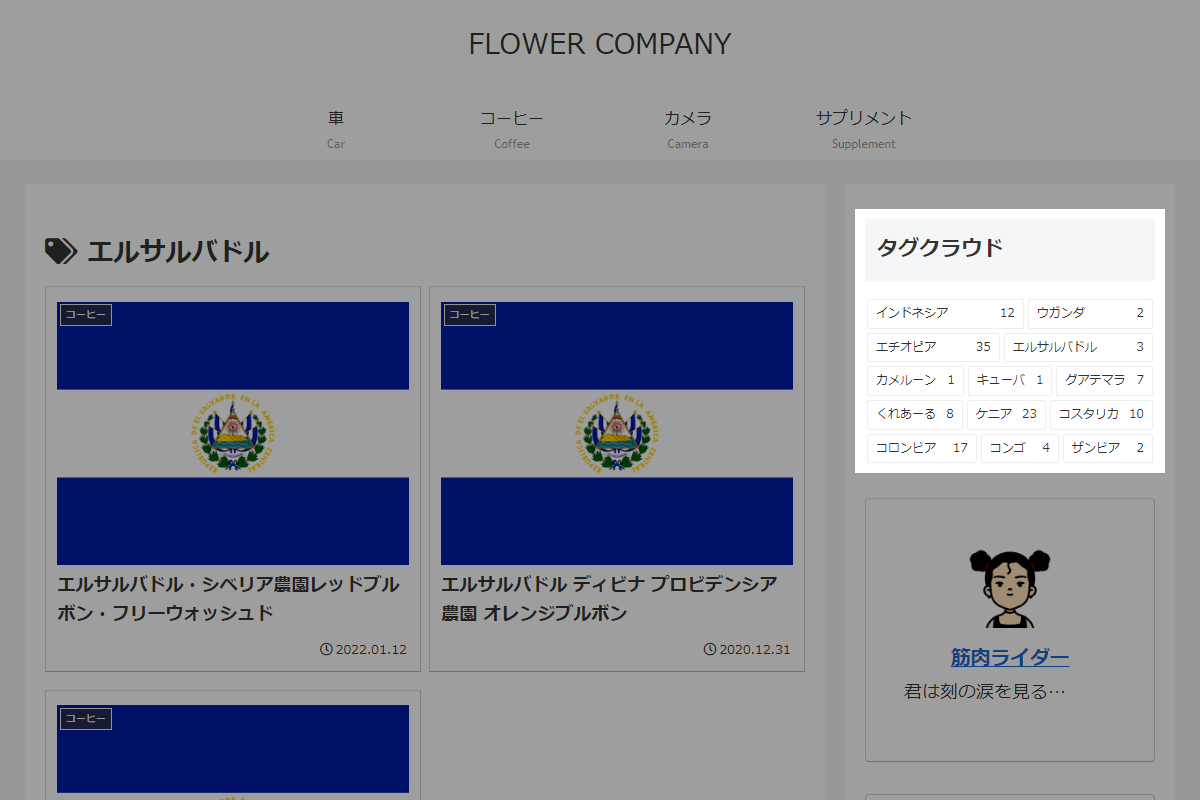
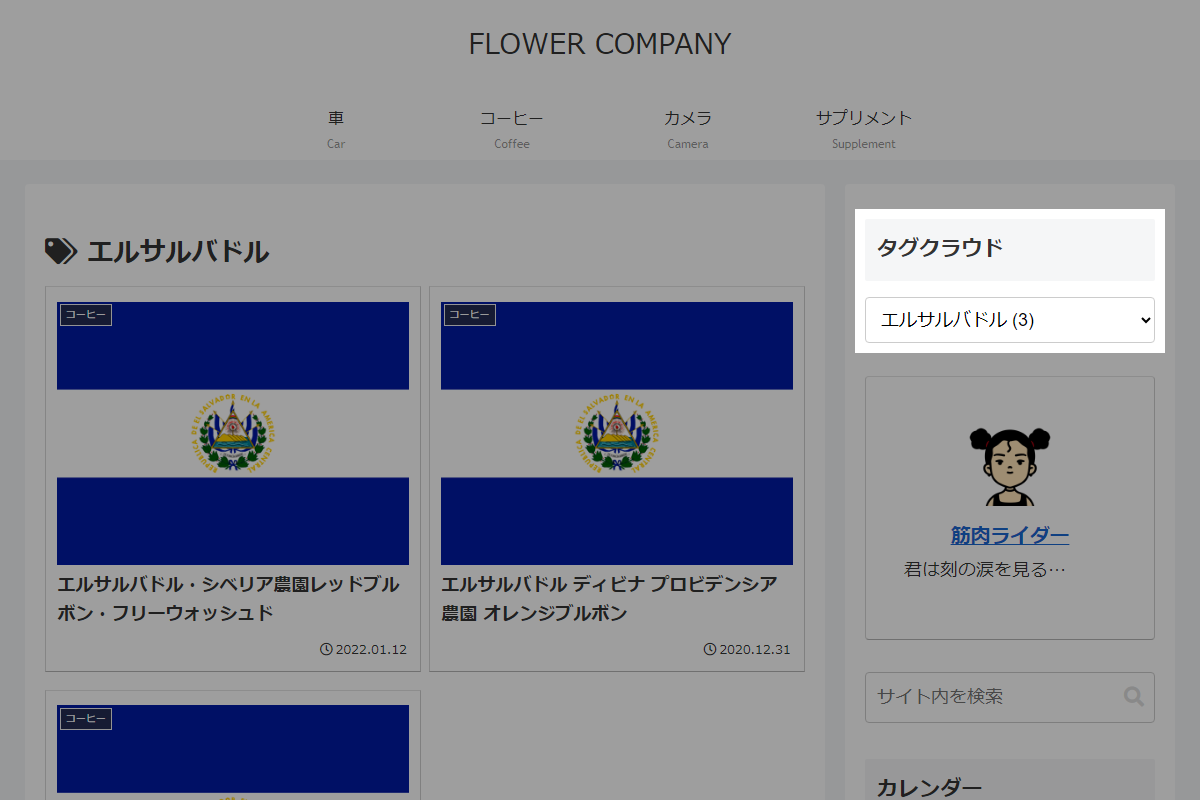
使用方法
以下にショートコードを示します。
[my_tags_in_category]| オプション | 説明 | 値 | 初期値 |
|---|---|---|---|
| cat | カテゴリーID(必須) | ||
| count | 投稿数を表示 | 0=非表示 / 1=表示 | 0 |
| dropdown | 表示形式 | 0=リスト形式 / 1=ドロップダウン形式 | 0 |
| order | ソート順 |
| ASC |
| orderby | ソート対象 |
| name |
実装手順
以下のコードをfunctions.phpに追加します。
// ショートコードを追加
add_shortcode('my_tags_in_category', function ($atts) {
  $atts = shortcode_atts([
    'cat'      => '',
    'count'    => 0,
    'dropdown' => 0,
    'order'    => 'ASC',
    'orderby'  => 'name',
  ], $atts);

  if (empty($atts['cat'])) {
    return '<p>カテゴリーIDが指定されていません。</p>';
  }

  // 指定されたカテゴリーの投稿IDを取得
  $post_ids = get_objects_in_term($atts['cat'], 'category');

  if (empty($post_ids) || is_wp_error($post_ids)) {
    return '<p>このカテゴリーには投稿がありません。</p>';
  }

  // 投稿IDからタグ情報を取得
  $tags = wp_get_object_terms(array_unique($post_ids), 'post_tag', [
    'order'   => $atts['order'],
    'orderby' => $atts['orderby'],
  ]);

  if (empty($tags) || is_wp_error($tags)) {
    return '<p>このカテゴリーにはタグがありません。</p>';
  }

  // 現在のタグIDを取得
  $queried_object = get_queried_object();
  $current_tag_id = ($queried_object && isset($queried_object->term_id)) ? (int) $queried_object->term_id : null;

  // 表示方式の切り替え
  $html = !empty($atts['dropdown'])
    ? render_tags_dropdown($tags, $atts, $current_tag_id)
    : render_tags_list($tags, $atts, $current_tag_id);

  return '<div class="widget_tags">' . $html . '</div>';
});


/**
 * タグをドロップダウン形式で表示
 *
 * @param array $tags タグのオブジェクト配列
 * @param array $atts ショートコード属性
 * @param int|null $current_tag_id 現在のタグID
 * @return string
 */
if (!function_exists('render_tags_dropdown')):
function render_tags_dropdown($tags, $atts, $current_tag_id) {
  ob_start();
  ?>
  <select onchange="if (this.value) { document.location.href = this.value; }">
    <option value="">タグを選択</option>
    <?php foreach ($tags as $tag): ?>
      <?php $selected = ((int) $tag->term_id === $current_tag_id) ? ' selected' : ''; ?>
      <option value="<?= esc_url(get_tag_link($tag->term_id)); ?>"<?= $selected; ?>>
        <?= esc_html($tag->name); ?>
        <?php if (!empty($atts['count'])): ?>
          (<?= (int) $tag->count; ?>)
        <?php endif; ?>
      </option>
    <?php endforeach; ?>
  </select>
  <?php

  return ob_get_clean();
}
endif;


/**
 * タグをリスト形式で表示
 *
 * @param array $tags タグのオブジェクト配列
 * @param array $atts ショートコード属性
 * @param int|null $current_tag_id 現在のタグID
 * @return string
 */
if (!function_exists('render_tags_list')):
function render_tags_list($tags, $atts, $current_tag_id) {
  ob_start();
  ?>
  <div class="tagcloud cat-<?= esc_attr($atts['cat']); ?>">
    <?php foreach ($tags as $index => $tag): ?>
      <?php $current_class = ((int) $tag->term_id === $current_tag_id) ? ' current' : ''; ?>
      <a class="tag-<?= esc_attr($index) . $current_class; ?>" href="<?= esc_url(get_tag_link($tag->term_id)); ?>">
        <span class="tag-caption"><?= esc_html($tag->name); ?></span>
        <?php if (!empty($atts['count'])): ?>
          <span class="tag-link-count"><?= (int) $tag->count; ?></span>
        <?php endif; ?>
      </a>
    <?php endforeach; ?>
  </div>
  <?php

  return ob_get_clean();
}
endif;
さいごに
今回紹介した方法を使えば、特定のカテゴリーに属するタグのみを表示し、リスト形式やドロップダウン形式で簡単に切り替えられます。
カテゴリーごとのタグを整理し、ユーザーの利便性を向上させるのに役立つでしょう。