
はじめに
WordPressサイトを運用する際、問い合わせフォームの設置は必須です。
多くのサイトでは「Contact Form 7(CF7)」が使われていますが、CF7はデフォルトではデータベースにデータを保存せず、メール送信のみを行う仕組みになっています。
そのため、サーバーの不調によるメールの不着や、送信履歴の管理が難しいという課題があります。
この記事で紹介する独自コードは、CF7とは異なり「送信データをカスタム投稿タイプとしてデータベースに確実に保存する(または設定でメール送信に切り替える)」という柔軟な仕様を持っています。
さらに、ユーザーが誤送信を防げる「確認画面(プレビュー)」を備え、管理画面からの手動追加を禁止した閲覧専用の履歴管理システムをショートコード1つで構築できるのが最大のポイントです。
この記事では、この方法について説明します。
CF7との違いと本コードのメリット
表1に、自作フォームとContact Form 7の仕様を比較を示します。
| 機能・特徴 | Contact Form 7(デフォルト) | 本記事の独自コード |
|---|---|---|
| データの保存 | データベースに保存されない(メール送信のみ) | カスタム投稿に非公開で自動保存(設定で切り替え可) |
| 管理画面の最適化 | 拡張プラグインがないと履歴が見られない | 専用の「問い合わせ履歴」メニューで一元管理 |
| 確認画面 | デフォルトでは非対応(別途プラグインが必要) | 標準で入力・確認・完了の3画面遷移に対応 |
| 保守性 | プラグインのアップデートによる不具合リスクあり | テーマのfunctions.phpのみで動き、外部依存ゼロ |
完成イメージ

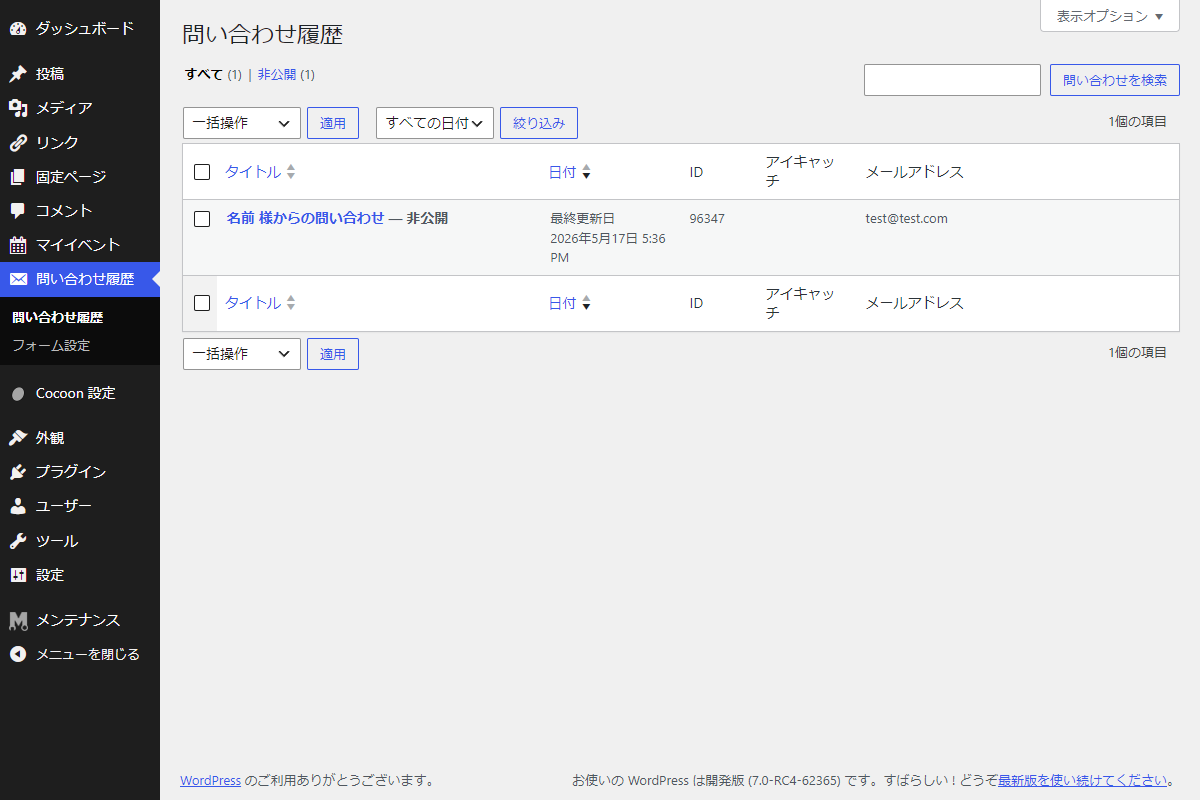
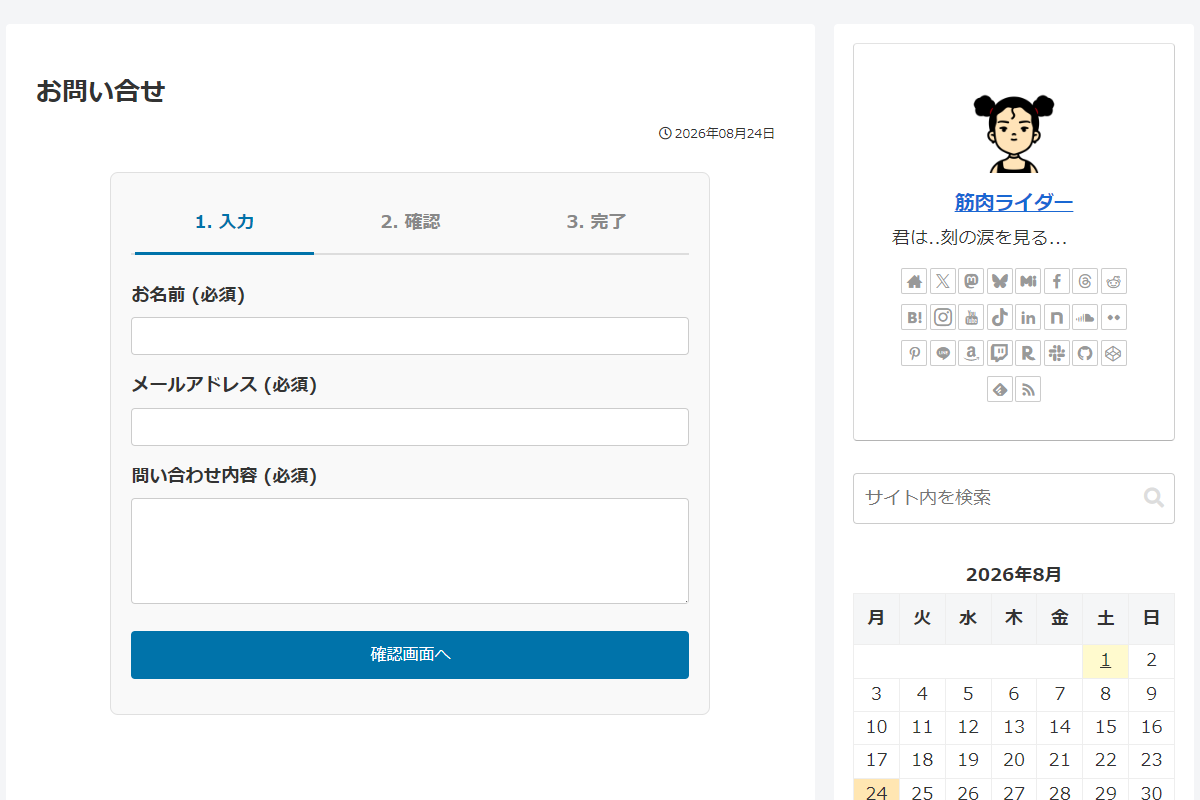
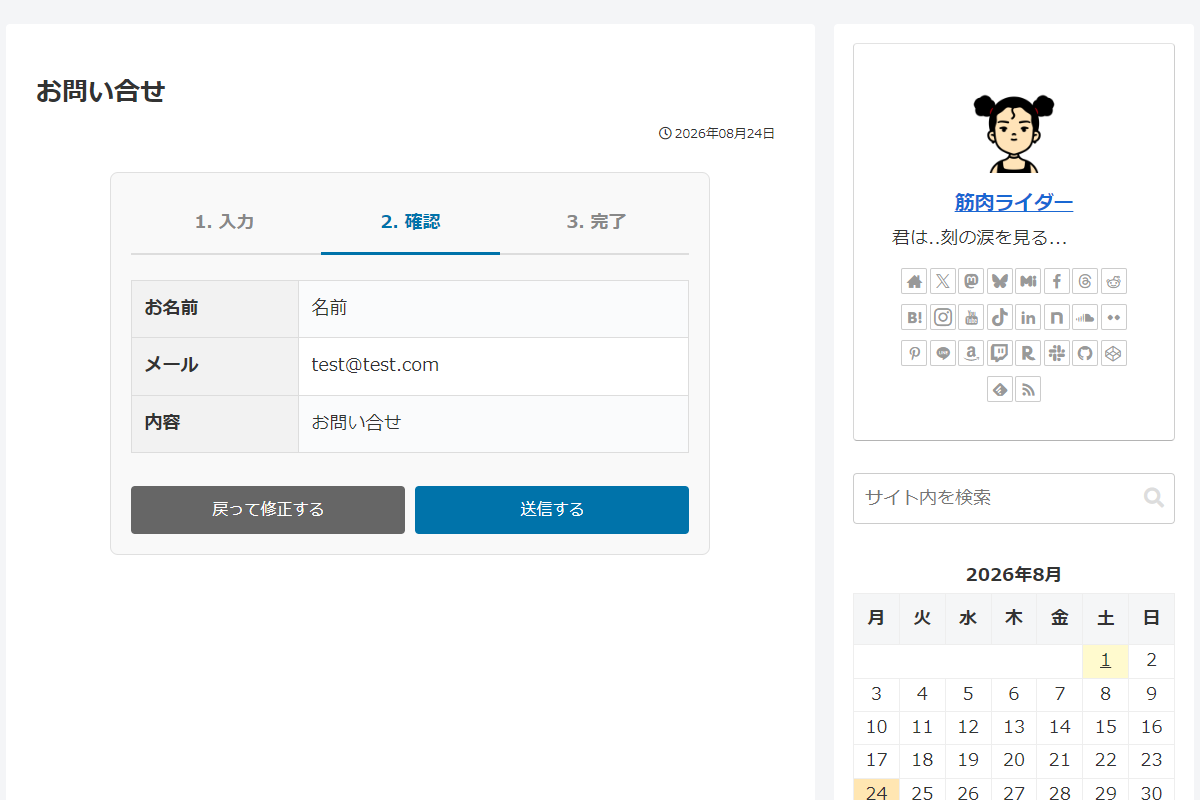
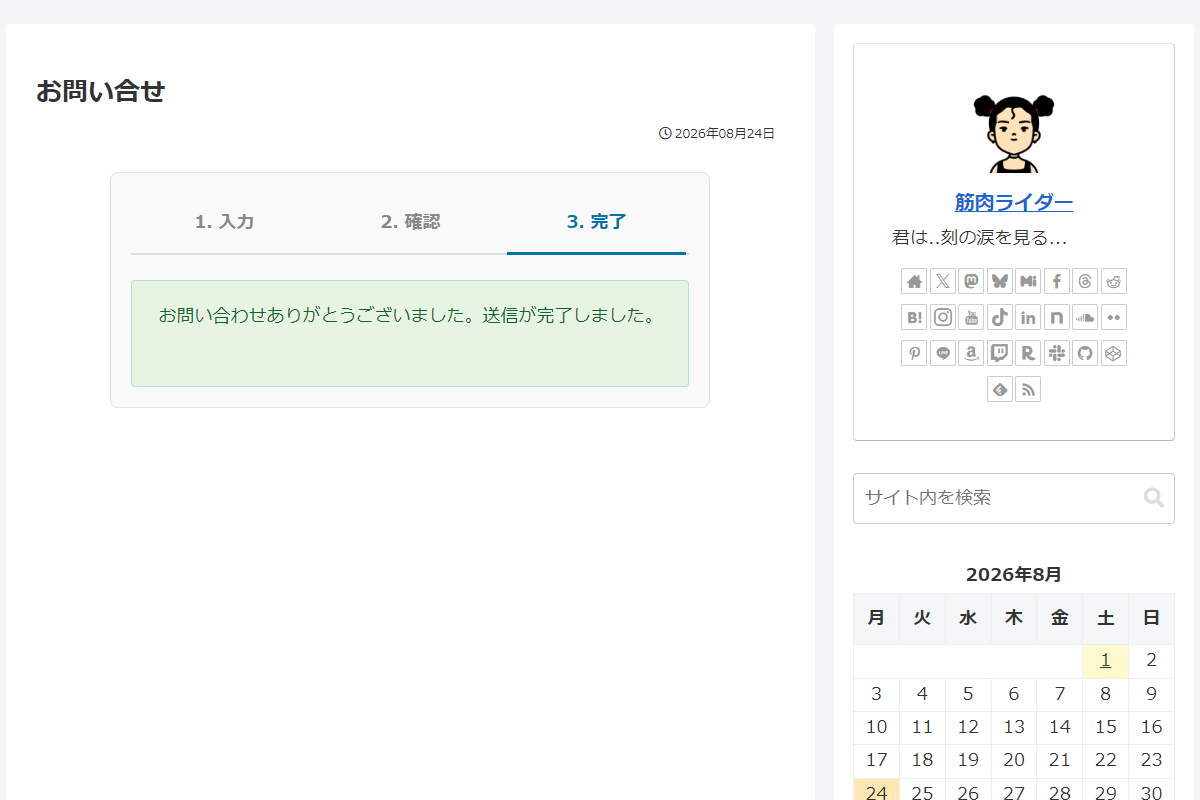
使用方法
以下にショートコードを示します。
[my_custom_contact_form]実装手順
以下の手順で実装します。
- my-custom-contact-form
- my-custom-contact-form.php
- assets
- css
- style.css
- css
- includes
- admin-settings
- custom-post-type
- form-handler
- shortcode
- ラベルPHPを追加
以下をmy-custom-contact-formに追加します。
<?php /** * Plugin Name: My Custom Contact Form * Description: 確認画面・DB保存機能を備えた独自お問い合わせフォーム * Version: 1.0.0 * Author: CHU-YA */ if (!defined('ABSPATH')) { exit; } // 定数定義 define('MCCF_PATH', plugin_dir_path(__FILE__)); define('MCCF_URL', plugin_dir_url(__FILE__)); // セッションの安全な初期化 add_action('wp_loaded', function () { if (!session_id() && !headers_sent()) { session_start(); } }, 1); // フロント用JS・CSSを追加 add_action('wp_enqueue_scripts', function () { wp_enqueue_style('mccf-style', MCCF_URL . 'assets/css/style.css', [], '1.0.0'); }); // ファイル読み込み require_once MCCF_PATH . 'includes/custom-post-type.php'; require_once MCCF_PATH . 'includes/admin-settings.php'; require_once MCCF_PATH . 'includes/form-handler.php'; require_once MCCF_PATH . 'includes/shortcode.php'; - ラベルPHPを追加
以下のコードをadmin-settings.phpに追加します。
<?php if (!defined('ABSPATH')) { exit; } // 設定項目(Option)を設定APIに登録 add_action('admin_init', function () { register_setting('my_custom_contact', 'my_custom_contact'); }); // 管理画面にメニューを追加 add_action('admin_menu', function () { add_submenu_page( 'edit.php?post_type=my_custom_contact', 'フォーム設定', 'フォーム設定', 'manage_options', 'custom_contact', 'render_custom_contact' ); }); /** * 管理画面ページを出力 * * @return void */ if (!function_exists('render_custom_contact')): function render_custom_contact() { ?> <div class="wrap"> <h1>問い合わせフォーム設定</h1> <?php settings_errors(); ?> <form method="post" action="options.php"> <?php settings_fields('my_custom_contact'); do_settings_sections('my_custom_contact'); $current_action = get_option('my_custom_contact', 'database'); ?> <table class="form-table"> <tr valign="top"> <th scope="row">送信時のアクション</th> <td> <fieldset> <label> <input type="radio" name="my_custom_contact" value="database" <?php checked($current_action, 'database'); ?>> カスタム投稿に保存する(履歴が残ります) </label><br><br> <label> <input type="radio" name="my_custom_contact" value="email" <?php checked($current_action, 'email'); ?>> WP登録メールアドレスに送信する(データベースには保存しません) </label> </fieldset> </td> </tr> </table> <?php submit_button(); ?> </form> </div> <?php } endif; // 管理画面一覧にカラムを追加 add_filter('manage_my_custom_contact_posts_columns', function ($columns) { $columns['contact_email'] = 'メールアドレス'; return $columns; }); // 管理画面一覧のカラムにデータを表示 add_action('manage_my_custom_contact_posts_custom_column', function ($column, $post_id) { if ($column !== 'contact_email') { return; } echo esc_html(get_post_meta($post_id, 'my_contact_email', true)); }, 10, 2); // メタボックスを追加 add_action('add_meta_boxes', function () { add_meta_box( 'contact_email_meta', '送信者メールアドレス', function ($post) { $email = get_post_meta($post->ID, 'my_contact_email', true); echo '<a href="mailto:' . esc_attr($email) . '">' . esc_html($email) . '</a>'; }, 'my_custom_contact', 'side', 'high' ); }); - ラベルPHPを追加
以下のコードをcustom-post-type.phpに追加します。
<?php if (!defined('ABSPATH')) { exit; } // カスタム投稿タイプを追加 add_action('init', function () { register_post_type('my_custom_contact', [ 'labels' => [ 'name' => '問い合わせ履歴', 'singular_name' => '問い合わせ履歴', 'add_new' => '新規追加', 'add_new_item' => '新規問い合わせ履歴を追加', 'edit_item' => '問い合わせ詳細の確認', 'view_item' => '問い合わせを確認', 'search_items' => '問い合わせを検索', 'not_found' => '問い合わせ履歴はありません。', 'not_found_in_trash' => 'ゴミ箱に問い合わせ履歴はありません。', ], 'public' => false, 'show_ui' => true, 'has_archive' => false, 'menu_icon' => 'dashicons-email-alt', 'supports' => ['title', 'editor'], 'capabilities' => [ 'create_posts' => 'do_not_allow', ], 'map_meta_cap' => true, ]); }); - ラベルPHPを追加
以下のコードをform-handler.phpに追加します。
<?php if (!defined('ABSPATH')) { exit; } /** * フォームからPOSTされたデータを取得し、セッションに保存して画面を遷移 * * @return void */ if (!function_exists('process_custom_contact_form')): function process_custom_contact_form() { if (!session_id() && !headers_sent()) { session_start(); } // nonceチェック if (!isset($_POST['custom_contact_nonce']) || !wp_verify_nonce($_POST['custom_contact_nonce'], 'custom_contact_action')) { wp_die('不正なリクエストです。'); } // 遷移元URLを取得 $current_page_url = remove_query_arg(['mode', 'status'], wp_get_referer()); // POST入力データのサニタイズ処理 $contact_name = sanitize_text_field($_POST['contact_name'] ?? ''); $contact_email = sanitize_email($_POST['contact_email'] ?? ''); $contact_content = sanitize_textarea_field($_POST['contact_content'] ?? ''); // 入力データをセッションに安全に退避 $_SESSION['contact_form_data'] = [ 'name' => $contact_name, 'email' => $contact_email, 'content' => $contact_content, ]; // 「戻って修正する」ボタン押下時の遷移処理 if (isset($_POST['back_to_input'])) { $_SESSION['contact_form_mode'] = 'input'; wp_redirect($current_page_url); exit; } // 「確認画面へ」ボタン押下時の遷移処理 if (isset($_POST['go_to_preview'])) { // 必須項目の入力チェックおよびメールフォーマット検証 if (empty($contact_name) || empty($contact_email) || empty($contact_content) || !is_email($contact_email)) { $_SESSION['contact_form_mode'] = 'input'; $_SESSION['contact_form_status'] = 'validation_error'; wp_redirect($current_page_url); exit; } $_SESSION['contact_form_mode'] = 'preview'; wp_redirect($current_page_url); exit; } // 「送信する」ボタン押下時の最終送信処理 if (isset($_POST['submit_final'])) { // 最終送信前の値存在チェック if (empty($contact_name) || empty($contact_email) || empty($contact_content)) { $_SESSION['contact_form_mode'] = 'input'; $_SESSION['contact_form_status'] = 'error'; wp_redirect($current_page_url); exit; } // 保存アクションの設定値を取得 $save_action = get_option('my_custom_contact', 'database'); $is_success = false; if ($save_action === 'email') { $to = get_option('admin_email'); $subject = '【問い合わせ】' . $contact_name . ' 様より'; $body = "お名前: {$contact_name}\n\n" . "メールアドレス: {$contact_email}\n\n\n" . "内容:\n{$contact_content}"; // メール送信ヘッダーの設定 $headers = [ 'Content-Type: text/plain; charset=UTF-8', 'From: ' . get_bloginfo('name') . ' <' . $to . '>', 'Reply-To: ' . $contact_name . ' <' . $contact_email . '>', ]; // メール送信の実行 $is_success = wp_mail($to, $subject, $body, $headers); } else { // 問い合わせ内容をカスタム投稿タイプとして保存 $post_id = wp_insert_post([ 'post_title' => $contact_name . ' 様からの問い合わせ', 'post_content' => $contact_content, 'post_status' => 'private', 'post_type' => 'my_custom_contact', ]); // 投稿の登録に成功した場合、メールアドレスをカスタムフィールドに保存 if ($post_id && !is_wp_error($post_id)) { update_post_meta($post_id, 'my_contact_email', $contact_email); $is_success = true; } } // 送信・保存の成否に応じた処理 if ($is_success) { unset($_SESSION['contact_form_data']); $_SESSION['contact_form_mode'] = 'success'; $_SESSION['contact_form_status'] = ''; wp_redirect($current_page_url); exit; } // 処理失敗時 $_SESSION['contact_form_mode'] = 'input'; $_SESSION['contact_form_status'] = 'failed'; wp_redirect($current_page_url); exit; } } endif; // Ajaxアクションを追加 add_action('admin_post_nopriv_route_contact', 'process_custom_contact_form'); add_action('admin_post_route_contact', 'process_custom_contact_form'); - ラベルPHPを追加
以下のコードをshortcode.phpに追加します。
<?php if (!defined('ABSPATH')) { exit; } // ショートコードを追加 add_shortcode('my_custom_contact_form', function () { // セッションを確認 if (!session_id() && !headers_sent()) { session_start(); } // セッションからモード・ステータス・入力データを取得 $mode = $_SESSION['contact_form_mode'] ?? 'input'; $status = $_SESSION['contact_form_status'] ?? ''; $form_data = [ 'name' => $_SESSION['contact_form_data']['name'] ?? '', 'email' => $_SESSION['contact_form_data']['email'] ?? '', 'content' => $_SESSION['contact_form_data']['content'] ?? '', ]; ob_start(); ?> <div class="custom-contact-form"> <ul class="custom-contact-form__steps"> <li class="<?= $mode === 'input' ? 'is-active' : ''; ?>">1. 入力</li> <li class="<?= $mode === 'preview' ? 'is-active' : ''; ?>">2. 確認</li> <li class="<?= $mode === 'success' ? 'is-active' : ''; ?>">3. 完了</li> </ul> <?php if ($status === 'failed'): ?> <p style="color: #c00; font-weight: bold;">送信処理に失敗しました。時間をおいて再度お試しいただくか、管理者へご連絡ください。</p> <?php elseif ($status === 'validation_error'): ?> <p style="color: #c00; font-weight: bold;">入力内容に不備があります。全項目を正しくご入力ください。</p> <?php endif; ?> <?php if ($mode === 'input'): ?> <form action="<?= esc_url(admin_url('admin-post.php')); ?>" method="post"> <input type="hidden" name="action" value="route_contact"> <?php wp_nonce_field('custom_contact_action', 'custom_contact_nonce'); ?> <p> <label>お名前 (必須)</label> <input type="text" name="contact_name" value="<?= esc_attr($form_data['name']); ?>" required> </p> <p> <label>メールアドレス (必須)</label> <input type="email" name="contact_email" value="<?= esc_attr($form_data['email']); ?>" required> </p> <p> <label>問い合わせ内容 (必須)</label> <textarea name="contact_content" rows="6" required><?= esc_textarea($form_data['content']); ?></textarea> </p> <p><input type="submit" name="go_to_preview" value="確認画面へ"></p> </form> <?php elseif ($mode === 'preview'): ?> <table> <tr><th>お名前</th><td><?= esc_html($form_data['name']); ?></td></tr> <tr><th>メール</th><td><?= esc_html($form_data['email']); ?></td></tr> <tr><th>内容</th><td><?= nl2br(esc_html($form_data['content'])); ?></td></tr> </table> <form action="<?= esc_url(admin_url('admin-post.php')); ?>" method="post"> <input type="hidden" name="action" value="route_contact"> <input type="hidden" name="contact_name" value="<?= esc_attr($form_data['name']); ?>"> <input type="hidden" name="contact_email" value="<?= esc_attr($form_data['email']); ?>"> <input type="hidden" name="contact_content" value="<?= esc_attr($form_data['content']); ?>"> <?php wp_nonce_field('custom_contact_action', 'custom_contact_nonce'); ?> <div style="display: flex; gap: 10px;"> <input type="submit" name="back_to_input" value="戻って修正する" style="background:#666;"> <input type="submit" name="submit_final" value="送信する"> </div> </form> <?php elseif ($mode === 'success'): ?> <div class="custom-contact-form__success-message"> <p>お問い合わせありがとうございました。送信が完了しました。</p> </div> <?php unset($_SESSION['contact_form_mode'], $_SESSION['contact_form_status']); ?> <?php endif; ?> </div> <?php return ob_get_clean(); }); - ラベルCSSを追加
以下のコードをstyle.cssに追加します。
.custom-contact-form {
  background-color: #f9f9f9;
  border: 1px solid #e0e0e0;
  border-radius: 8px;
  box-sizing: border-box;
  margin: 0 auto;
  max-width: 600px;
  padding: 20px;

  .custom-contact-form__steps {
    border-bottom: 2px solid #ddd;
    display: flex;
    justify-content: space-between;
    list-style: none;
    margin: 0 0 25px 0;
    padding: 0;

    li {
      color: #888;
      flex: 1;
      font-weight: bold;
      padding: 10px 0;
      text-align: center;

      &.is-active {
        border-bottom: 3px solid #0073aa;
        color: #0073aa;
        margin-bottom: -2px;
      }
    }
  }

  form p {
    margin-bottom: 15px;
  }

  label {
    display: block;
    font-weight: bold;
    margin-bottom: 5px;
  }

  input[type='text'],
  input[type='email'],
  textarea {
    border: 1px solid #ccc;
    border-radius: 4px;
    box-sizing: border-box;
    font-size: 14px;
    max-width: 100% !important;
    padding: 10px;
    width: 100% !important;
  }

  input[type='submit'] {
    background-color: #0073aa;
    border: none;
    border-radius: 4px;
    color: #fff;
    cursor: pointer;
    font-size: 16px;
    padding: 12px 24px;
    transition: background 0.3s ease;

    &:hover {
      background-color: #005177;
    }
  }

  table {
    background-color: #fff;
    border-collapse: collapse;
    margin-bottom: 20px;
    width: 100%;

    th,
    td {
      border: 1px solid #ddd;
      padding: 12px;
      text-align: left;
    }

    th {
      background-color: #f2f2f2;
      width: 30%;
    }
  }

  .custom-contact-form__success-message {
    background-color: #e7f4e4;
    border: 1px solid #b7e1cd;
    border-radius: 4px;
    color: #0d652d;
    padding: 20px;
    text-align: center;
  }
}
さいごに
今回紹介した方法を使えば、プラグインを使わずに、WordPressの標準機能だけで安全かつ堅牢な問い合わせフォームを構築できます。
セッションを利用したスムーズな画面遷移や、管理画面からの手動追加を制限したクリーンな履歴管理システムなど、実務でそのまま使える要件を全て網羅しています。
コードをfunctions.phpに記述するだけで外部依存のない軽量なシステムが手に入るため、サイトのセキュリティ向上やアップデートに伴う不具合リスクの軽減にも直結します。