
完成イメージ
- cocoon-child-master
- functions
- functions1.php
- functions2.php
- functions3.php
- functions.php
- javascript.js
- style.css
- functions
実装手順
以下の手順で実装します。
- ラベルタイトル
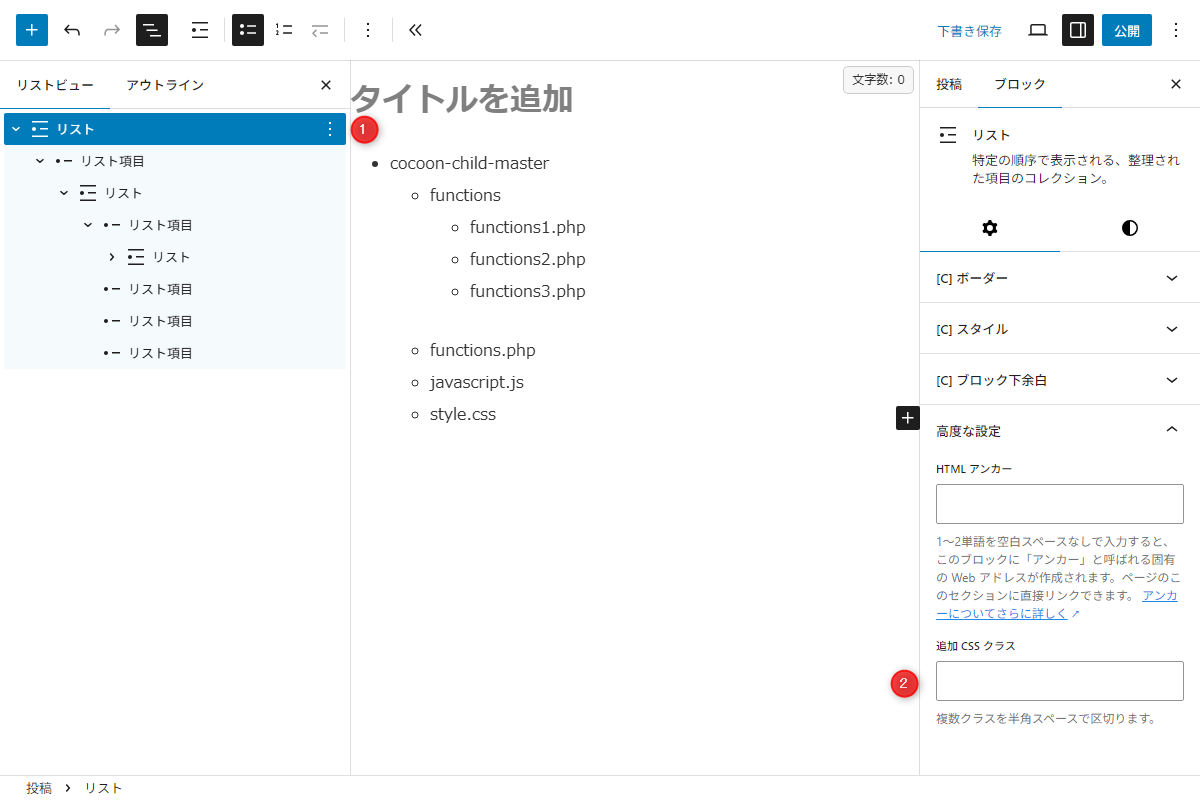
Gutenbergエディター 図1に示すように、以下の手順で指定します。
- 「リスト」ブロックを配置します。
階層に応じて、リストにインデントを指定します。 - 高度な設定→追加CSSクラスに
my-hierarchyと入力します。
- 「リスト」ブロックを配置します。
- ラベルCSSを追加
以下のコードをstyle.cssに追加します。
.article .my-hierarchy {
  background-color: #000;
  color: #eaeaea;
  font-family: 'Menlo', 'Consolas', 'monaco', 'monospace', 'MS ゴシック', sans-serif;
  overflow-x: auto;
  padding: 15px;
  white-space: nowrap;

  /* スクロールバー指定 */
  &::-webkit-scrollbar {
    height: 10px;

    &-thumb {
      background-color: #ccc;
    }
  }

  /* 直下および階層内のli指定 */
  li {
    list-style: none;
    margin: 0;
    padding-left: 1em;
    position: relative;
  }

  /* 子階層のul指定 */
  ul {
    margin: 0;
    padding-left: 1em;

    li {
      /* ツリー構造の横線 */
      &::before {
        background-color: #fff;
        content: '';
        height: 1px;
        left: -0.5em;
        margin: auto;
        position: absolute;
        top: 0.75em;
        width: 1em;
      }

      /* ツリー構造の縦線 */
      &::after {
        background-color: #fff;
        bottom: 0;
        content: '';
        height: 100%;
        left: -0.5em;
        position: absolute;
        top: 0;
        width: 1px;
      }

      /* 最後の要素の縦線を途中で止める */
      &:last-child::after {
        height: 0.75em;
      }
    }
  }
}
さいごに
今回紹介した方法を使えば、「リスト」ブロックを活用して、視認性の高い階層リストを作成できます。


