はじめに
以下の記事では、Cocoonのフロントページ「タブ一覧」にページネーションを追加する方法を紹介しました。
しかし、カテゴリータブでは、2ページ目以降をクリックすると通常のカテゴリー一覧ページへ遷移してしまい、「1」をクリックしてもフロントページではなくカテゴリー一覧の1ページ目に留まってしまいます。
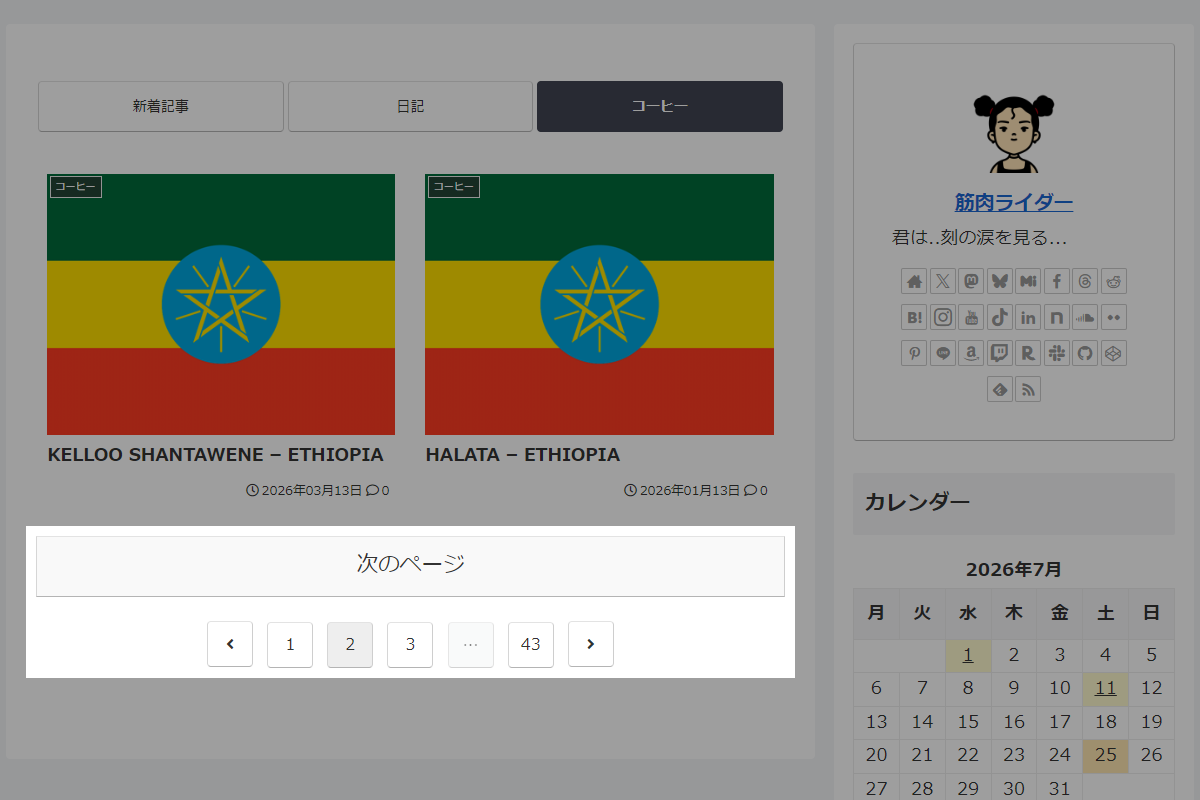
そこで、カテゴリーページへ遷移せず、フロントページ内のタブでそのままページを切り替えられるようにします。
この記事では、この方法について説明します。
完成イメージ
実装手順
以下の手順で実装しまs。
- ラベルPHPを追加
以下のコードをfunctions.phpに追加します。
/** * ページネーションと「次のページ」を出力 * * @param WP_Query $query 対象のWP_Queryオブジェクト * @param int $paged 現在のページ番号 * @param string $pagination_base paginate_links用のベースURL * @param string $next_url 「次のページ」ボタン用のURL * @return void */ if (!function_exists('render_tab_pagination')): function render_tab_pagination($query, $paged, $pagination_base, $next_url) { if ($query->max_num_pages <= 1) { return; } // 次のページを出力 if ($paged < $query->max_num_pages): ?> <div class="pagination-next"> <a href="<?= esc_url($next_url); ?>" class="pagination-next-link key-btn"> <?= apply_filters('pagination_next_link_caption', __('次のページ', THEME_NAME)); ?> </a> </div> <?php endif; ?> <!-- ページネーションリンクの出力 --> <div class="pagination"> <?= paginate_links([ 'base' => $pagination_base, 'format' => '', 'current' => $paged, 'total' => $query->max_num_pages, 'mid_size' => 1, 'prev_text' => '<span class="screen-reader-text">' . __('前へ', THEME_NAME) . '</span><span class="fa fa-angle-left" aria-hidden="true"></span>', 'next_text' => '<span class="screen-reader-text">' . __('次へ', THEME_NAME) . '</span><span class="fa fa-angle-right" aria-hidden="true"></span>', ]); ?> </div> <?php } endif; /** * エントリーカードとページネーションを出力 * * @param array $args WP_Queryに渡す引数の配列 * @param int $paged 現在のページ番号 * @param string $pagination_base paginate_links用のベースURL * @param string $next_url 「次のページ」ボタン用のURL * @param string $list_classes リスト全体のCSSクラス名 * @return void */ if (!function_exists('render_tab_content_section')): function render_tab_content_section($args, $paged, $pagination_base, $next_url, $list_classes) { $query = new WP_Query($args); if ($query->have_posts()): ?> <div class="<?= esc_attr($list_classes); ?>"> <?php $count = 0; while ($query->have_posts()) { $query->the_post(); $count++; set_query_var('count', $count); cocoon_template_part('tmp/entry-card'); } wp_reset_postdata(); ?> </div> <?php // ページネーションを出力 render_tab_pagination($query, $paged, $pagination_base, $next_url); ?> <?php else: ?> <?php cocoon_template_part('tmp/list-not-found-posts'); ?> <?php endif; } endif; // テンプレート(ページネーション)を変更 add_filter('cocoon_part__tmp/pagination', function ($content) { if (is_front_page_type_tab_index() && is_front_page()) { $content = ''; } return $content; }); // テンプレート(タブ一覧)を変更 add_filter('cocoon_part__tmp/list-tab-index', function ($content, $name, $args) { // タブのカテゴリーIDと最大表示数を取得 $cat_ids = get_index_list_category_ids(); $cat_count = apply_filters('cocoon_index_max_category_tab_count', 3); $list_classes = get_index_list_classes(); // アクティブなタブ番号を取得 $active_tab = isset($_GET['tab_index']) ? (int)$_GET['tab_index'] : 1; // ページネーションのベースURL $home_url = remove_query_arg(['tab_index', 'new_paged', 'cat_paged', 'paged']); ob_start(); ?> <div id="index-tab-wrap" class="index-tab-wrap list-wrap <?= esc_attr(get_front_page_type_class()); ?>"> <input id="index-tab-1" type="radio" name="tab_item" <?php checked($active_tab, 1); ?>> <?php $valid_cat_ids = []; $number = 1; for ($i = 0; $i < count($cat_ids) && $i < $cat_count; $i++) { $cat_id = $cat_ids[$i]; if (is_category_exist($cat_id)) { $number++; $valid_cat_ids[] = [ 'id' => $cat_id, 'number' => $number, ]; echo '<input id="index-tab-' . $number . '" type="radio" name="tab_item" ' . checked($active_tab, $number, false) . '>'; } } ?> <div class="index-tab-buttons"> <?php // 新着記事タブの遷移先URL $tab1_url = add_query_arg(['tab_index' => 1, 'new_paged' => 1], $home_url); ?> <label class="index-tab-button" for="index-tab-1" onclick="location.href='<?= esc_url($tab1_url); ?>'"> <?= apply_filters('new_entries_caption', __('新着記事', THEME_NAME)); ?> </label> <?php foreach ($valid_cat_ids as $cat): ?> <?php $tab_url = add_query_arg(['tab_index' => $cat['number'], 'cat_paged' => 1], $home_url); ?> <label class="index-tab-button" for="index-tab-<?= $cat['number']; ?>" onclick="location.href='<?= esc_url($tab_url); ?>'"> <?= get_category_name_by_id($cat['id']); ?> </label> <?php endforeach; ?> </div> <!-- 新着記事タブのコンテンツ --> <div class="tab-cont tb1"> <?php $is_new_tab = ($active_tab === 1); $new_paged = $is_new_tab && isset($_GET['new_paged']) ? max(1, (int)$_GET['new_paged']) : 1; $new_args = [ 'post_type' => 'post', 'posts_per_page' => get_option_posts_per_page(), 'paged' => $new_paged, 'no_found_rows' => false, ]; $query_new_tab = new WP_Query($new_args); $max_pages = $query_new_tab->max_num_pages; $next_new_page = ($max_pages == $new_paged) ? $new_paged : $new_paged + 1; $next_new_url = add_query_arg(['tab_index' => 1, 'new_paged' => $next_new_page], $home_url); $new_base = add_query_arg(['tab_index' => 1, 'new_paged' => '%#%'], $home_url); if ($query_new_tab->have_posts()): ?> <div class="<?= esc_attr($list_classes); ?>"> <?php $count = 0; while ($query_new_tab->have_posts()) { $query_new_tab->the_post(); $count++; set_query_var('count', $count); cocoon_template_part('tmp/entry-card'); } wp_reset_postdata(); ?> </div> <?php render_tab_pagination($query_new_tab, $new_paged, $new_base, $next_new_url); ?> <?php else: ?> <?php cocoon_template_part('tmp/list-not-found-posts'); ?> <?php endif; ?> </div> <!-- カテゴリータブのコンテンツループ --> <?php foreach ($valid_cat_ids as $cat): ?> <?php $cat_id = $cat['id']; $number = $cat['number']; $is_current_tab = ($active_tab === $number); $paged = $is_current_tab && isset($_GET['cat_paged']) ? max(1, (int)$_GET['cat_paged']) : 1; $args = [ 'post_type' => 'post', 'posts_per_page' => get_option_posts_per_page(), 'orderby' => !is_index_sort_orderby_date() ? get_index_sort_orderby() : 'date', 'order' => 'DESC', 'cat' => $cat_id, 'category__not_in' => get_archive_exclude_category_ids(), 'post__not_in' => get_archive_exclude_post_ids(), 'paged' => $paged, 'no_found_rows' => false, ]; $args = apply_filters('list_category_tab_args', $args, $cat_id); $query_cat_tab = new WP_Query($args); $max_pages = $query_cat_tab->max_num_pages; $next_cat_page = ($max_pages == $paged) ? $paged : $paged + 1; $next_cat_url = add_query_arg(['tab_index' => $number, 'cat_paged' => $next_cat_page], $home_url); $cat_base = add_query_arg(['tab_index' => $number, 'cat_paged' => '%#%'], $home_url); ?> <div class="tab-cont tb<?= $number; ?>"> <?php if ($query_cat_tab->have_posts()): ?> <div class="<?= esc_attr($list_classes); ?>"> <?php $count = 0; while ($query_cat_tab->have_posts()) { $query_cat_tab->the_post(); $count++; set_query_var('count', $count); cocoon_template_part('tmp/entry-card'); } wp_reset_postdata(); ?> </div> <?php render_tab_pagination($query_cat_tab, $paged, $cat_base, $next_cat_url); ?> <?php else: ?> <?php cocoon_template_part('tmp/list-not-found-posts'); ?> <?php endif; ?> </div> <?php endforeach; ?> </div> <?php return ob_get_clean(); }, 10, 3); - ラベルCSSを追加
以下のコードをstyle.cssに追加します。
.pagination,
.pagination-next {
  display: block !important;
}

/* タブ切り替えでリダイレクトするのでアニメーションを止める */
#index-tab-1:checked ~ .tab-cont.tb1,
#index-tab-2:checked ~ .tab-cont.tb2,
#index-tab-3:checked ~ .tab-cont.tb3,
#index-tab-4:checked ~ .tab-cont.tb4 {
  animation: none;
}
さいごに
今回紹介した方法を使えば、フロントページタイプ「タブ一覧」において、カテゴリータブや新着記事タブがそれぞれ独立したページネーションを持ち、別ページのアーカイブへ遷移することなくフロントページ内でスムーズにページを切り替えることが可能になります。