
拡張:Cocoon設定画面に投稿ID入力フォームを追加する方法
Cocoonの設定→投稿に、関連記事の先頭に優先的に表示したい投稿IDを入力するフォームを追加します。
完成イメージ
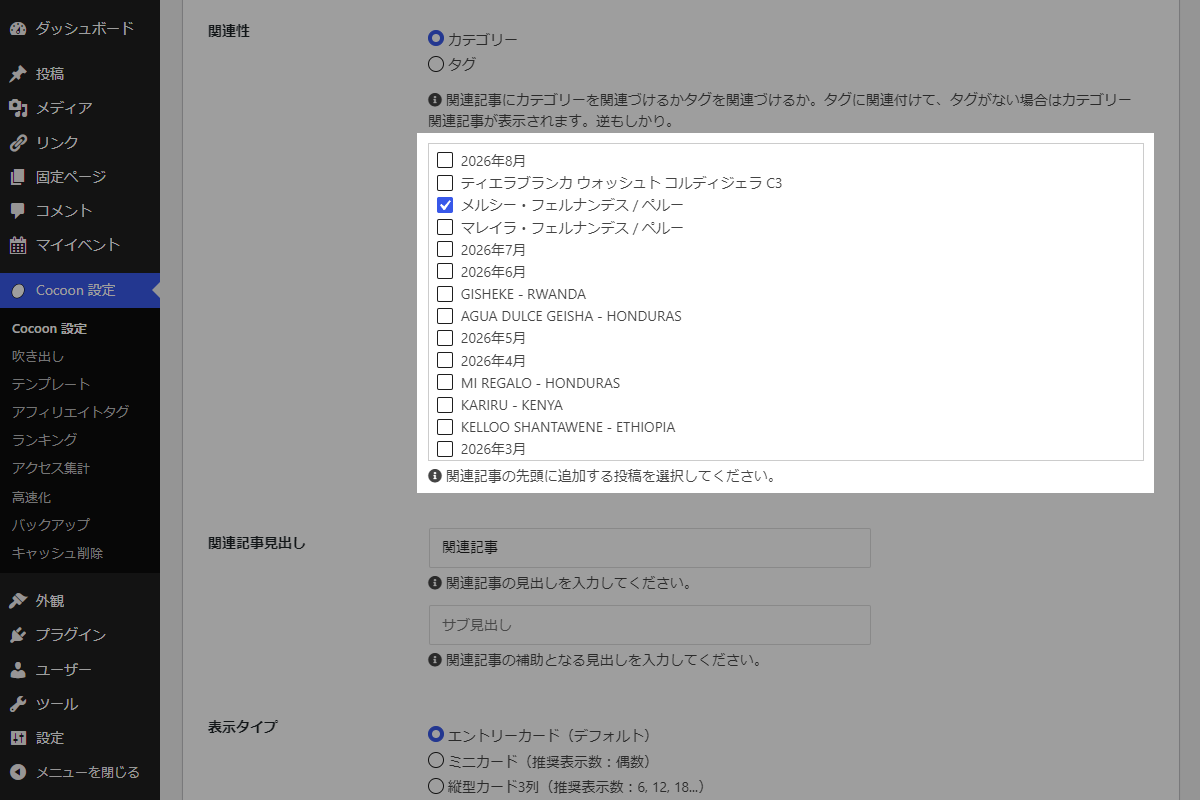
実装手順
以下のコードをfunctions.phpに追加します。
// Cocoon設定にメニューを追加
add_action('admin_menu', function () {
  $page_hook = get_plugin_page_hookname('theme-settings', '');
  if ($page_hook) {
    add_action($page_hook, 'add_single_related_field');
  }
}, 99);


/**
 * Cocoon設定(投稿)のメニュー項目を追加
 *
 * @return void
 */
if (!function_exists('add_single_related_field')):
function add_single_related_field() {
  $checks = get_theme_option('my_related_post_ids', []);

  // 文字列で渡された場合は配列へ変換
  if (is_string($checks)) {
    $checks = explode(',', $checks);
  }

  // 選択中IDリストの数値変換
  $checks = array_map('intval', (array) $checks);

  // 選択肢用投稿一覧の取得
  $posts = get_posts([
    'post_type'      => 'post',
    'posts_per_page' => -1,
    'orderby'        => 'date',
    'order'          => 'DESC',
  ]);

  ob_start();
  ?>
  <div id="related-post-selector" style="max-height:300px; overflow:auto; border:1px solid #ccc; padding:5px;width:100%">
    <?php if ($posts) : ?>
      <?php foreach ($posts as $post) : ?>
        <?php
          $checked  = in_array((int) $post->ID, $checks, true) ? ' checked="checked"' : '';
          $input_id = 'my_related_post_ids-' . $post->ID;
        ?>
        <label style="display:block; margin-bottom:3px;" for="<?= esc_attr($input_id); ?>">
          <input type="checkbox" id="<?= esc_attr($input_id); ?>" name="my_related_post_ids[]" value="<?= esc_attr($post->ID); ?>"<?= $checked; ?>>
          <?= esc_html($post->post_title); ?>
        </label>
      <?php endforeach; ?>
    <?php endif; ?>
  </div>
  <?php echo generate_tips_tag('関連記事の先頭に追加する投稿を選択してください。', false); ?>
  <?php
  $html = ob_get_clean();

  ?>
  <script>
  jQuery(function ($) {
    const $td = $('label[for="related_association_type"]').closest('tr').find('td');
    const postListHtml = <?= json_encode($html); ?>;

    if ($td.length) {
      $td.append(postListHtml);
    }
  });
  </script>
  <?php
}
endif;


// Cocoon設定値を保存
add_action('cocoon_settings_after_save', function () {
  update_theme_option('my_related_post_ids');
});


/**
 * 関連投稿のクエリ引数に任意の投稿IDを追加して先頭に表示
 *
 * @param array $args 元のWP_Query引数
 * @return array 固定投稿IDを先頭に含めた新しいクエリ引数
 */
if (!function_exists('custom_related_args')):
function custom_related_args($args) {
  // Cocoon設定から投稿IDを取得
  $raw_ids = get_theme_option('my_related_post_ids', []);

  if (is_string($raw_ids)) {
    $raw_ids = array_filter(explode(',', $raw_ids));
  }

  $fixed_post_ids = !empty($raw_ids) ? array_map('intval', (array) $raw_ids) : [];

  $current_id = get_the_ID();

  // 固定投稿IDリストに自分自身のIDが含まれていれば除外
  $fixed_post_ids = array_diff($fixed_post_ids, [$current_id]);

  if (empty($fixed_post_ids)) {
    return $args;
  }

  // 現在のクエリ条件で元の関連投稿を取得
  $query = new WP_Query($args);

  // 取得できた投稿ID配列の抽出
  $post_ids = $query->have_posts() ? wp_list_pluck($query->posts, 'ID') : [];

  $post_ids = array_unique(array_merge($fixed_post_ids, $post_ids));

  // 1ページあたりの表示件数を取得
  $posts_per_page = $args['posts_per_page'] ?? get_option('posts_per_page');

  $new_args = [
    'post_type'      => 'post',
    'orderby'        => 'post__in',
    'posts_per_page' => $posts_per_page,
    'post__in'       => $post_ids,
  ];

  return $new_args;
}
endif;


// 関連投稿のクエリを変更
add_filter('get_related_wp_query_args', 'custom_related_args', 20);


// 関連投稿ウィジェットのクエリを変更
add_filter('widget_related_entries_args', 'custom_related_args', 20);
さいごに
今回紹介した方法を使えば、指定した投稿を優先的に関連記事に表示させることができます。
これにより、関連するコンテンツをより効果的に表示し、ユーザーにとって有益な情報を提供できるようになります。

