
はじめに
以下の質問に回答します。

特定の投稿を本文下および「関連記事」ウィジェットに優先的に表示します。
この記事では、この方法について説明します。
完成イメージ
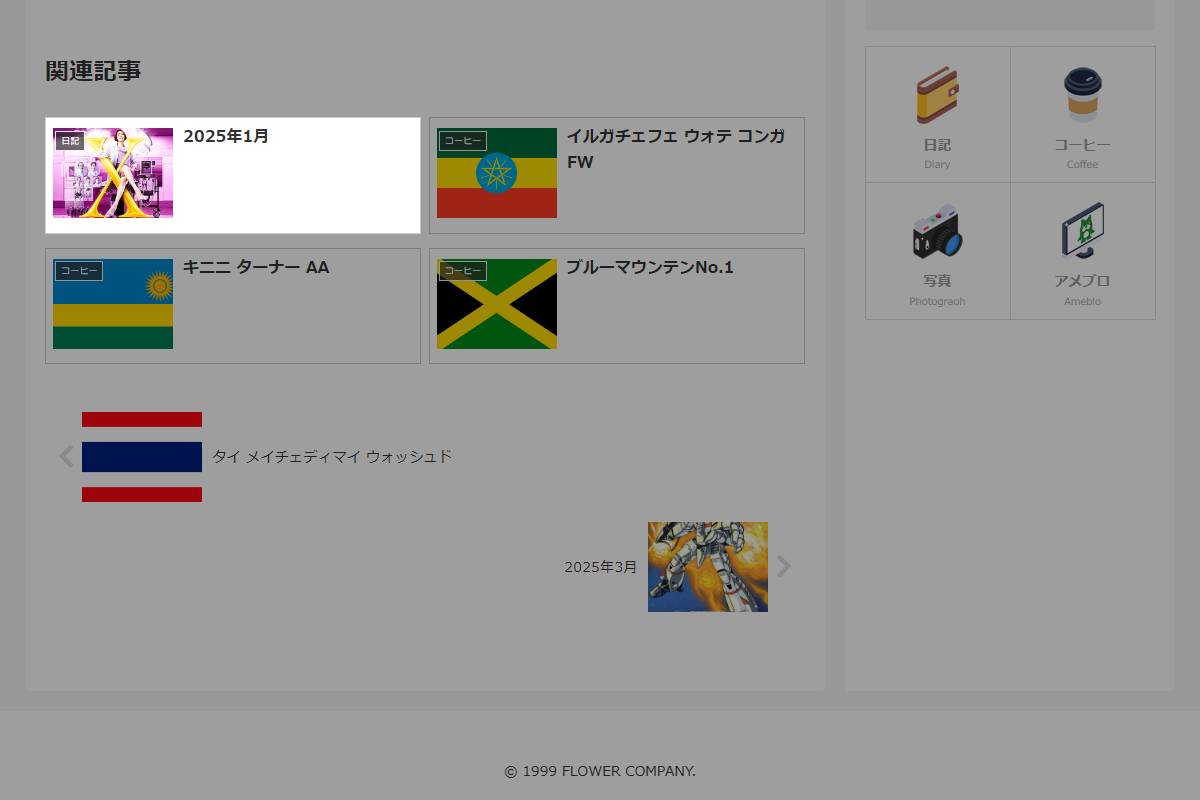
実装手順
以下のコードをfunctions.phpに追加します。
/**
 * 関連投稿のクエリ引数に任意の投稿IDを追加して先頭に表示
 *
 * @param array $args 元のWP_Query引数
 * @return array 固定投稿IDを先頭に含めた新しいクエリ引数
 */
if (!function_exists('custom_related_args')):
function custom_related_args($args) {
  // 固定で先頭に表示したい投稿IDを定義
  $fixed_post_ids = [123, 456, 789];

  // 現在表示中の投稿IDを取得
  $current_id = get_the_ID();

  // 固定投稿IDに自分自身のIDが含まれていれば除外
  $fixed_post_ids = array_diff($fixed_post_ids, [$current_id]);

  // 任意の投稿IDがない場合
  if (empty($fixed_post_ids)) {
    return $args;
  }

  // 現在のクエリ条件で関連投稿を取得
  $query = new WP_Query($args);

  // 投稿が取得できた場合、投稿IDを取得
  $post_ids = $query->have_posts() ? wp_list_pluck($query->posts, 'ID') : [];

  // 重複を除外し、固定投稿IDを先頭に設定
  $post_ids = array_unique(array_merge($fixed_post_ids, $post_ids));

  // posts_per_page のフォールバックを設定
  $posts_per_page = $args['posts_per_page'] ?? get_option('posts_per_page');

  // 新しいクエリ引数を設定
  $new_args = [
    'post_type'      => 'post',
    'orderby'        => 'post__in',
    'posts_per_page' => $posts_per_page,
    'post__in'       => $post_ids,
  ];

  return $new_args;
}
endif;


// 関連投稿クエリを変更
add_filter('get_related_wp_query_args' , 'custom_related_args', 20);
add_filter('widget_related_entries_args' , 'custom_related_args', 20);
解説
array(7) {
  ["post_type"]=>string(4) "post",              // 投稿タイプ
  ["post__not_in"]=>array(1) {
    [0]=>int(62739)                             // 表示している投稿は除外
  },
  ["posts_per_page"]=>string(1) "2",            // 取得する投稿の数
  ["orderby"]=>string(4) "rand",                // 並び順をランダムに指定
  ["no_found_rows"]=>bool(true),
  ["date_query"]=>array(1) {
    [0]=>array(2) {
      ["after"]=>string(16) "2022-01-18 0:0:0", // 指定日付以降の投稿
      ["inclusive"]=>bool(true)                 // 日付条件を含める
    }
  },
  ["category__in"]=>array(1) {
    [0]=>int(1)                                 // 投稿のカテゴリーID
  }
}- Cocoon設定→投稿→関連性に応じ、まず指定された関連投稿を取得。
- 関連投稿のIDを取得し、指定した投稿ID(ここでは123)を先頭に追加。
- 最終的に、クエリの引数に
post__inを使い、指定された投稿IDを含めた投稿IDのリストを返却し、関連記事として表示。