
はじめに
複数のユーザーが WordPressの管理に関わる場面において、以下のような利用シーンが考えられます。
- 一部の編集担当者に、特定の固定ページ(例:問い合わせ、会社情報)だけを編集させたい
- ページごとに責任者を分け、他ページへの操作を防止したい
- クライアントサイトで、誤編集や誤削除を避けたい
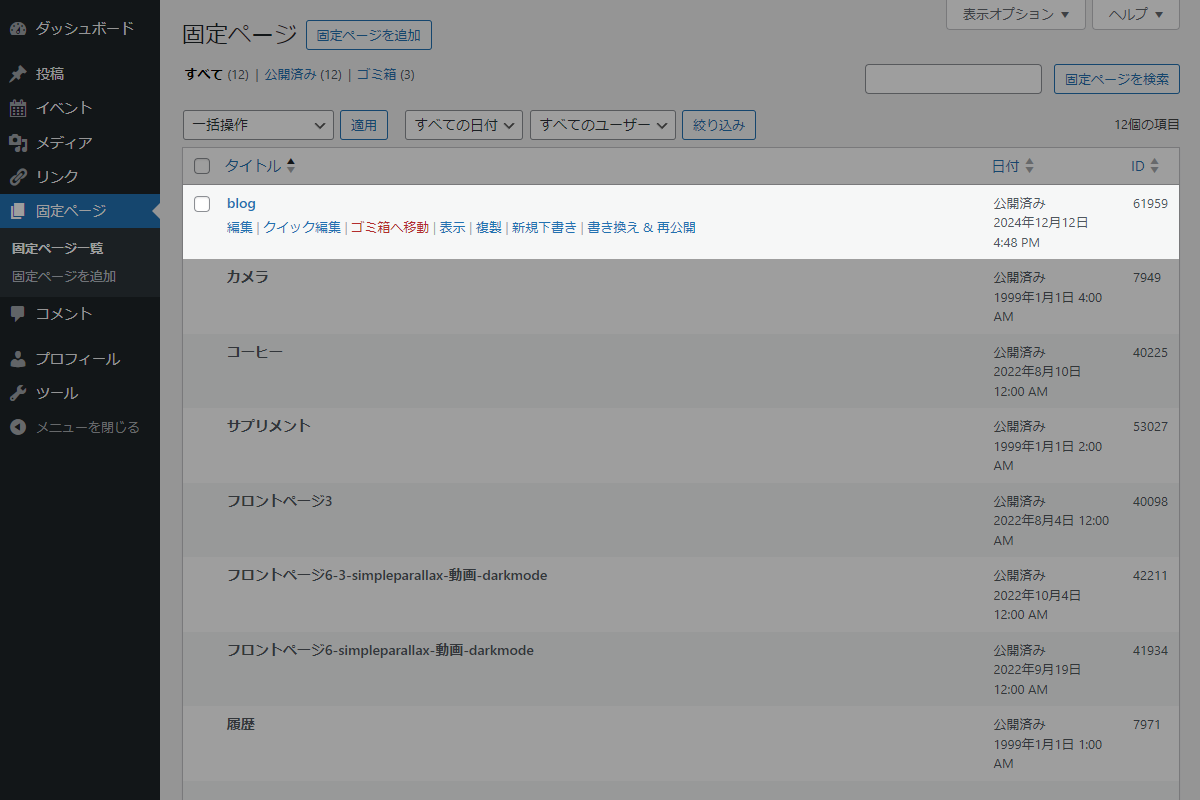
そこで、特定のユーザーに対して、特定の固定ページだけを編集・削除可能に制限します(表1参照)。
この記事では、この方法について説明します。
| ページ区分 | 権限 | 管理者 | 編集者 | 投稿者 | 寄稿者 | 購読者 |
|---|---|---|---|---|---|---|
| 投稿 | 作成 | ● | ● | ● | ● | – |
| 編集・削除 | ● | ● | 自分の投稿 | 自分の投稿 | – | |
| 公開 | ● | ● | ● | – | – | |
| 固定ページ | 作成 | ● | ● | – | – | – |
| 編集・削除 | ● | ● | – | – | – | |
| 公開 | ● | ● | – | – | – |
完成イメージ
実装手順
以下のコードをfunctions.phpに追加します。
add_filter('map_meta_cap', function ($caps, $cap, $user_id, $args) {
  // 編集を許可するユーザーIDを設定
  $allowed_user_ids = [1, 2];

  // 編集を許可する固定ページIDを設定
  $allowed_page_ids = [123, 456];

  // 対象外は終了
  if (!in_array($user_id, $allowed_user_ids, true)) {
    return $caps;
  }

  // 編集・削除・閲覧以外は処理対象外
  if (!in_array($cap, ['edit_post', 'delete_post', 'read_post'], true) || empty($args[0])) {
    return $caps;
  }

  $post_id = (int) $args[0];
  $post    = get_post($post_id);

  if (!$post) {
    return $caps;
  }

  // 許可対象外は操作を禁止
  if ($post->post_type === 'page' && !in_array($post->ID, $allowed_page_ids, true)) {
    return ['do_not_allow'];
  }

  return $caps;
}, 10, 4);
拡張:管理者がユーザーごとに編集可能な固定ページをチェックボックスで設定する方法
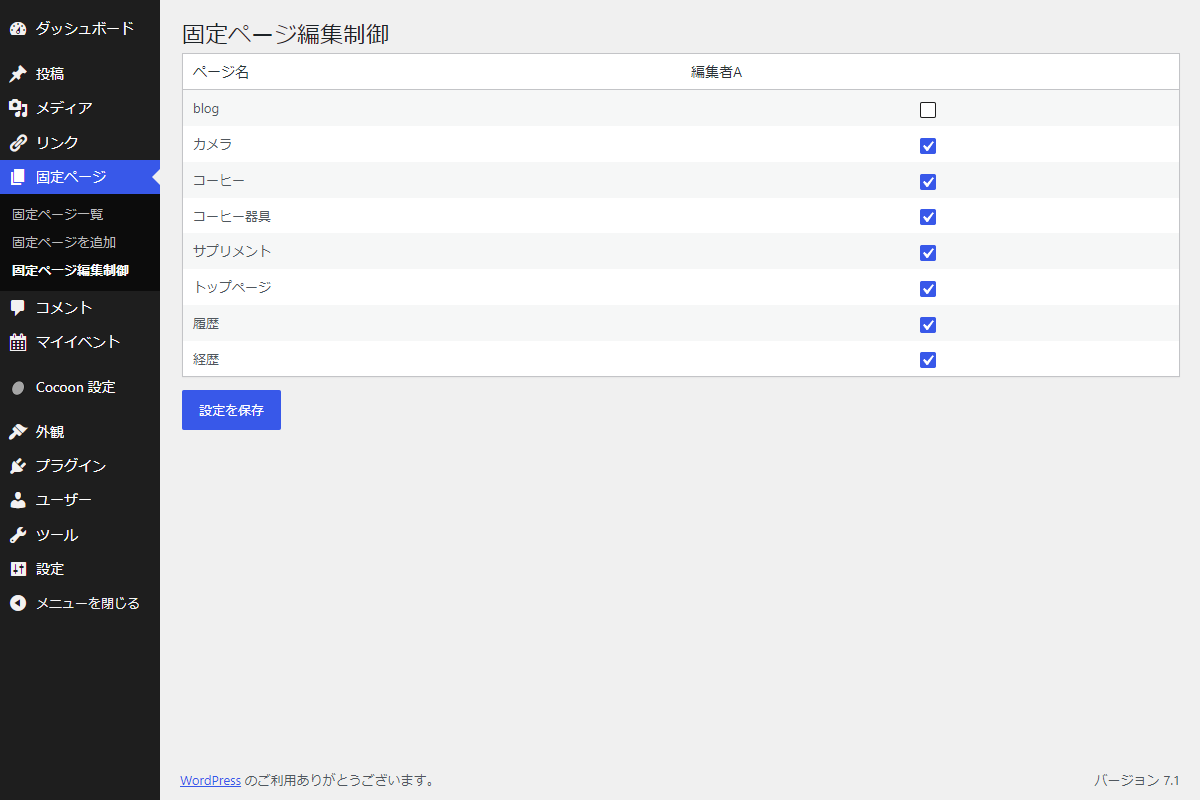
上記のコードを改善し、管理者が管理画面から、ユーザーごとに編集可能な固定ページをチェックボックスで設定し、その内容を編集権限に反映させます。
完成イメージ
実装手順
以下のコードをfunctions.phpに追加します。
// 管理画面にメニューを追加
add_action('admin_menu', function () {
  // 権限チェック
  if (!current_user_can('administrator')) {
    return;
  }

  add_submenu_page(
    'edit.php?post_type=page',
    '固定ページ編集制御',
    '固定ページ編集制御',
    'manage_options',
    'edit_matrix',
    'render_edit_matrix'
  );
});


/**
 * 管理画面ページを出力
 *
 * @return void
 */
if (!function_exists('render_edit_matrix')):
function render_edit_matrix() {
  // 権限チェック
  if (!current_user_can('manage_options')) {
    return;
  }

  // 設定対象のユーザーと固定ページを取得
  $users  = get_users(['role__in' => ['editor', 'author']]);
  $pages  = get_posts([
    'post_type'      => 'page',
    'post_status'    => 'publish',
    'posts_per_page' => -1,
    'orderby'        => 'menu_order',
    'order'          => 'ASC',
  ]);
  $matrix = get_option('my_edit_matrix', []);

  // nonceチェック
  if ($_SERVER['REQUEST_METHOD'] === 'POST' && check_admin_referer('edit_matrix_action', 'edit_matrix_nonce')) {
    $new_matrix = [];

    // 送信された権限データをユーザーIDごとに処理
    foreach ($_POST['permissions'] ?? [] as $user_id => $page_ids) {
      $new_matrix[(int) $user_id] = array_map('intval', $page_ids);
    }

    // 設定データを更新
    update_option('my_edit_matrix', $new_matrix);
    $matrix = $new_matrix;

    // 保存完了メッセージを登録
    add_settings_error('edit_matrix', 'edit_matrix_saved', '設定を保存しました。', 'updated');
  }

  ?>
  <div class="wrap edit-matrix">
    <h1 class="edit-matrix__title">固定ページ編集制御</h1>

    <?php settings_errors('edit_matrix'); ?>

    <form method="post" class="edit-matrix__form">
      <?php wp_nonce_field('edit_matrix_action', 'edit_matrix_nonce'); ?>

      <table class="widefat fixed striped edit-matrix__table">
        <thead>
          <tr>
            <th>ページ名</th>
            <?php foreach ($users as $user): ?>
              <th><?= esc_html($user->display_name); ?></th>
            <?php endforeach; ?>
          </tr>
        </thead>

        <tbody>
          <?php foreach ($pages as $page): ?>
            <tr>
              <td><?= esc_html($page->post_title); ?></td>

              <?php foreach ($users as $user): ?>
                <?php
                $checked = true;

                if (isset($matrix[$user->ID])) {
                  $checked = in_array($page->ID, $matrix[$user->ID], true);
                }
                ?>

                <td class="edit-matrix__checkbox"><input type="checkbox" name="permissions[<?= esc_attr($user->ID); ?>][]" value="<?= esc_attr($page->ID); ?>" <?php checked($checked); ?>></td>
              <?php endforeach; ?>

            </tr>
          <?php endforeach; ?>
        </tbody>
      </table>

      <p class="edit-matrix__submit"><input type="submit" class="button button-primary" value="設定を保存"></p>
    </form>
  </div>
  <?php
}
endif;


// 固定ページの編集・削除権限を制御
add_filter('map_meta_cap', function ($caps, $cap, $user_id, $args) {
  // ユーザー情報を取得
  $user = get_userdata($user_id);

  // 対象外は終了
  if (!$user || in_array('administrator', $user->roles, true)) {
    return $caps;
  }

  // 対象外は終了
  if (!in_array($cap, ['edit_post', 'delete_post'], true) || empty($args[0])) {
    return $caps;
  }

  $post_id = (int) $args[0];
  $post    = get_post($post_id);

  // 対象外は終了
  if (!$post) {
    return $caps;
  }

  // 対象外は終了
  if ($post->post_type !== 'page') {
    return $caps;
  }

  $matrix = get_option('my_edit_matrix', []);

  // 許可済みは処理対象外
  if (isset($matrix[$user_id]) && in_array($post_id, $matrix[$user_id], true)) {
    return $caps;
  }

  // 編集・削除を禁止
  return ['do_not_allow'];
}, 10, 4);
さいごに
今回紹介した方法を使えば、特定のユーザーに対して特定の固定ページのみ編集・削除を許可し、それ以外のページへの操作を確実に制限できます。
これにより、複数の編集者が関わるサイトでも誤操作や不必要な変更を防ぎ、管理を効率化することが可能です。
