
はじめに
WordPressには投稿をブログの先頭に固定する表示する機能があります。
この機能に期限を設定することで、表示期限を過ぎた投稿は自動的に「先頭固定表示」を解除します。
これにより、特定の投稿を期限付きで目立たせることができます。
この記事では、この方法について説明します。
完成イメージ
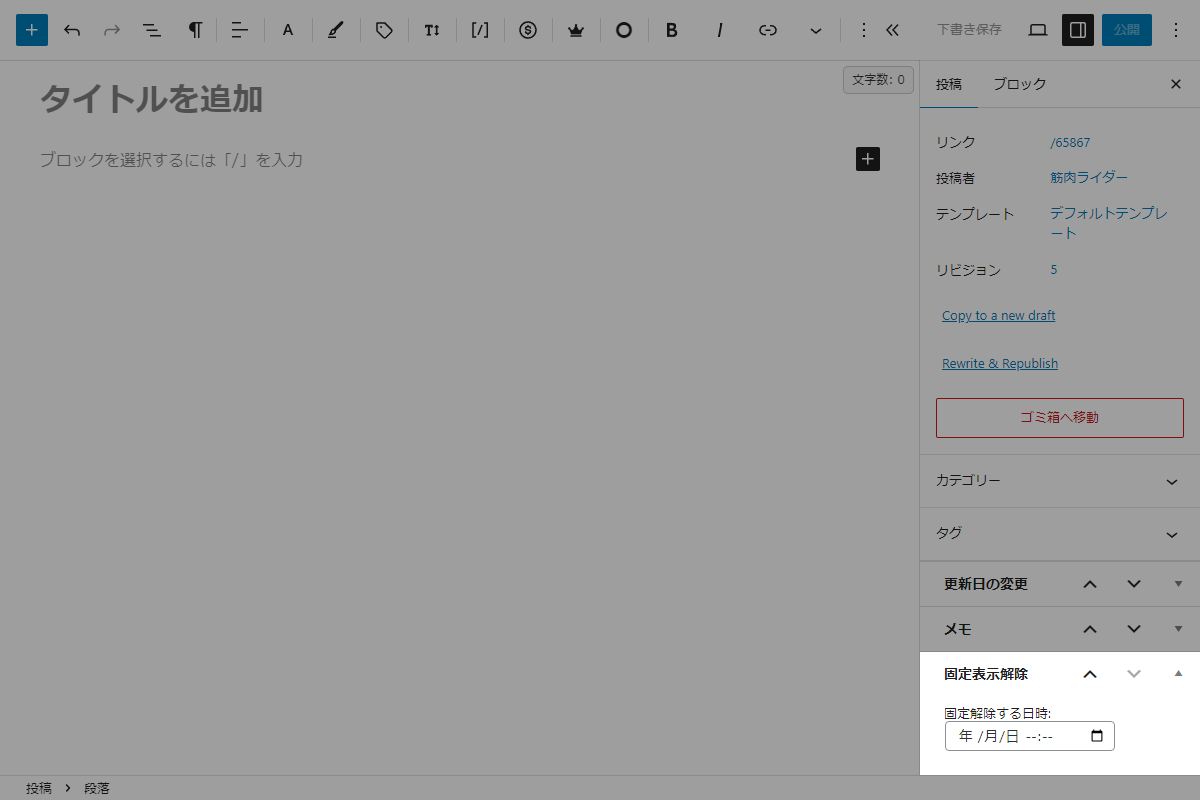
実装手順
以下のコードをfunctions.phpに追加します。
// メタボックスを追加
add_action('add_meta_boxes', function () {
  add_meta_box(
    'sticky_datetime',
    '固定表示解除',
    'render_sticky_datetime',
    'post',
    'side',
    'high'
  );
});


/**
 * メタボックスの入力フォームを出力
 *
 * @param WP_Post $post 現在の投稿オブジェクト
 * @return void
 */
if (!function_exists('render_sticky_datetime')) :
function render_sticky_datetime($post) {
  // 現在のカスタムフィールドの値を取得
  $sticky_datetime = get_post_meta($post->ID, 'my_sticky_datetime', true);

  // datetime-local形式に合わせてフォーマット(空の場合は空欄にする)
  $sticky_datetime_display = $sticky_datetime ? date('Y-m-d\TH:i', $sticky_datetime) : '';

  wp_nonce_field('sticky_datetime_action', 'sticky_datetime_nonce');
  ?>
  <label for="sticky_datetime">固定解除する日時:</label>
  <input type="datetime-local" id="sticky_datetime" name="sticky_datetime" value="<?= esc_attr($sticky_datetime_display); ?>" />
  <?php
}
endif;


// 投稿データを保存
add_action('save_post', function ($post_id) {
  // nonceチェック
  if (!isset($_POST['sticky_datetime_nonce']) || !wp_verify_nonce($_POST['sticky_datetime_nonce'], 'sticky_datetime_action')) {
    return;
  }

  // 自動保存チェック
  if (defined('DOING_AUTOSAVE') && DOING_AUTOSAVE) {
    return;
  }

  // リビジョンは除外
  if (wp_is_post_revision($post_id)) {
    return;
  }

  // 権限チェック
  if (!current_user_can('edit_post', $post_id)) {
    return;
  }

  // 入力値が存在し、かつ空ではない場合のみタイムスタンプを保存
  if (!empty($_POST['sticky_datetime'])) {
    $sticky_datetime_input = sanitize_text_field($_POST['sticky_datetime']);

    // 入力値が正しい日付形式かチェック
    if ($timestamp = strtotime($sticky_datetime_input)) {
      // UNIXタイムスタンプとして保存
      update_post_meta($post_id, 'my_sticky_datetime', $timestamp);
      return;
    }
  }

  // 入力かフィールドが空の場合はカスタムフィールドを削除
  delete_post_meta($post_id, 'my_sticky_datetime');
});


// 対象の処理を実行
add_action('wp', function () {
  // 現在の時間を取得
  $now = current_time('timestamp');

  // 現在の先頭固定投稿リストを取得
  $current_sticky_posts = get_option('sticky_posts', []);

  if (empty($current_sticky_posts)) {
    return;
  }

  $args = [
    'post_type' => 'post',
    'post_status' => 'publish',           // 公開中の投稿のみチェック
    'post__in' => $current_sticky_posts,  // 固定中の投稿のみ対象に絞り込み
    'meta_query' => [
      [
        'key' => 'my_sticky_datetime',    // カスタムフィールドのキー
        'value' => $now,
        'compare' => '<',                 // 期間外
        'type' => 'NUMERIC'               // タイムスタンプとして比較
      ],
    ],
    'posts_per_page' => -1,               // 該当する全ての投稿を取得
  ];

  $unstick_posts = get_posts($args);

  if (empty($unstick_posts)) {
    return;
  }

  // 解除対象のID配列を取り出して一括差分抽出
  $unstick_ids = wp_list_pluck($unstick_posts, 'ID');
  $updated_sticky_posts = array_values(array_diff($current_sticky_posts, $unstick_ids));

  // 先頭固定リストを更新
  update_option('sticky_posts', $updated_sticky_posts);
});
さいごに
今回紹介した方法を使えば、特定の期間にのみ先頭固定表示を行い、投稿を目立たせることができます。
例えば、キャンペーンやイベント情報など、限定的な期間に重要な投稿をトップに表示し、その後自動的に解除することができます。
期限が過ぎると自動的に表示が解除されるため、手動での管理が不要となり、運営者にとっても便利です。
