
はじめに
メインビジュアルのロゴにも活用できる、テキストを円に沿ってアニメーション表示します。
この記事では、この方法について説明します。
完成イメージ
実装手順
以下の手順で実装します。
- ラベルHTMLを追加
以下のコードを「カスタムHTML」ブロックに入力します。
<div class="circular-text"> <div class="circular-text__logo"> <svg viewBox="0 0 100 100"> <path d="M 0,50 a 50,50 0 1,1 0,1 z" id="circle" /> <text textLength="314px"> <textPath xlink:href="#circle" textLength="314px">テキスト</textPath> </text> </svg> </div> </div> - ラベルCSSを追加
以下のコードをstyle.cssに追加します。
:root {
  --circular-text-height: 250px;
  --circular-text-color: #f5d1c3;
  --circular-text-font-size: 16px;
  --circular-text-url: url('画像URL');
  --circular-text-size: 200px;
  --circular-text-speed: 20s;
}

.circular-text {
  display: grid;
  height: var(--circular-text-height);
  place-content: center;

  .circular-text__logo {
    background-image: var(--circular-text-url);
    background-position: center;
    background-repeat: no-repeat;
    background-size: calc(var(--circular-text-size) - 50px);
    height: var(--circular-text-size);
    width: var(--circular-text-size);

    path {
      fill: none;
    }

    svg {
      animation: circular-text-rotation var(--circular-text-speed) linear infinite;
      fill: var(--circular-text-color);
      font-size: var(--circular-text-font-size);
      overflow: visible;
    }
  }
}

@keyframes circular-text-rotation {
  to {
    transform: rotate(1turn);
  }
}
参考:PHPによるブロック作成
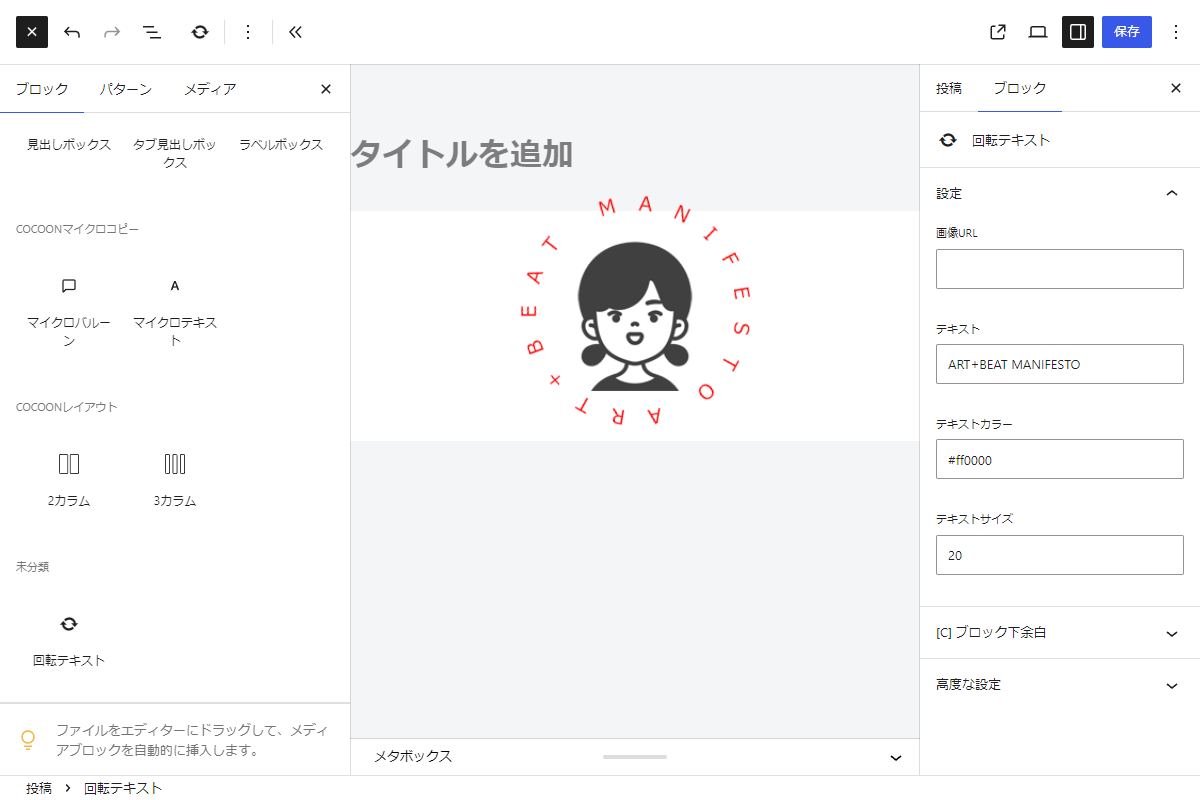
WordPress 7.0でサポートされた機能を活用し、PHPだけでブロックを作成します。
完成イメージ
実装手順
以下のコードをfunctions.phpに追加します。
// ブロックを登録
add_action('init', function () {
  ob_start();
  ?>
  .circular-text {
    display: grid;
    height: calc(var(--circular-text-size) + 50px);
    place-content: center;

    .circular-text__logo {
      background-image: var(--circular-text-bg-image);
      background-position: center;
      background-repeat: no-repeat;
      background-size: 80%;
      height: var(--circular-text-size);
      width: var(--circular-text-size);

      path {
        fill: none;
      }

      svg {
        animation: circular-text-rotation 20s linear infinite;
        fill: var(--circular-text-color);
        font-size: var(--circular-text-font-size);
        overflow: visible;
        transform-origin: center;
      }

      text {
        dominant-baseline: alphabetic;
      }
    }
  }

  @keyframes circular-text-rotation {
    to {
      transform: rotate(1turn);
    }
  }
  <?php

  $handle = 'circular-text';

  wp_register_style($handle, false);
  wp_add_inline_style($handle, ob_get_clean());

  register_block_type('my-block/circular-text', [
    'title'       => '回転テキスト',
    'icon'        => 'update',
    'category'    => 'cocoon-block',
    'attributes'  => [
      'image_url'   => [
        'type'      => 'string',
        'label'     => '画像URL',
        'default'   => '',
      ],
      'main_text'   => [
        'type'      => 'string',
        'label'     => 'テキスト',
        'default'   => '',
      ],
      'text_color'  => [
        'type'      => 'string',
        'label'     => 'テキストカラー',
        'default'   => '#333333',
      ],
      'font_size'   => [
        'type'      => 'number',
        'label'     => 'テキストサイズ',
        'default'   => 16,
      ],
    ],
    'supports' => [
      'autoRegister' => true,
    ],
    'style' => $handle,
    'render_callback' => 'render_circular_text',
  ]);
});


/**
 * 回転テキストブロックのフロントエンド表示を出力
 *
 * @param array $attributes ブロックの属性
 * @param string $content ブロックのコンテンツ
 * @param WP_Block $block ブロックのインスタンス
 * @return string レンダリングされたHTML
 */
if (!function_exists('render_circular_text')):
function render_circular_text($attributes, $content, $block) {
  // 属性値を取得
  $main_text  = isset($attributes['main_text']) ? trim($attributes['main_text']) : '';
  $image_url  = isset($attributes['image_url']) ? $attributes['image_url'] : '';
  $text_color = isset($attributes['text_color']) ? $attributes['text_color'] : '#333333';
  $font_size  = isset($attributes['font_size']) ? (int) $attributes['font_size'] : 16;

  // ロゴの基本サイズ
  $logo_size = 200;

  // カスタムプロパティ用のスタイル
  $styles = [
    '--circular-text-size: ' . $logo_size . 'px',
    '--circular-text-color: ' . esc_attr($text_color),
    '--circular-text-font-size: ' . esc_attr((int) ($font_size * 100 / $logo_size)) . 'px',
    '--circular-text-bg-image: url(' . esc_url($image_url) . ')',
  ];

  // SVGパスとテキストを紐付けるユニークID
  $unique_id = 'circular-text-' . wp_unique_id();

  // ブロックラッパー属性
  $wrapper_attributes = get_block_wrapper_attributes([
    'class' => 'circular-text',
    'style' => implode('; ', $styles),
  ]);

  ob_start();
  ?>
  <div <?= $wrapper_attributes; ?>>
    <div class="circular-text__logo">
      <svg viewBox="0 0 100 100">
        <path
          d="M 50,50 m -50,0 a 50,50 0 1,1 100,0 a 50,50 0 1,1 -100,0"
          id="<?= esc_attr($unique_id); ?>"
        />
        <text>
          <textPath href="#<?= esc_attr($unique_id); ?>" textLength="314" lengthAdjust="spacing">
            <?= esc_html($main_text) . ' '; ?>
          </textPath>
        </text>
      </svg>
    </div>
  </div>
  <?php

  return ob_get_clean();
}
endif;
さいごに
今回紹介した方法を使えば、テキストを円に沿ってアニメーション表示させるデザインを簡単に実現できます。
これは、ロゴやメインビジュアルにインパクトを与えるだけでなく、動的な要素を加えることで、サイト全体のデザイン性を高める効果もあります。
ぜひ、サイトの魅力を引き出す手段として活用してみてください。

