

はじめに
Threadsはリリース以来、急速に利用者を増やしており、今やブログ記事の拡散には欠かせないプラットフォームの一つとなっています。

しかし、現時点のCocoon標準設定では、シェアボタンの選択肢にThreadsが含まれていません。
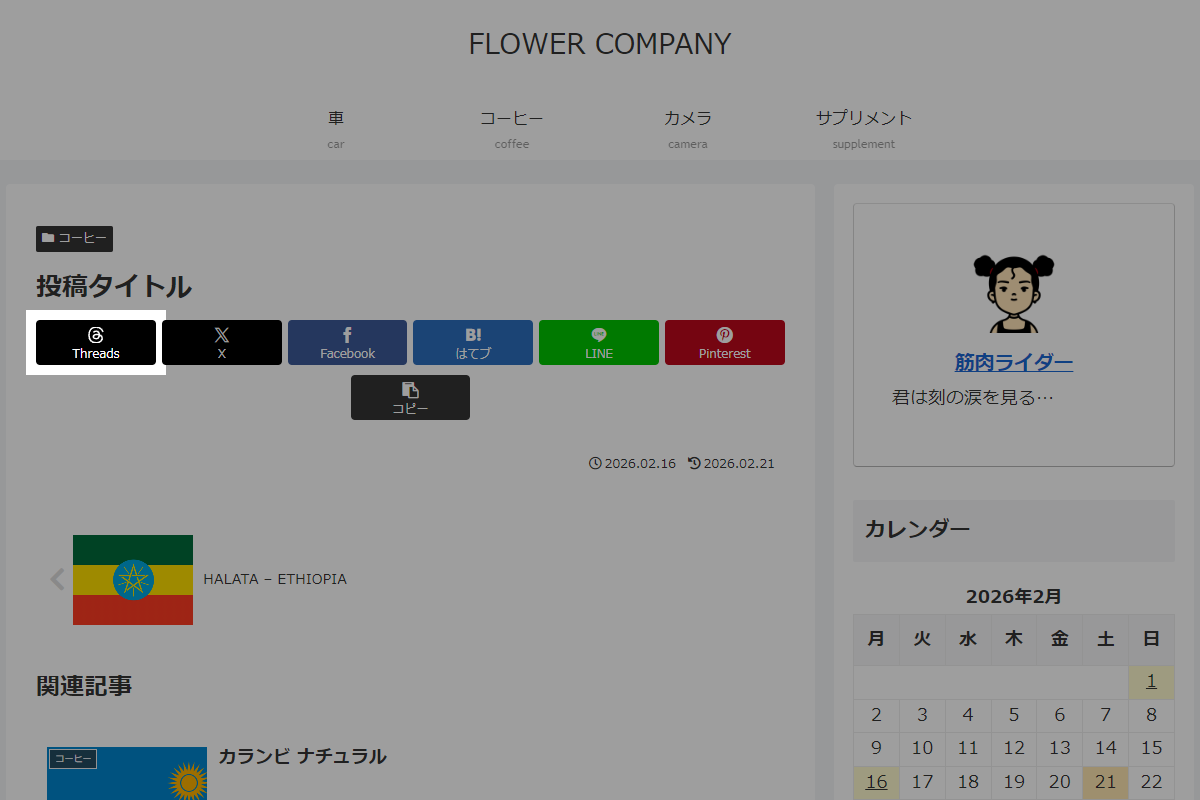
そこで、SNSシャアボタンにThreadsを追加します。
この記事では、この方法について説明します。
完成イメージ
実装手順
以下の手順で実装します。
- ラベルPHPを追加
以下のコードをfunctions.phpに追加します。
add_filter('cocoon_part__tmp/sns-share-buttons', function ($content) { $share_text = urlencode(get_share_page_title() . ' ' . get_share_page_url()); $threads_url = 'https://www.threads.net/intent/post?text=' . $share_text; $threads_title = esc_attr__('Threadsでシェア', 'cocoon'); $threads_caption = __('Threads', 'cocoon'); // ボタンのHTML ob_start(); ?> <a href="<?php echo $threads_url; ?>" class="sns-button share-button threads-button threads-share-button-sq" target="_blank" title="<?php echo $threads_title; ?>" rel="nofollow noopener noreferrer" aria-label="<?php echo $threads_title; ?>"> <span class="social-icon icon-threads"></span> <span class="button-caption"><?php echo $threads_caption; ?></span> <span class="share-count threads-share-count"></span> </a> <?php $threads_button = ob_get_clean(); $search = '/(<div class="sns-share-buttons sns-buttons">)/'; return preg_replace($search, '$1' . $threads_button, $content); }); - ラベルCSSを追加
以下のコードをstyle.cssに追加します。
:root {
  --cocoon-threads-color: #000;
}

.icon-threads::before {
  background-color: #fff;
  content: '';
  display: block;
  height: 1em;
  mask-image: url('data:image/svg+xml;charset=utf8,%3Csvg%20xmlns%3D%22http%3A%2F%2Fwww.w3.org%2F2000%2Fsvg%22%20viewBox%3D%220%200%20448%20512%22%3E%3Cpath%20d%3D%22M331.5%20235.7c2.2%20.9%204.2%201.9%206.3%202.8c29.2%2014.1%2050.6%2035.2%2061.8%2061.4c15.7%2036.5%2017.2%2095.8-30.3%20143.2c-36.2%2036.2-80.3%2052.5-142.6%2053h-.3c-70.2-.5-124.1-24.1-160.4-70.2c-32.3-41-48.9-98.1-49.5-169.6V256v-.2C17%20184.3%2033.6%20127.2%2065.9%2086.2C102.2%2040.1%20156.2%2016.5%20226.4%2016h.3c70.3%20.5%20124.9%2024%20162.3%2069.9c18.4%2022.7%2032%2050%2040.6%2081.7l-40.4%2010.8c-7.1-25.8-17.8-47.8-32.2-65.4c-29.2-35.8-73-54.2-130.5-54.6c-57%20.5-100.1%2018.8-128.2%2054.4C72.1%20146.1%2058.5%20194.3%2058%20256c.5%2061.7%2014.1%20109.9%2040.3%20143.3c28%2035.6%2071.2%2053.9%20128.2%2054.4c51.4-.4%2085.4-12.6%20113.7-40.9c32.3-32.2%2031.7-71.8%2021.4-95.9c-6.1-14.2-17.1-26-31.9-34.9c-3.7%2026.9-11.8%2048.3-24.7%2064.8c-17.1%2021.8-41.4%2033.6-72.7%2035.3c-23.6%201.3-46.3-4.4-63.9-16c-20.8-13.8-33-34.8-34.3-59.3c-2.5-48.3%2035.7-83%2095.2-86.4c21.1-1.2%2040.9-.3%2059.2%202.8c-2.4-14.8-7.3-26.6-14.6-35.2c-10-11.7-25.6-17.7-46.2-17.8H227c-16.6%200-39%204.6-53.3%2026.3l-34.4-23.6c19.2-29.1%2050.3-45.1%2087.8-45.1h.8c62.6%20.4%2099.9%2039.5%20103.7%20107.7l-.2%20.2zm-156%2068.8c1.3%2025.1%2028.4%2036.8%2054.6%2035.3c25.6-1.4%2054.6-11.4%2059.5-73.2c-13.2-2.9-27.8-4.4-43.4-4.4c-4.8%200-9.6%20.1-14.4%20.4c-42.9%202.4-57.2%2023.2-56.2%2041.8l-.1%20.1z%22%2F%3E%3C%2Fsvg%3E');
  mask-position: center;
  mask-repeat: no-repeat;
  mask-size: contain;
  width: 1em;
}

/* ブランドカラー */
[class*=bc-brand-color] .threads-button {
  --cocoon-sns-color: var(--cocoon-threads-color);
}

/* ブランドカラー(白抜き) */
.bc-brand-color-white .icon-threads::before {
  background-color: var(--cocoon-threads-color);
}
参考:SNSシェアボタンを追加する方法(Cocoon 2.9.3.13~)
Cocoon 2.9.3.13から「SNSフォローボタン」はフックにより簡単に追加できるようになりました。
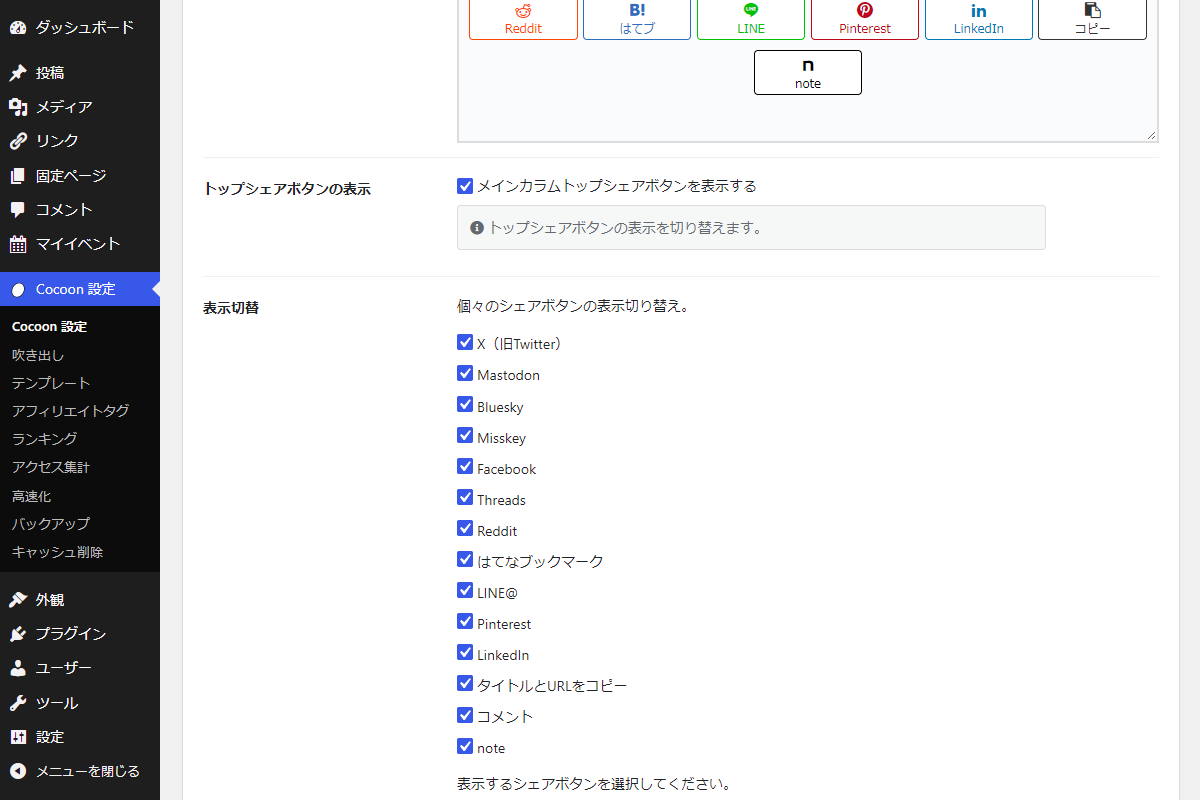
今回は「note」を例に追加手順を紹介します。
完成イメージ
実装手順
以下のコードをfunctions.phpに追加します。
// 定数定義
define('OP_TOP_NOTE_SHARE_BUTTON_VISIBLE', 'top_note_share_button_visible');
define('OP_BOTTOM_NOTE_SHARE_BUTTON_VISIBLE', 'bottom_note_share_button_visible');


/**
 * トップシェアボタンの表示状態を取得
 *
 * @return bool
 */
if (!function_exists('is_top_note_share_button_visible')):
function is_top_note_share_button_visible(){
  return get_theme_option(OP_TOP_NOTE_SHARE_BUTTON_VISIBLE, 1);
}
endif;


/**
 * ボトムシェアボタンの表示状態を取得
 *
 * @return bool
 */
if (!function_exists('is_bottom_note_share_button_visible')):
function is_bottom_note_share_button_visible(){
  return get_theme_option(OP_BOTTOM_NOTE_SHARE_BUTTON_VISIBLE, 1);
}
endif;


/**
 * 指定された表示位置に応じたシェアボタンの表示判定
 *
 * @param string $option 表示位置オプション (SS_TOP, SS_BOTTOM, SS_MOBILE)
 * @return bool
 */
if (!function_exists('is_note_share_button_visible')):
function is_note_share_button_visible($option) {
  return ($option == SS_TOP    && is_top_note_share_button_visible()) ||
         ($option == SS_BOTTOM && is_bottom_note_share_button_visible()) ||
         ($option == SS_MOBILE);
}
endif;


/**
 * noteのシェアURLを取得
 *
 * @param string|null $url 対象URL(未指定の場合は現在のページURL)
 * @return string
 */
if (!function_exists('get_note_share_url')):
function get_note_share_url($url = null){
  if (empty($url)) {
    $url = get_permalink();
  }
  return 'https://note.com/intent/post?url=' . rawurlencode($url);
}
endif;


// SNSシェアボタンを追加
add_filter('cocoon_sns_share_options', function ($options) {
  $options['note'] = [
    'label'             => __( 'note', THEME_NAME ),
    'top_key'           => OP_TOP_NOTE_SHARE_BUTTON_VISIBLE,
    'bottom_key'        => OP_BOTTOM_NOTE_SHARE_BUTTON_VISIBLE,
    'top_visible_fn'    => 'is_top_note_share_button_visible',
    'bottom_visible_fn' => 'is_bottom_note_share_button_visible',
    'visible_fn'        => 'is_note_share_button_visible',
    'url_fn'            => 'get_note_share_url',
    'class'             => 'note-button note-share-button-sq',
    'icon'              => 'icon-note-logo',
    'count_class'       => 'note-share-count',
    'caption'           => __( 'note', THEME_NAME ),
    'title'             => __( 'noteで投稿', THEME_NAME ),
  ];
  return $options;
});
さいごに
今回紹介した方法を使えば、Cocoonの標準機能に頼ることなく、最新のThreadsシェアボタンを自由な位置に追加することができます。
PHPのフィルターフックを活用することで、テーマの直接編集を避けつつ、メンテナンス性の高いカスタマイズが可能です。

