はじめに
作成したスキンを閲覧者に紹介する際、異なるデザインスキンを手軽に切り替えて試してもらいたい場合があります。
しかし、以下の公式ドキュメントで紹介されている方法では、ページを移動した際にスキンが保持されなかったり、スキン一覧のメニューを毎回手動で作成しなければならなかったりします。

そこで、コードを改善し、Cocoon設定→スキン→スキン覧設定に連動して自動で切り替えメニューを生成します。
また、従来のドロップダウン形式では、テスト確認でスキンの切り替えに少し手間に感じるため、「前へ / 次へ」ボタンでの操作も追加しました。
この記事では、この方法について説明します。
問題点
フォーラム掲載のコードでは、スキン切り替えを行う際、setcookie()のパラメータpathが不足しており、選択したスキンがページごとに反映され、クッキーに登録されてしまいます。
これにより、サイト全体で同じスキンが適用されないという問題が発生します。
完成イメージ
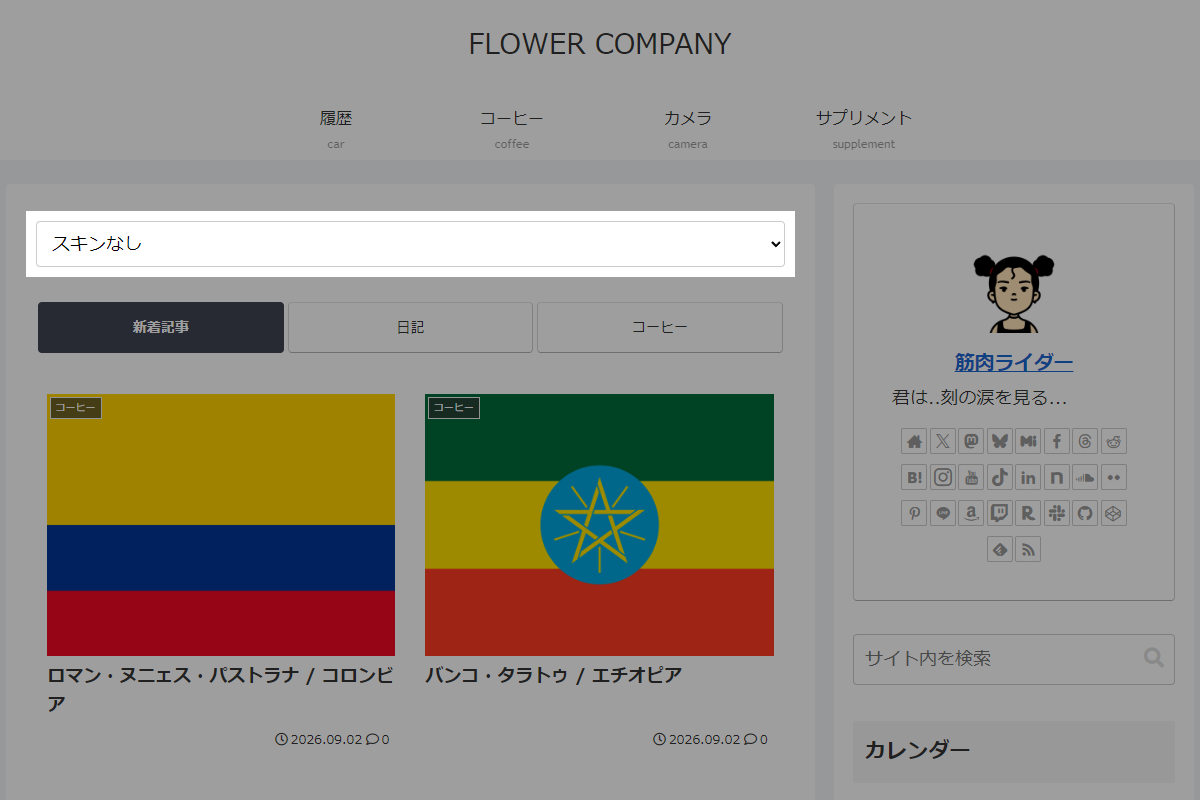
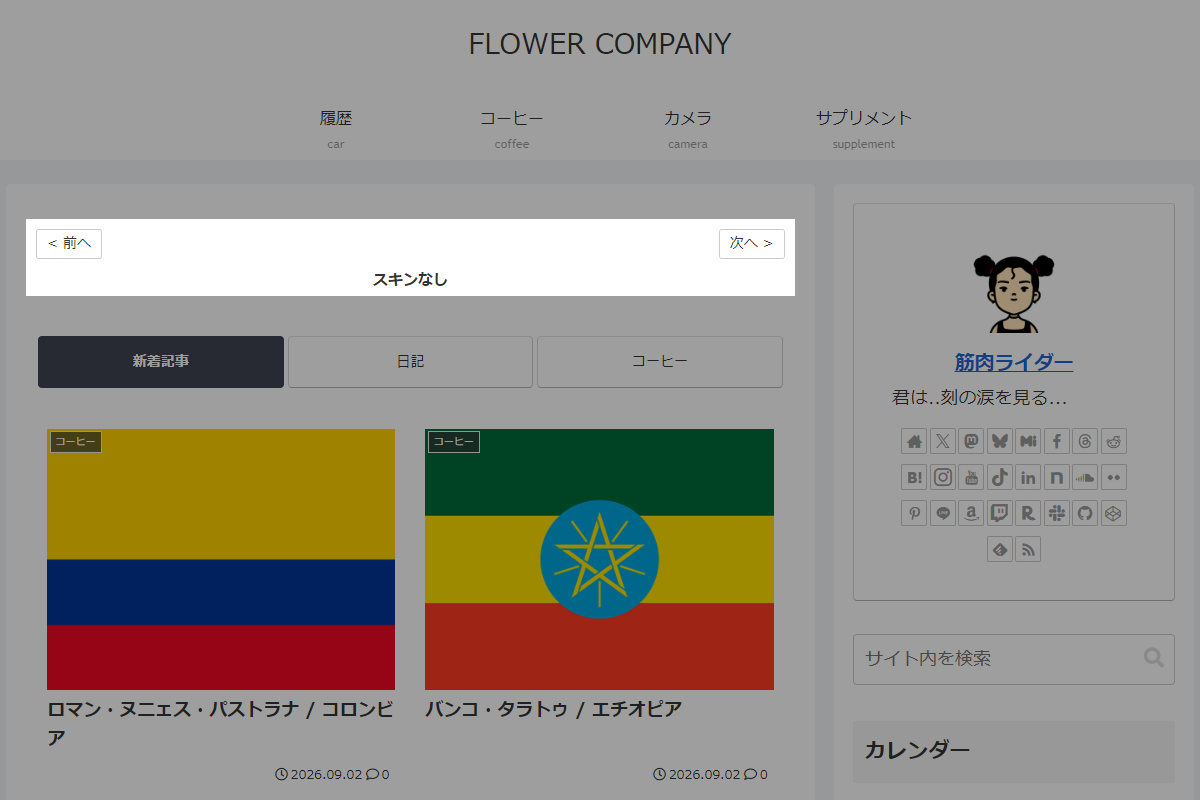
使用方法
以下にショートコードを示します。
[my_skin]実装手順
以下の手順で実装します。
- ラベルPHPを追加(共通部)
以下のコードをfunctions.phpに追加します。
// クッキー保存設定 define('MY_THEME_SWITCH_SAVE_TO_COOKIE', false); // Cocoon設定(スキン)のスキン一覧を変更 add_filter('theme_mod_skin_url', function ($current_mod) { if (is_admin()) { return $current_mod; } $ts = null; // URLパラメータからスキンを取得 if (isset($_GET['my-theme-switch'])) { $ts = esc_html($_GET['my-theme-switch']); if (MY_THEME_SWITCH_SAVE_TO_COOKIE) { if ($ts === 'reset') { // クッキーを削除 setcookie('my-theme-switch', '', time() - 3600, '/'); } else { // 選択されたスキンの相対パスをクッキーに登録 setcookie('my-theme-switch', $ts, time() + (86400 * 30), '/'); } } } else if (MY_THEME_SWITCH_SAVE_TO_COOKIE) { $ts = $_COOKIE['my-theme-switch'] ?? null; } // スキン指定が空、またはリセットの場合は「スキンなし(空文字)」に変更 if (empty($ts) || $ts === 'reset') { return ''; } // スキンの相対パスを取得 $rel_path = esc_html($ts); // 親ディレクトリ指定の場合は処理対象外 if (strpos($rel_path, '..') !== false) { return ''; } // サーバー上の物理ファイルパスを設定 $file_path = WP_CONTENT_DIR . '/themes/' . $rel_path; // 物理ファイルが存在する場合は絶対URLに置換 return file_exists($file_path) ? content_url('/themes/' . $rel_path) : ''; }); - ラベルPHPを追加(ドロップダウン版)
以下のコードをfunctions.phpに追加します。
add_shortcode('my_skin', function () { $skin = isset($_GET['my-theme-switch']) ? esc_html($_GET['my-theme-switch']) : null; // クッキーから相対パスを取得 if (MY_THEME_SWITCH_SAVE_TO_COOKIE && empty($skin) && isset($_COOKIE['my-theme-switch'])) { $skin = esc_html($_COOKIE['my-theme-switch']); } // スキン情報を取得 $skin_infos = get_skin_infos(); // 現在のページURLを取得 $current_url = strtok(get_permalink(), '?'); // content_url() のベース部分を取得 $content_url = content_url() . '/themes/'; ob_start(); ?> <select class="my-theme-switch-select" onchange=" var val = this.value; if (val === 'reset') { window.location.href = '<?= esc_js($current_url); ?>?my-theme-switch=reset'; } else { window.location.href = '<?= esc_js($current_url); ?>?my-theme-switch=' + encodeURIComponent(val); } "> <option value="reset" <?= selected($skin, 'reset', false); ?>>スキンなし</option> <?php if (!empty($skin_infos)): ?> <?php foreach ($skin_infos as $info): ?> <?php $rel_path = str_replace($content_url, '', $info['file_url']); $selected = selected($skin, $rel_path, false); ?> <option value="<?= esc_attr($rel_path); ?>" <?= $selected; ?>> <?= esc_html(trim($info['skin_name'])); ?> </option> <?php endforeach; ?> <?php endif; ?> </select> <?php return ob_get_clean(); }); - ラベルPHPを追加(前後ボタン版)
以下のコードをfunctions.phpに追加します。
// ショートコードを追加 add_shortcode('my_skin', function () { $skin = isset($_GET['my-theme-switch']) ? esc_html($_GET['my-theme-switch']) : null; // クッキーから相対パスを取得 if (MY_THEME_SWITCH_SAVE_TO_COOKIE && empty($skin) && isset($_COOKIE['my-theme-switch'])) { $skin = esc_html($_COOKIE['my-theme-switch']); } // スキン情報を取得 $skin_infos = get_skin_infos(); // 「スキンなし(リセット)」を先頭に登録 $items = [ [ 'val' => 'reset', 'name' => 'スキンなし', ], ]; // content_url() のベース部分を取得 $content_url = content_url() . '/themes/'; if (!empty($skin_infos)) { foreach ($skin_infos as $info) { // テーマディレクトリ以降の相対パスを取得 $rel_path = str_replace($content_url, '', $info['file_url']); // [Child] を含めた名称を登録 $items[] = [ 'val' => $rel_path, 'name' => trim($info['skin_name']), ]; } } $count = count($items); // 現在選択されているスキンのインデックスを取得 $current_index = 0; if (!empty($skin) && $skin !== 'reset') { foreach ($items as $i => $item) { if ($item['val'] === $skin) { $current_index = $i; break; } } } // 前後のインデックスを設定 $prev_index = ($current_index - 1 + $count) % $count; $next_index = ($current_index + 1) % $count; // 現在のURLからクエリパラメータを除去 $current_url = strtok(get_permalink(), '?'); // 前後のURLを設定 $prev_url = add_query_arg('my-theme-switch', $items[$prev_index]['val'], $current_url); $next_url = add_query_arg('my-theme-switch', $items[$next_index]['val'], $current_url); ob_start(); ?> <div class="theme-switch-wrapper"> <div class="theme-switch-nav"> <a href="<?= esc_url($prev_url); ?>" class="theme-switch-nav-btn">< 前へ</a> <a href="<?= esc_url($next_url); ?>" class="theme-switch-nav-btn">次へ ></a> </div> <div class="theme-switch-current-name"> <?= esc_html($items[$current_index]['name']); ?> </div> </div> <?php return ob_get_clean(); }); // フロント用JS・CSSを追加 add_action('wp_enqueue_scripts', function () { ob_start(); ?> .theme-switch-wrapper { max-width: 100%; padding: 8px 0; } .theme-switch-nav { align-items: center; display: flex; justify-content: space-between; margin-bottom: 8px; } .theme-switch-nav-btn { background-color: #fff; border: 1px solid #ccc; border-radius: 3px; color: #333; cursor: pointer; display: inline-block; font-size: 14px; line-height: 1.4; padding: 4px 10px; text-decoration: none; } .theme-switch-nav-btn:hover { background-color: #f5f5f5; color: #333; } .theme-switch-current-name { font-size: 15px; font-weight: bold; text-align: center; } <?php $handle = 'theme-switch-style'; wp_register_style($handle, false); wp_enqueue_style($handle); wp_add_inline_style($handle, ob_get_clean()); });
さいごに
今回紹介した方法を使えば、子テーマスキン一覧から選択し、簡単にデザインスキンを切り替えてデモ表示することができます。
スキン切り替えが全ページに反映され、クッキーの設定も正しく行われるようになります。