はじめに
以前の記事で、「Cocoon設定画面に独自項目を追加して保存・取得する方法」をご紹介しました。
特定のタブ内に項目を挿入するだけでも便利ですが、設定項目が増えてくると特定のタブだけでは管理しきれなくなる場合があります。
そこで今回は、JavaScript(DOM操作)を利用してCocoon設定画面内に「独自タブ」を新しく追加し、項目をすっきり整理するカスタマイズを行います。
この方法について説明します。
実装の方法
タブを追加する方法は、運用やコードの設計方針に合わせて以下の2種類から選べます。
- functions.phpのみで完結させる場合
functions.php内にタブの描画処理(HTML)を直接記述するシンプルな方法です。
小規模な設定やコード量を抑えたい場合に適しています。
- 設定画面を外部ファイルに切り出す場合
タブのHTMLテンプレートを別ファイル(.php)に切り出して読み込む方法です。
コードの可読性や保守性が高まり、大規模な設定画面を作成する際に適しています。
どちらの方式を採用すべきかは、作成するフォームの規模やコードの管理方法によって異なります(表1参照)。
| 評価項目 | functions.phpのみで完結させる場合 | 設定画面を外部ファイルに切り出す場合 |
|---|---|---|
| コード配置 | 小さなフォーム・単一の処理 | 独立した設定画面・大きな処理 |
| HTMLの規模 | 短いHTML | 長いHTML |
| 特徴・拡張性 | 小規模な処理に向く | 複数タブ・大規模な設定画面に向く |
| 管理性 | PHPコード内で完結 | HTMLをファイル単位で管理 |
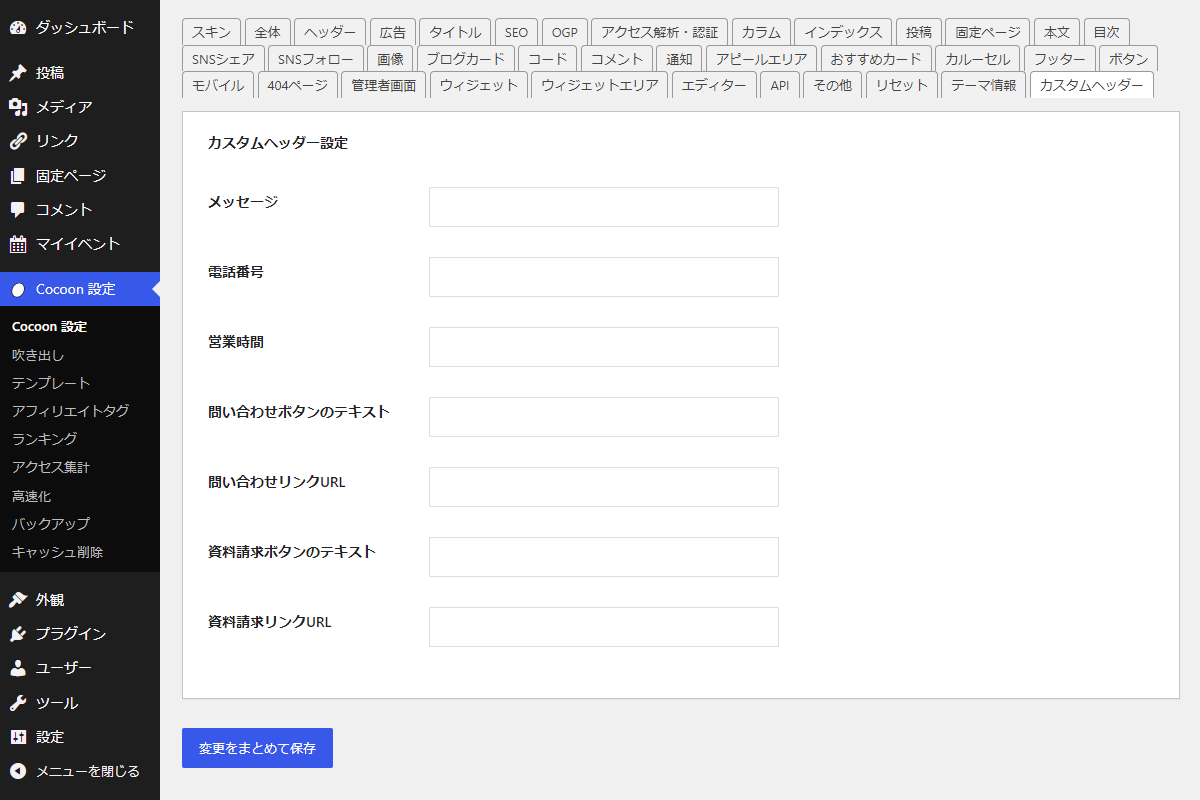
完成イメージ
実装手順
今回は、以前の記事で作成した入力フォームを例に既存のタブ内ではなく、独立した独自タブとして追加します。

なお、フロント側(サイト上)でヘッダー情報を出力する処理(header_outputや wp_header_logo_after_openフックなど)は、以前の記事のコードをそのまま利用できます。
事前準備:設定値の定義と保存処理
以下のコードをfunctions.phpに追加します。
「関数指定方式」と「外部ファイル読み込み方式」のどちらを採用する場合でも、設定項目の定義・取得・保存を行う基本ロジックは共通です(前回の記事と同じ仕組みを利用します)。
/**
 * オプション設定を管理
 *
 * @return array オプション設定の配列
 */
if (!function_exists('my_cocoon_options')):
function my_cocoon_options() {
  return [
    'my_custom_message'             => ['default' => '', 'label' => 'メッセージ'],
    'my_custom_phone'               => ['default' => '', 'label' => '電話番号'],
    'my_custom_business_hours'      => ['default' => '', 'label' => '営業時間'],
    'my_custom_button_text'         => ['default' => '', 'label' => '問い合わせボタンのテキスト'],
    'my_custom_button_url'          => ['default' => '', 'label' => '問い合わせリンクURL'],
    'my_custom_request_button_text' => ['default' => '', 'label' => '資料請求ボタンのテキスト'],
    'my_custom_request_button_url'  => ['default' => '', 'label' => '資料請求リンクURL'],
  ];
}
endif;


/**
 * オプション設定値を取得
 *
 * @param string $key オプションキー名
 * @return mixed 設定された値(未設定の場合はデフォルト値)
 */
if (!function_exists('get_my_cocoon_options')):
function get_my_cocoon_options($key) {
  $options = my_cocoon_options();

  return get_theme_option($key, $options[$key]['default']);
}
endif;


// Cocoon設定値を保存
add_action('cocoon_settings_after_save', function () {
  foreach (array_keys(my_cocoon_options()) as $key) {
    update_theme_option($key);
  }
});


// Cocoon設定画面にタブ追加用フックを登録
add_action('admin_menu', function () {
  $page_hook = get_plugin_page_hookname('theme-settings', '');

  if ($page_hook) {
    add_action($page_hook, 'add_cocoon_tabs');
  }
}, 99);
functions.phpのみで完結させる場合
以下のコードをfunctions.phpに追加します。
/**
 * Cocoon設定にカスタムタブを追加
 *
 * @return void
 */
if (!function_exists('add_cocoon_tabs')):
function add_cocoon_tabs() {
  foreach (get_cocoon_tabs() as $key => $tab) {
    // コールバック関数が未定義の場合は処理対象外
    if (!isset($tab['callback']) || !function_exists($tab['callback'])) {
      continue;
    }

    $input_id   = "tab-{$key}-input";
    $label_id   = "tab-{$key}-label";
    $content_id = "tab-{$key}-content";
    $selected   = ($_POST['tab-input'] ?? '') === $input_id ? 'checked' : '';

    // ↓=== コンテンツ部を関数から生成 ===↓
    ob_start();
    call_user_func($tab['callback'], $content_id);
    $content_html = ob_get_clean();
    // ↑================================↑

    // タブ部分の生成
    ob_start();
    ?>
    <input id="<?php echo esc_attr($input_id); ?>" value="<?php echo esc_attr($input_id); ?>" class="tab-input" type="radio" name="tab-input" <?php echo $selected; ?>>
    <label for="<?php echo esc_attr($input_id); ?>" id="<?php echo esc_attr($label_id); ?>" class="<?php echo esc_attr($label_id); ?> tab-label"><?php echo esc_html($tab['label']); ?></label>
    <?php
    $tab_html = ob_get_clean();

    // カスタムタブを追加
    ob_start();
    ?>
    <style>
    #tabs #<?php echo esc_attr($input_id); ?>:checked ~ #<?php echo esc_attr($label_id); ?> {
      background-color: #fff !important;
      border-bottom: 1px solid #fff !important;
    }

    #tabs #<?php echo esc_attr($input_id); ?>:checked ~ #<?php echo esc_attr($content_id); ?> {
      display: block !important;
    }
    </style>

    <script>
    jQuery(function ($) {
      $('#tabs .tab-label').last().after(<?php echo wp_json_encode($tab_html); ?>);
      $('#tabs').append(<?php echo wp_json_encode($content_html); ?>);
    });
    </script>
    <?php
    echo ob_get_clean();
  }
}
endif;


/**
 * カスタムタブ一覧を取得
 *
 * @return array タブ設定の配列
 */
if (!function_exists('get_cocoon_tabs')):
function get_cocoon_tabs() {
  return [
    'custom' => [
      'label'    => 'カスタムヘッダー',
      'callback' => 'header_form',
    ],

    // 複数追加例
    // 'sample' => [
    //   'label'    => 'サンプル設定',
    //   'callback' => 'sample_form',
    // ],
  ];
}
endif;


/**
 * カスタムヘッダー設定タブを出力
 *
 * @param string $content_id コンテンツID
 * @return void
 */
if (!function_exists('header_form')):
function header_form($content_id) {
  ?>
  <div id="<?php echo esc_attr($content_id); ?>" class="custom metabox-holder">
    <div class="metabox-holder">
      <div id="custom-header-settings" class="postbox">
        <h2 class="hndle"><span>カスタムヘッダー設定</span></h2>
        <div class="inside">
          <table class="form-table">
            <tbody>
              <?php foreach (my_cocoon_options() as $key => $option): ?>
                <?php $value = esc_attr(get_my_cocoon_options($key)); ?>
                <tr>
                  <th scope="row">
                    <label for="<?php echo esc_attr($key); ?>"><?php echo esc_html($option['label']); ?></label>
                  </th>
                  <td>
                    <input type="text" id="<?php echo esc_attr($key); ?>" name="<?php echo esc_attr($key); ?>" value="<?php echo $value; ?>" class="regular-text">
                  </td>
                </tr>
              <?php endforeach; ?>
            </tbody>
          </table>
        </div>
      </div>
    </div>
  </div>
  <?php
}
endif;
設定画面を外部ファイルに切り出す場合
以下の手順で実装します。
- ラベルPHPを追加
以下のコードをfunctions.phpに追加します。
/** * Cocoon設定にカスタムタブを追加 * * @return void */ if (!function_exists('add_cocoon_tabs')): function add_cocoon_tabs() { $custom_tabs = get_cocoon_tabs(); if (empty($custom_tabs)) { return; } foreach ($custom_tabs as $key => $tab) { if (!file_exists($tab['file'])) { continue; } $input_id = "tab-{$key}-input"; $label_id = "tab-{$key}-label"; $content_id = "tab-{$key}-content"; $selected = ($_POST['tab-input'] ?? '') === $input_id ? 'checked' : ''; // ↓=== コンテンツ部をファイルから取得 ===↓ ob_start(); require $tab['file']; $content_html = ob_get_clean(); // ↑====================================↑ // タブ部分を生成 ob_start(); ?> <input id="<?php echo esc_attr($input_id); ?>" value="<?php echo esc_attr($input_id); ?>" class="tab-input" type="radio" name="tab-input" <?php echo $selected; ?>> <label for="<?php echo esc_attr($input_id); ?>" id="<?php echo esc_attr($label_id); ?>" class="<?php echo esc_attr($label_id); ?> tab-label"><?php echo esc_html($tab['label']); ?></label> <?php $tab_html = ob_get_clean(); // タブを追加 ob_start(); ?> <style> #tabs #<?php echo esc_attr($input_id); ?>:checked ~ #<?php echo esc_attr($label_id); ?> { background-color: #fff !important; border-bottom: 1px solid #fff !important; } #tabs #<?php echo esc_attr($input_id); ?>:checked ~ #<?php echo esc_attr($content_id); ?> { display: block !important; } </style> <script> jQuery(function ($) { $('#tabs .tab-label').last().after(<?php echo wp_json_encode($tab_html); ?>); $('#tabs').append(<?php echo wp_json_encode($content_html); ?>); }); </script> <?php echo ob_get_clean(); } } endif; /** * カスタムタブ一覧を取得 * * @return array タブ設定の配列 */ if (!function_exists('get_cocoon_tabs')): function get_cocoon_tabs() { return [ 'custom' => [ 'label' => 'カスタムヘッダー', 'file' => get_stylesheet_directory() . '/tab/my-header-tab.php', ], // 追加例 // 'sample' => [ // 'label' => 'サンプル', // 'file' => get_stylesheet_directory() . '/tab/my-sample-tab.php', // ], ]; } endif; - ラベルPHPを追加
子テーマディレクトリ内に
tabフォルダを作成し、以下のファイルを追加します。ファイルパス: cocoon-child-master/tab/my-header-tab.php
<div id="tab-custom-content" class="custom metabox-holder">
  <div class="metabox-holder">
    <div id="custom-header-settings" class="postbox">
      <h2 class="hndle"><span>カスタムヘッダー設定</span></h2>

      <div class="inside">
        <table class="form-table">
          <tbody>
            <?php foreach (my_cocoon_options() as $key => $option): ?>
              <?php $value = esc_attr(get_my_cocoon_options($key)); ?>

              <tr>
                <th scope="row">
                  <label for="<?php echo esc_attr($key); ?>">
                    <?php echo esc_html($option['label']); ?>
                  </label>
                </th>
                <td>
                  <input type="text" id="<?php echo esc_attr($key); ?>" name="<?php echo esc_attr($key); ?>" value="<?php echo $value; ?>" class="regular-text">
                </td>
              </tr>

            <?php endforeach; ?>
          </tbody>
        </table>
      </div>
    </div>
  </div>
</div>
さいごに
今回紹介した方法を使えば、Cocoon設定画面の既存レイアウトを壊すことなく、綺麗に独立した独自タブを追加することができます。
管理する設定項目が増えてきた際も、タブごとに情報を整理することで運用・メンテナンスのしやすさが大きく向上します。
小規模な拡張であれば「関数指定方式」、複数のタブや大規模なフォームであれば「外部ファイル読み込み方式」といったように、サイトの成長や開発規模に合わせて最適なかたちでご活用ください。