
完成イメージ
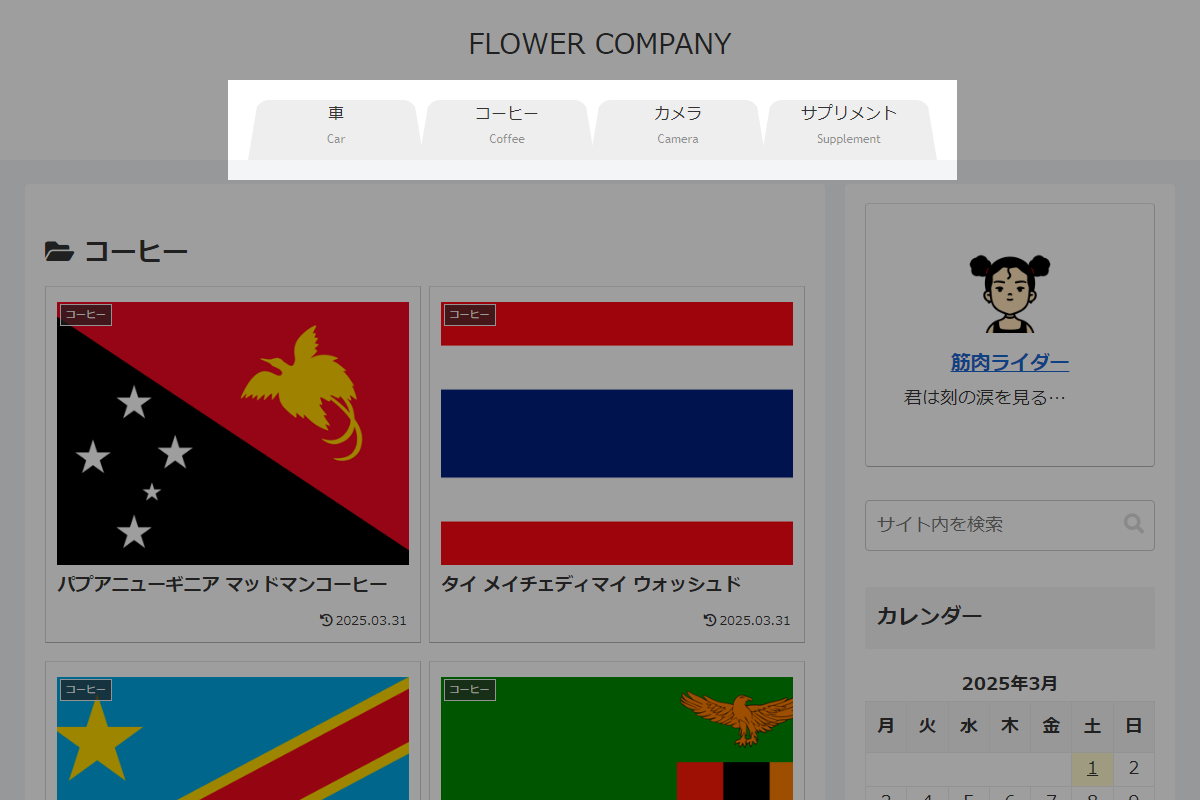
実装手順
以下の手順で実装します。
- ラベルタイトル
表1に示す項目を設定をします。
Cocoon設定 設定 大項目 項目 設定値 ヘッダー ヘッダーレイアウト - センターロゴ(デフォルト)
- センターロゴ(スリムメニュー)
- ラベルCSSを追加
以下のコードをstyle.cssに追加します。
:root {
  --navi-height: 60px;
}

.cl-slim {
  --navi-height: 40px;
}

.navi-in {
  > ul .caption-wrap {
    align-content: unset;
  }

  a {
    border-bottom: var(--navi-height) solid #eee;
    border-left: 10px solid transparent;
    border-radius: 20px 20px 0 0 / 40px 40px 0 0;
    border-right: 10px solid transparent;
    height: 0;
    width: 100%;
  }

  .current_page_item a {
    border-bottom-color: #c0c0c0;
    pointer-events: none;
    z-index: 1;
  }

  ul li {
    &:nth-child(2) {
      left: -5px;
    }

    &:nth-child(3) {
      left: -10px;
    }

    &:nth-child(4) {
      left: -15px;
    }
  }
}
さいごに
今回紹介した方法を使えば、グローバルナビメニューをタブ切り替え風に簡単に実装できます。
これにより、サイトのヘッダーがよりスタイリッシュでインタラクティブになります。

