はじめに
通常投稿(post)には「先頭固定表示」機能がありますが、カスタム投稿タイプにはありません。
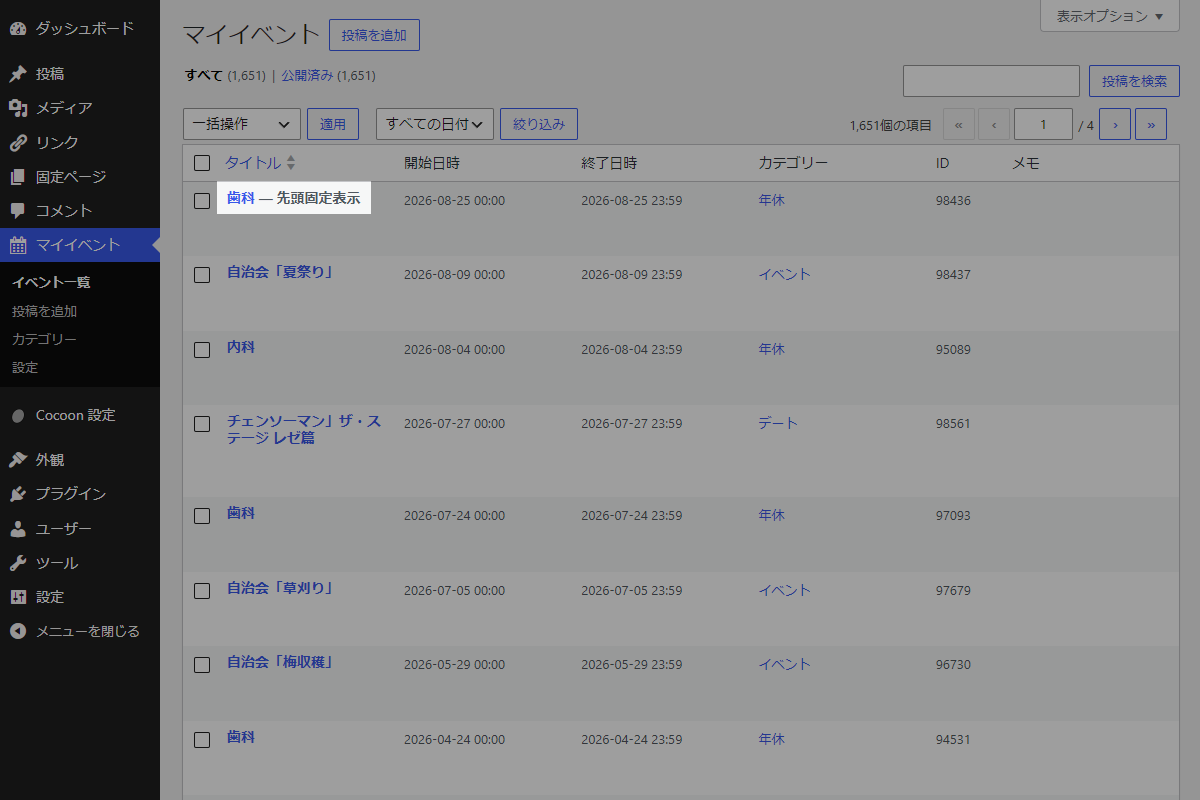
そこで、カスタム投稿タイプの編集画面に「先頭固定」のメタボックスを追加し、チェックした投稿をカスタム投稿一覧の先頭に表示できるようにします。
この記事では、この方法について説明します。
完成イメージ

実装手順
以下のコードをfunctions.phpに追加します。
// メタボックスを追加
add_action('add_meta_boxes', function () {
  $post_types = get_target_sticky_post_types();

  foreach ($post_types as $post_type) {
    add_meta_box(
      'cpt_sticky',
      '先頭固定設定',
      'render_cpt_sticky',
      $post_type,
      'side',
      'default'
    );
  }
});


/**
 * メタボックスの入力フォームを出力
 *
 * @param WP_Post $post 投稿オブジェクト
 * @return void
 */
if (!function_exists('render_cpt_sticky')):
function render_cpt_sticky($post) {
  $value = get_post_meta($post->ID, 'my_cpt_sticky', true);

  wp_nonce_field('cpt_sticky_action', 'cpt_sticky_nonce');
  ?>
  <label>
    <input type="checkbox" name="cpt_sticky" value="1" <?php checked(1, $value); ?>>先頭に固定
  </label>
  <?php
}
endif;


// 投稿データを保存
add_action('save_post', function ($post_id) {
  // nonceチェック
  if (!isset($_POST['cpt_sticky_nonce']) || !wp_verify_nonce(wp_unslash($_POST['cpt_sticky_nonce']), 'cpt_sticky_action')) {
    return;
  }

  // 自動保存チェック
  if (defined('DOING_AUTOSAVE') && DOING_AUTOSAVE) {
    return;
  }

  // リビジョンは除外
  if (wp_is_post_revision($post_id)) {
    return;
  }

  // 権限チェック
  if (!current_user_can('edit_post', $post_id)) {
    return;
  }

  if (isset($_POST['cpt_sticky'])) {
    update_post_meta($post_id, 'my_cpt_sticky', 1);
    return;
  }

  delete_post_meta($post_id, 'my_cpt_sticky');
});


/**
 * すべての公開カスタム投稿タイプを取得
 *
 * @return array カスタム投稿タイプのスラッグ配列
 */
if (!function_exists('get_target_sticky_post_types')):
function get_target_sticky_post_types() {
  return get_post_types(['public' => true, '_builtin' => false], 'names');
}
endif;


/**
 * 投稿または投稿タイプが対象のカスタム投稿タイプか判定
 *
 * @param mixed $post 投稿ID、WP_Postオブジェクト、投稿タイプ名
 * @return bool 対象であればtrue
 */
if (!function_exists('is_target_sticky_post')):
function is_target_sticky_post($post) {
  $post_types = get_target_sticky_post_types();

  if (is_string($post)) {
    return in_array($post, $post_types, true);
  }

  $post_type = get_post_type($post);

  return $post_type && in_array($post_type, $post_types, true);
}
endif;


// 投稿クエリの取得条件を変更
add_action('pre_get_posts', function ($query) {
  if (is_admin() || !$query->is_main_query()) {
    return;
  }

  $current_cpt = $query->get('post_type');

  if (is_array($current_cpt)) {
    $current_cpt = reset($current_cpt);
  }

  if (!is_target_sticky_post($current_cpt)) {
    return;
  }

  if (!is_post_type_archive($current_cpt)) {
    return;
  }

  $paged = max(1, get_query_var('paged'));

  // 固定投稿のIDとオブジェクトを取得
  $sticky_posts = get_posts([
    'post_type'           => $current_cpt,
    'meta_key'            => 'my_cpt_sticky',
    'meta_value'          => 1,
    'posts_per_page'      => -1,
    'post_status'         => 'publish',
    'orderby'             => 'post_date',
    'order'               => 'DESC',
    'ignore_sticky_posts' => 1,
  ]);

  if (!$sticky_posts) {
    return;
  }

  $sticky_ids = wp_list_pluck($sticky_posts, 'ID');

  // メインクエリから固定投稿を除外
  $query->set('post__not_in', $sticky_ids);

  // 1ページ目の固定投稿を先頭に追加
  if ($paged === 1) {
    // ページネーションの総件数を補正
    add_filter('found_posts', function ($found_posts, $q) use ($sticky_ids) {
      if ($q->is_main_query()) {
        $found_posts += count($sticky_ids);
      }

      return $found_posts;
    }, 10, 2);

    // 固定投稿を先頭に追加
    add_filter('the_posts', function ($posts, $posts_query) use ($sticky_posts) {
      if (!$posts_query->is_main_query()) {
        return $posts;
      }

      // 重複を防止
      return array_merge($sticky_posts, $posts);
    }, 10, 2);
  }
});


// 投稿にクラスを追加
add_filter('post_class', function ($classes, $class, $post_id) {
  if (is_admin()) {
    return $classes;
  }

  if (is_target_sticky_post($post_id)) {
    $is_sticky = get_post_meta($post_id, 'my_cpt_sticky', true);

    if ($is_sticky === '1') {
      $classes[] = 'sticky';
    }
  }

  return $classes;
}, 10, 3);


// 投稿一覧でタイトル横に「先頭固定表示」ラベルを追加
add_filter('display_post_states', function ($post_states, $post) {
  if (!is_target_sticky_post($post)) {
    return $post_states;
  }

  $is_sticky = get_post_meta($post->ID, 'my_cpt_sticky', true);

  if ($is_sticky === '1') {
    $post_states['cpt_sticky'] = '先頭固定表示';
  }

  return $post_states;
}, 10, 2);
さいごに
今回紹介した方法を使えば、カスタム投稿タイプの投稿を簡単に先頭固定でき、カスタム投稿一覧で重要な情報を目立たせることができます。
編集画面のチェックボックスを使うだけなので、特別なプラグインなしでも運用可能です。
これにより、ユーザーにとって見やすく整理された投稿一覧を提供できます。