
はじめに
WordPressでは、投稿に複数のカテゴリーを設定できるのが標準仕様です。
しかし、特定の運用ルールや情報設計上、カテゴリーを必ず1つだけ選ばせたいケースも多く存在します。
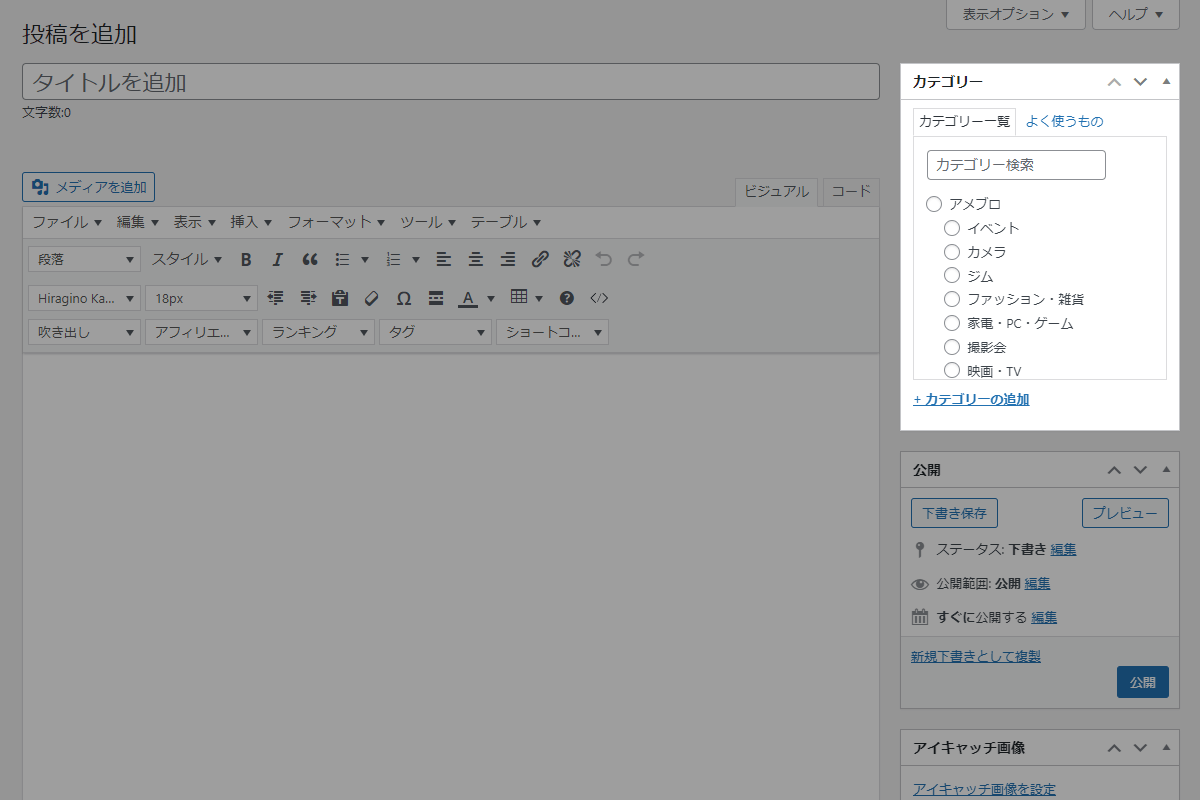
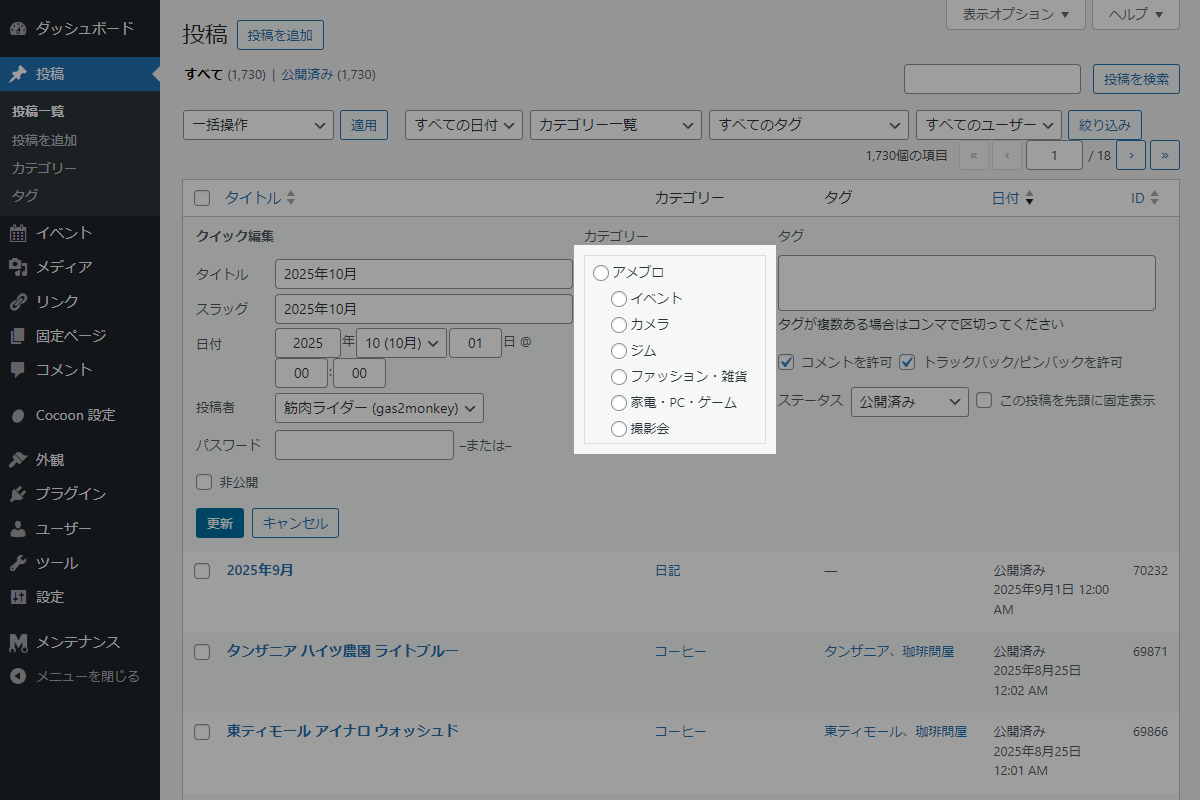
プラグイン「Radio Buttons for Taxonomies」などを使わずに、投稿編集画面・新規投稿画面・投稿一覧(クイック編集)画面において、カテゴリー選択を複数選択可能なチェックボックスからラジオボタンに変換することで、カテゴリーを1つだけ選択できるように制限します。
この記事では、この方法について説明します。
完成イメージ
実装手順
以下のコードをfunctions.phpに追加します。
add_action('admin_enqueue_scripts', function ($hook_suffix) {
  if (!in_array($hook_suffix,['post.php', 'post-new.php', 'edit.php'], true)) {
    return;
  }

  ob_start();
  ?>
  jQuery(function ($) {
    /**
     * チェックボックスをラジオボタンに変換
     *
     * @param {jQuery} $checkbox - 対象の jQuery チェックボックス要素
     */
    function replaceWithRadio($checkbox) {
      // ラジオボタンのinput要素を作成
      const $radio = $('<input type="radio" />')
        .attr('name', 'post_category[]')
        .attr('value', $checkbox.val())
        .attr('id', $checkbox.attr('id'))
        .prop('checked', $checkbox.prop('checked'));

      // チェックボックスをラジオボタンに置換
      $checkbox.replaceWith($radio);
    }

    // 投稿編集画面・新規投稿画面のカテゴリーをラジオボタンに置換
    $('#categorydiv input[type="checkbox"]').each(function () {
      replaceWithRadio($(this));
    });

    // クイック編集のクリックイベント
    $(document).on('click', '.editinline', function () {
      // クイック編集フォームが非同期で生成されるため、少し遅延させて処理を実行
      setTimeout(function () {
        // 表示中のクイック編集フォームからチェックボックスを取得
        $('.inline-edit-row:visible input[type="checkbox"]').each(function () {
          const $checkbox = $(this);
          // name属性がpost_categoryで始まるカテゴリーのみ対象
          if ($checkbox.attr('name')?.startsWith('post_category')) {
            replaceWithRadio($checkbox);
          }
        });
      }, 50);
    });
  });
  <?php
  wp_add_inline_script('jquery', ob_get_clean());
});
参考:Gutenbergエディターにも反映する方法
Gutenbergエディターでは、標準のカテゴリー設定パネル自体を変更することはできません。
そのため、カテゴリーをラジオボタンで選択できる独自のメタボックスを追加し、標準のカテゴリー設定パネルは非表示にします。

実装手順
以下のコードをfunctions.phpに追加します。
// エディターからの標準カテゴリーパネルを非表示
add_action('init', function () {
  $taxonomy = get_taxonomy('category');

  if (!$taxonomy) {
    return;
  }

  $taxonomy->show_in_rest = false;
  $taxonomy->meta_box_cb  = false;
});


// メタボックスを追加
add_action('add_meta_boxes', function () {
  add_meta_box(
    'category_selection',
    'カテゴリー',
    'render_category_selection',
    'post',
    'side',
    'high'
  );
});


/**
 * メタボックスの入力フォームを出力
 *
 * @param WP_Post $post 投稿オブジェクト
 * @return void
 */
if (!function_exists('render_category_selection')) :
function render_category_selection($post) {
  // 保存済みカスタムフィールドを取得
  $current_id = 0;
  $custom_id  = get_post_meta($post->ID, 'my_category_id', true);

  if (!empty($custom_id) && term_exists($custom_id, 'category')) {
    $current_id = absint($custom_id);
  }

  // 保存済みのカテゴリーIDがない場合は投稿カテゴリーの先頭を使用
  if ($current_id === 0) {
    $terms = wp_get_post_terms($post->ID, 'category', ['fields' => 'ids']);

    if (!is_wp_error($terms) && !empty($terms)) {
      $current_id = absint($terms[0]);
    }
  }

  wp_nonce_field('category_selection_action', 'category_selection_nonce');

  // 全てのカテゴリー取得
  $categories = get_terms([
    'taxonomy'   => 'category',
    'hide_empty' => false,
    'orderby'    => 'name',
  ]);

  if (empty($categories) || is_wp_error($categories)) {
    return;
  }

  ?>
  <ul class="category-selection__list" style="list-style: none; margin-left: 0;">
    <?php

    /**
     * カテゴリーの階層構造を再帰的に展開してラジオボタンとして出力
     *
     * @param array $categories 階層化されたカテゴリー配列
     * @param int $selected_id 選択中のカテゴリーID
     * @param int $parent_id 親カテゴリーのID
     * @param int $depth 階層の深さ
     * @return void
     */
    $display_category_hierarchy = function ($categories, $selected_id = 0, $parent_id = 0, $depth = 0) use (&$display_category_hierarchy) {
      foreach ($categories as $category) {
        if ($category->parent != $parent_id) {
          continue;
        }

        $checked = ($category->term_id == $selected_id) ? 'checked' : '';

        ?>
        <li>
          <label style="display: block; padding-left: <?php echo esc_attr($depth * 15); ?>px;">
            <input type="radio" name="category_selection" value="<?php echo esc_attr($category->term_id); ?>" <?php echo $checked; ?> />
            <?php echo esc_html($category->name); ?>
          </label>
        </li>
        <?php

        // 子カテゴリーを再帰的に展開
        $display_category_hierarchy($categories, $selected_id, $category->term_id, $depth + 1);
      }
    };

    $display_category_hierarchy($categories, $current_id);

    ?>
  </ul>
  <?php
}
endif;


// 投稿データを保存
add_action('save_post', function ($post_id) {
  // デフォルトカテゴリーのIDを取得
  $default_category_id = absint(get_option('default_category'));

  // nonceチェック
  if (
    !isset($_POST['category_selection_nonce']) ||
    !wp_verify_nonce($_POST['category_selection_nonce'], 'category_selection_action')
  ) {
    return $post_id;
  }

  // 自動保存チェック
  if (
    (defined('DOING_AUTOSAVE') && DOING_AUTOSAVE) ||
    wp_is_post_autosave($post_id)
  ) {
    return $post_id;
  }

  // リビジョンの除外
  if (wp_is_post_revision($post_id)) {
    return $post_id;
  }

  // 権限チェック
  if (!current_user_can('edit_post', $post_id)) {
    return $post_id;
  }

  // フォームから送信されたカテゴリーIDを取得
  $submitted_id = isset($_POST['category_selection']) ? absint($_POST['category_selection']) : 0;

  // 無効なIDならデフォルトカテゴリーを設定
  $term_id_to_save = (
    $submitted_id === 0 ||
    !term_exists($submitted_id, 'category')
  )
    ? $default_category_id
    : $submitted_id;

  // カスタムフィールドにカテゴリーIDを保存
  update_post_meta($post_id, 'my_category_id', $term_id_to_save);

  // 投稿のカテゴリーを更新
  wp_set_post_terms($post_id, [$term_id_to_save], 'category', false);

  return $post_id;
});


// 管理画面用JS・CSSを追加
add_action('admin_enqueue_scripts', function ($hook_suffix) {
  if (!in_array($hook_suffix, ['post.php', 'post-new.php', 'edit.php'], true)) {
    return;
  }

  ob_start();
  ?>
  jQuery(function ($) {

    /**
     * チェックボックスをラジオボタンに変換
     *
     * @param {jQuery} $checkbox - 対象の jQuery チェックボックス要素
     */
    function replaceWithRadio($checkbox) {
      // ラジオボタンの新しいinput要素を作成
      const $radio = $('<input type="radio" />')
        .attr('name', 'post_category[]')
        .attr('value', $checkbox.val())
        .attr('id', $checkbox.attr('id'))
        .prop('checked', $checkbox.prop('checked'));

      // チェックボックスをラジオボタンに置換
      $checkbox.replaceWith($radio);
    }

    // 投稿編集画面・新規投稿画面のカテゴリーをラジオボタンに置換
    $('#categorydiv input[type="checkbox"]').each(function () {
      replaceWithRadio($(this));
    });

    // クイック編集のクリックイベント
    $(document).on('click', '.editinline', function () {
      // クイック編集フォームのDOMが非同期で生成されるため、少し遅延させてから処理を実行
      setTimeout(function () {
        // 表示中のクイック編集フォームからチェックボックスを取得
        $('.inline-edit-row:visible input[type="checkbox"]').each(function () {
          const $checkbox = $(this);

          // name属性がpost_categoryで始まるカテゴリーのみ対象
          if ($checkbox.attr('name')?.startsWith('post_category')) {
            replaceWithRadio($checkbox);
          }
        });
      }, 50);
    });
  });
  <?php

  wp_add_inline_script('jquery', ob_get_clean());
});
さいごに
今回紹介した方法を使えば、投稿編集画面やクイック編集画面において、カテゴリー選択を1つのみに制限することができます。
チェックボックスをラジオボタンに変換することで、ユーザーにとっても直感的で誤操作の少ないUIを実現でき、分類ルールをより確実に守らせることが可能になります。

