
はじめに
以下の質問に回答します。

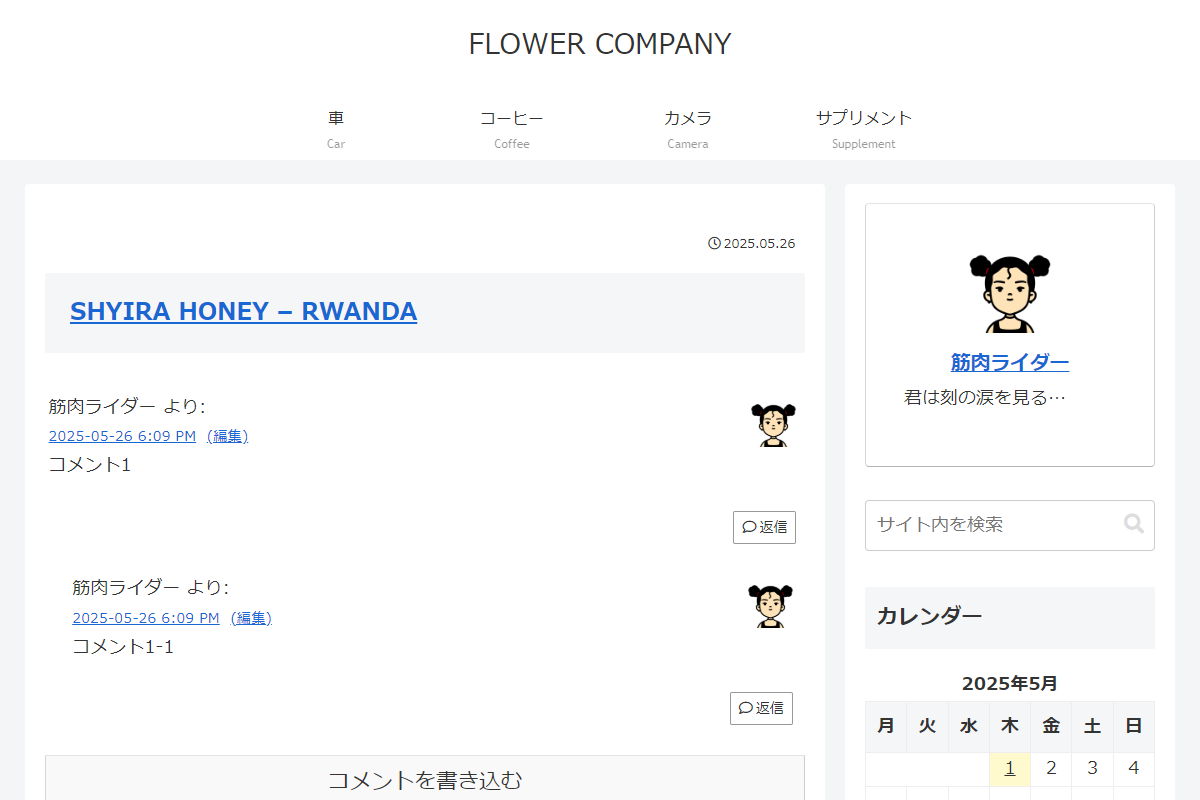
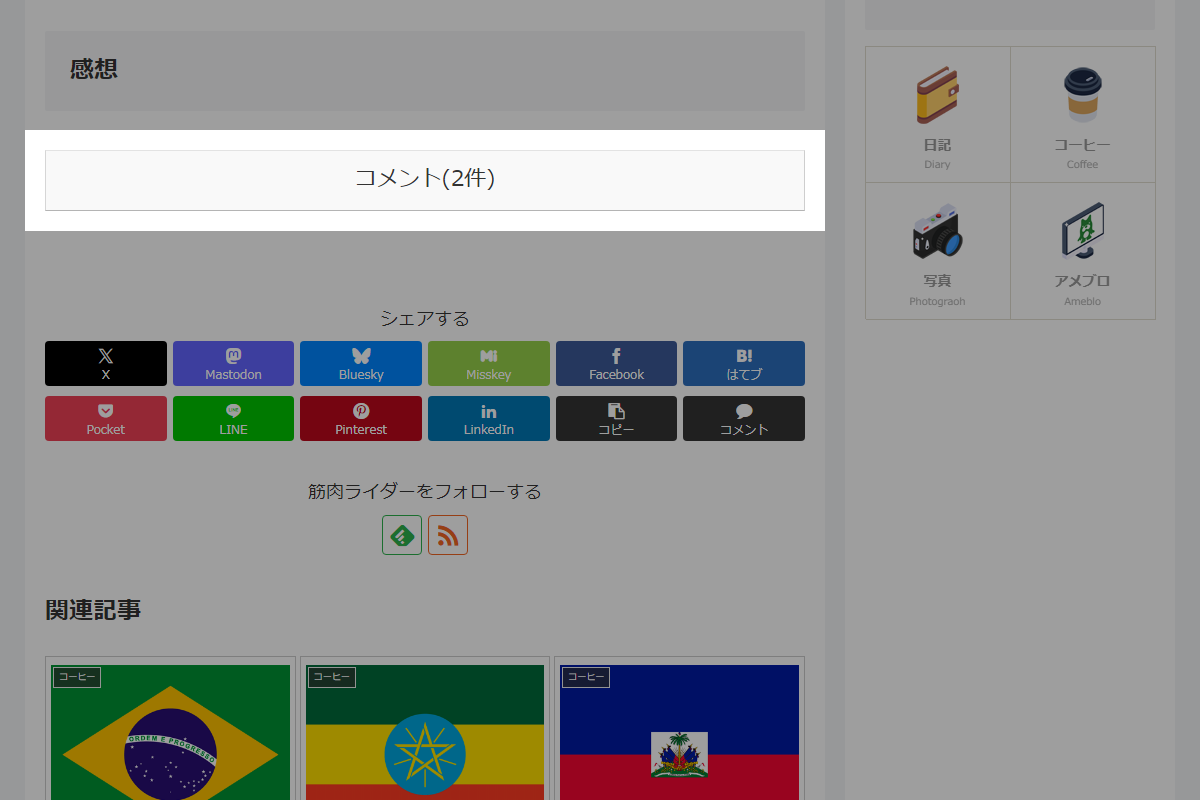
投稿本文の下に「コメント」ボタンを追加し、クリックするとその投稿のコメント一覧を別ページで表示します。
この記事では、この方法について説明します。
完成イメージ
実装手順
以下の手順で作成します。
- ラベルコメント一覧用の固定ページを作成
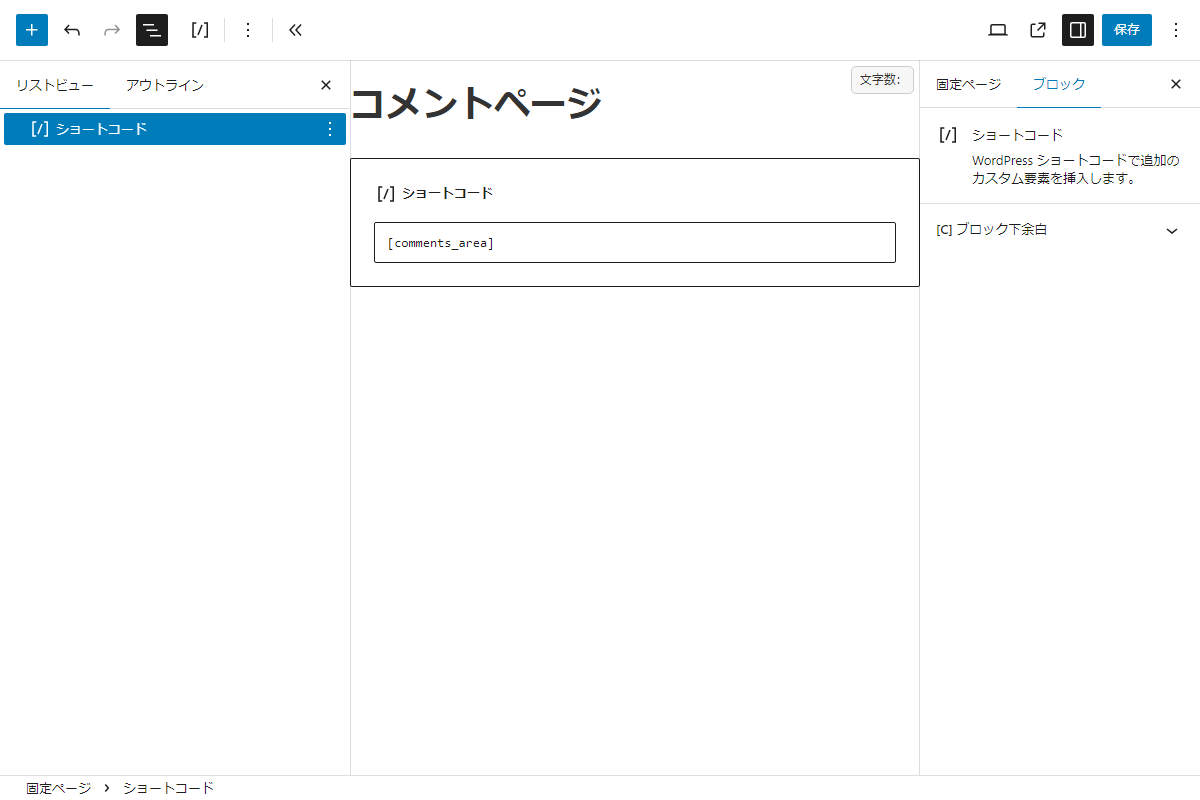
Gutenbegエディター 以下の手順で設定します。
- コメント一覧を表示するための固定ページを作成します。
- 「ショートコード」ブロックを選択し、
[my_comments_area]と入力します。 - ページを保存する際、スラッグを
comment-listに設定します。
- ラベルPHPを追加
以下のコードをfunctions.phpを追加します。
// ショートコードを追加
add_shortcode('my_comments_area', function () {
  if (empty($_GET['post_id'])) {
    return '<p>投稿IDが指定されていません。</p>';
  }

  $post_id = (int) $_GET['post_id'];
  $target_post = get_post($post_id);

  if (!$target_post) {
    return '<p>指定された投稿が存在しません。</p>';
  }

  if (!comments_open($post_id)) {
    return '<p>コメントは許可されていません。</p>';
  }

  global $post;
  $original_post = $post;
  $post = $target_post;
  setup_postdata($post);

  ob_start();
  comments_template();
  $output = ob_get_clean();

  // コメントタイトルを元記事へのリンク付きタイトルに置換
  $post_link = get_permalink($post_id);
  $post_title = get_the_title($post_id);
  $replacement_html = '<h2 id="comments" class="comment-title"><a href="' . esc_url($post_link) . '">' . esc_html($post_title) . '</a></h2>';

  $output = preg_replace(
    '#<h2 id="comments" class="comment-title">.*?</h2>#is',
    $replacement_html,
    $output
  );

  // コメントページネーションURLを固定ページ用URLに置換
  $custom_page_base = home_url('/comment-list/');

  $output = preg_replace_callback(
    '/href=["\']([^"\']*?\/comment-page-(\d+)\/?([^"\']*))["\']/i',
    function ($matches) use ($custom_page_base, $post_id) {
      $page_num = $matches[2];
      $new_url = $custom_page_base . 'comment-page-' . $page_num . '/?post_id=' . $post_id;

      return 'href="' . esc_url($new_url) . '"';
    },
    $output
  );

  $post = $original_post;
  setup_postdata($post);

  return $output;
});


// コメント投稿・返信後のリダイレクト先を固定ページに変更
add_filter('comment_post_redirect', function ($location) {
  if (!empty($_SERVER['HTTP_REFERER'])) {
    $referrer = $_SERVER['HTTP_REFERER'];

    if (strpos($referrer, 'replytocom=') !== false) {
      // 返信完了後のリダイレクト
      $referrer = remove_query_arg('replytocom', $referrer);
    } else {
      // 通常コメント投稿後のリダイレクト
      $referrer = remove_query_arg('comment-page', $referrer);
      $referrer = preg_replace('/comment-page-\d+\//', 'comment-page-1/', $referrer);
    }

    return esc_url_raw($referrer);
  }

  return $location;
});


// コメントへの返信リンク変更
add_filter('comment_reply_link', function ($link, $args, $comment, $post) {
  $custom_page_url = home_url('/comment-list/');
  $comment_id = $comment->comment_ID;

  // 返信先IDとアンカー付きURLを生成
  $custom_url = add_query_arg(
    ['replytocom' => $comment_id],
    $custom_page_url
  );
  $custom_url .= '#respond';

  // リンク先URLをカスタムURLに置換
  $link = preg_replace(
    '/href=["\'](.*?)["\']/',
    'href="' . esc_url($custom_url) . '"',
    $link
  );

  return $link;
}, 10, 4);


// コメント表示順を新しい順に変更
add_filter('comments_clauses', function ($clauses, $query) {
  if (!is_admin()) {
    $clauses['orderby'] = 'comment_date_gmt DESC';
  }

  return $clauses;
}, 10, 2);


// 本文を変更
add_filter('the_content', function ($content) {
  if (is_single() && is_single_comment_visible() && !post_password_required()) {
    $post_id = get_the_ID();
    $comment_count = get_comments_number($post_id);

    $btn = '<a href="' . esc_url(home_url('/comment-list/comment-page-1/')) . '?post_id=' . $post_id . '" class="comment-btn key-btn">コメント(' . $comment_count . '件)</a>';

    $content .= $btn;
  }

  return $content;
});


// Cocoon設定(目次)の目次の表示を変更
add_filter('theme_mod_toc_visible', function ($current_mod) {
  if (
    is_page() &&
    get_post_field('post_name', get_queried_object_id()) === 'comment-list'
  ) {
    $current_mod = false;
  }

  return $current_mod;
});


// テンプレート(投稿ページ)を変更
add_filter('cocoon_part__tmp/single-contents', function ($content, $name, $args) {
  if (!is_single() || !is_single_comment_visible() || post_password_required()) {
    return $content;
  }

  libxml_use_internal_errors(true);

  $dom = new DOMDocument();

  $converted_content = mb_encode_numericentity(
    $content,
    [0x80, 0x10FFFF, 0, ~0],
    'UTF-8'
  );

  $dom->loadHTML(
    $converted_content,
    LIBXML_HTML_NOIMPLIED | LIBXML_HTML_NODEFDTD
  );

  $xpath = new DOMXPath($dom);

  $nodes = $xpath->query('//*[@id="comment-area"]');

  foreach ($nodes as $node) {
    $node->parentNode->removeChild($node);
  }

  $result = $dom->saveHTML();

  libxml_clear_errors();

  return $result;
}, 10, 3);
さいごに
今回紹介した方法を使えば、投稿とコメントの表示を分離し、ユーザーにとって見やすく整理されたコメント閲覧を提供できます。
特に、コメント数が多い場合に効果的です。
