
はじめに
以下を実現します。

完成イメージ
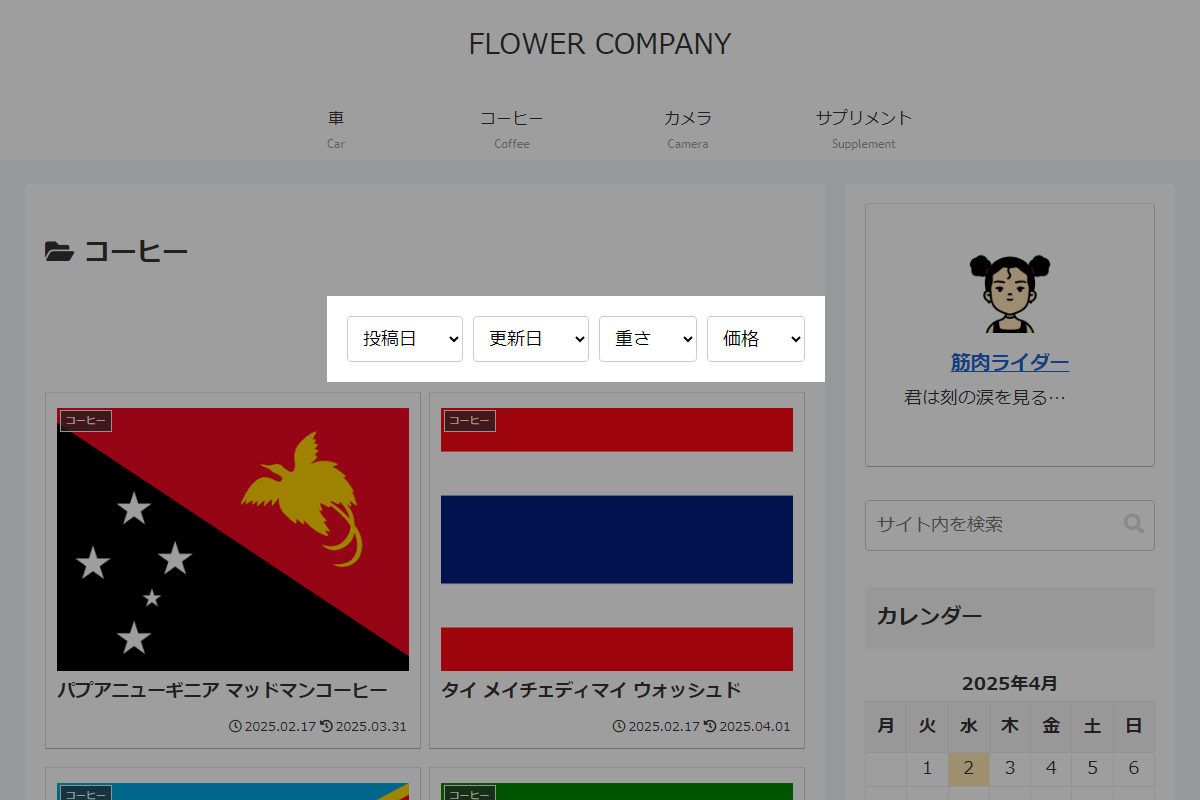
実装手順
以下のコードをfunctions.phpに追加します。
/**
 * 一覧ページの並び替え項目一覧を定義
 * 各要素:[カテゴリー名, 昇順ラベル, 昇順キー, 降順ラベル, 降順キー]
 *
 * @return array 並び替え設定の二次元配列
 */
if (!function_exists('get_custom_sort_options')):
function get_custom_sort_options() {
  return [
    ['投稿日', '古い順', 'ASC_date', '新しい順', 'DESC_date'],
    ['更新日', '古い順', 'ASC_modified', '新しい順', 'DESC_modified'],
    ['重さ', '軽い順', 'ASC_weight', '重い順', 'DESC_weight'],
    ['価格', '安い順', 'ASC_fee', '高い順', 'DESC_fee'],
  ];
}
endif;


// テンプレート(エントリーカード一覧)の直前に追加
add_action('cocoon_part_before__tmp/list-index', function () {
  $sort = get_custom_sort_options();

  $gt = isset($_GET['my-sort']) ? esc_html($_GET['my-sort']) : null;

  ob_start();
  ?>
  <div class="sort">
    <?php for ($i = 0; $i < count($sort); $i++) : ?>
      <div class="sort__item">
        <select class="sort__select" onchange="location.replace(value)">
          <!-- デフォルトのプレースホルダー(カテゴリー名) -->
          <option><?= $sort[$i][0]; ?></option>

          <!-- 昇順の選択肢 -->
          <option value="?my-sort=<?= $sort[$i][2]; ?>" <?php selected($gt, $sort[$i][2]); ?>>
            <?= $sort[$i][1]; ?>
          </option>

          <!-- 降順の選択肢 -->
          <option value="?my-sort=<?= $sort[$i][4]; ?>" <?php selected($gt, $sort[$i][4]); ?>>
            <?= $sort[$i][3]; ?>
          </option>
        </select>
      </div>
    <?php endfor; ?>
  </div>
  <?php
  echo ob_get_clean();
});


// 投稿クエリの取得条件を変更
add_action('pre_get_posts', function ($query) {
  if (is_admin() || !$query->is_main_query()) {
    return;
  }

  $gt = isset($_GET['my-sort']) ? $_GET['my-sort'] : null;

  if (isset($gt)) {
    $gt = explode("_", $gt);

    switch ($gt[1]) {
      case 'weight':
      case 'fee':
        // カスタムフィールド(数値)のメタ値に基づく並び替え設定
        $query->set('order', $gt[0]);
        $query->set('orderby', 'meta_value_num');
        $query->set('meta_key', $gt[1]);
        break;

      case 'date':
      case 'modified':
        // 投稿日または更新日に基づく並び替え設定
        $query->set('order', $gt[0]);
        $query->set('orderby', $gt[1]);
        break;
    }
  }
});


// フロント用JS・CSSを追加
add_action('wp_enqueue_scripts', function () {
  ob_start();
  ?>
  .sort {
    display: flex;
    gap: 10px;
    justify-content: end;
    padding: 30px 0;
  }
  <?php

  $handle = 'custom-sort';

  wp_register_style($handle, false);
  wp_enqueue_style($handle);
  wp_add_inline_style($handle, ob_get_clean());
});
注意点
カスタムフィールドをキーとして並び替え表示する場合、カスタムフィールドがある投稿のみが対象となります。
カスタムフィールドがないエントリーカードは非表示となります。
そのため、表示数が少ない場合、並び替えボタンを選択した際に、ページによっては404エラーが表示されることがあります。
さいごに
今回紹介した方法を使えば、エントリーカードの表示順を簡単に並び替えるボタンを設置できます。
フックを使用して一覧を出力する際にHTMLを追加し、以下を使用してクエリの並びを変更します。
