はじめに
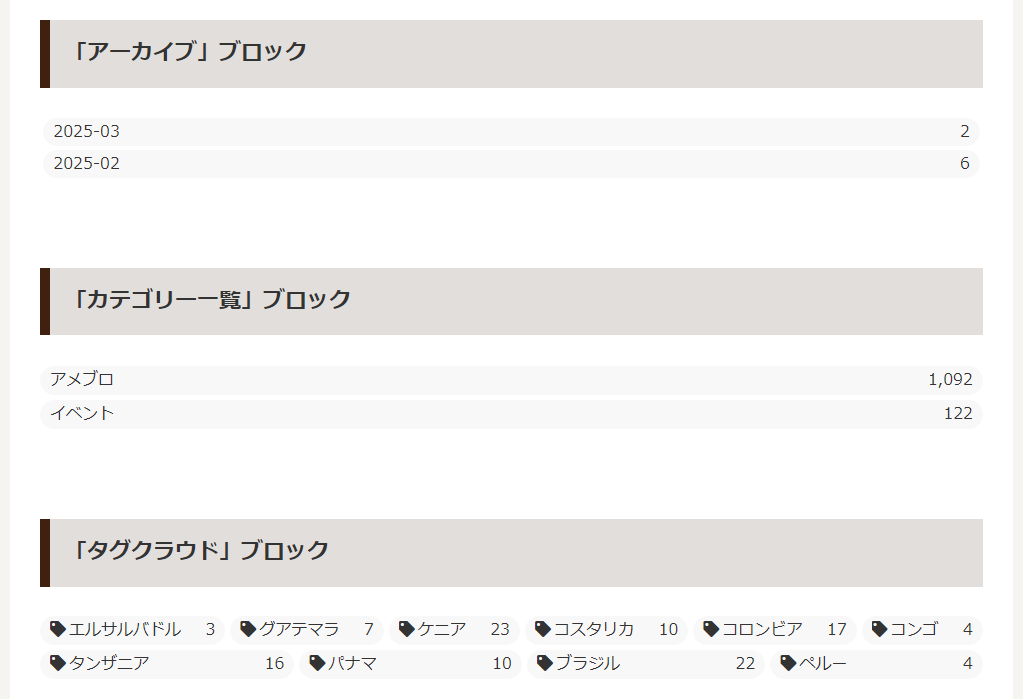
Cocoon 2.8.0での見直しにより、以下のブロックがウィジェットと同様に独自のカスタマイズをやめ、WordPress標準に戻されました。
- アーカイブ
- カテゴリー一覧
- タグクラウド
しかし、その結果、ウィジェットとデザインが異なる状態になっています。
この記事では、デザインを統一する方法について説明します。

完成イメージ
実装手順
以下の手順で実装します。
Gutenbergエディター上での表示は変わりません。
- ラベルPHPを追加
以下のコードをfunctions.phpに追加します。
add_filter('render_block_core/archives', 'remove_post_count_parentheses', 10, 2); add_filter('render_block_core/categories', 'remove_post_count_parentheses', 10, 2); add_filter('render_block_core/tag-cloud', function ($content, $block) { $args = []; if (isset($block['attrs']['showTagCounts'])) { $args['show_count'] = $block['attrs']['showTagCounts']; } $content = wp_tag_cloud_custom($content, $args); return $content; }, 10, 2); - ラベルCSSを追加
以下のコードをstyle.cssに追加します。
body:not(.wp-admin) .wp-block-archives a,
body:not(.wp-admin) .wp-block-categories a,
body:not(.wp-admin) .wp-block-tag-cloud a {
  align-items: center;
  background-color: rgb(204 204 204 / 15%);
  border-radius: 50px;
  color: var(--cocoon-text-color);
  display: flex;
  font-size: 16px;
  justify-content: space-between;
  line-height: 1.8;
  min-width: 0;
  padding: 0 10px;
  text-decoration: none;
  transition: none;
}

.wp-block-archives a:hover,
.wp-block-categories a:hover,
.wp-block-tag-cloud a:hover {
  background-color: var(--hover-color) !important;
}

/* カテゴリー */
.wp-block-categories {
  display: flex;
  flex-direction: column;
  gap: 5px;
  padding: 0;
}

.body .wp-block-categories li {
  margin: 0;
}

.wp-block-categories .children {
  display: flex;
  flex-direction: column;
  gap: 5px;
  list-style: none;
  margin: 5px 0 0;
  padding-left: 20px;
}

/* タグクラウド */
.wp-block-tag-cloud {
  display: flex;
  flex-wrap: wrap;
  gap: 5px;
}

.wp-block-tag-cloud a {
  border: 0;
  border-bottom-left-radius: 0;
  border-top-left-radius: 0;
  flex: 1 1 auto;
  margin: 0;
}

.wp-block-tag-cloud .tag-caption {
  margin: 0;
}

.tag-caption .tax-icon {
  margin: 0 3px 0 0;
}
さいごに
今回紹介した方法を使えば、「アーカイブ」「カテゴリー一覧」「タグクラウド」ブロックのデザインをウィジェットと同じようにカスタマイズできます。
Gutenbergエディターを使ったデザインの統一が可能になり、より柔軟に見た目を調整できます。
なお、「ウィジェット」ブロックは利用頻度が低いため、スキンでは対応していません。