
はじめに
| 設定 | 大項目 | 項目 | 設定値 |
|---|---|---|---|
| アピールエリア | アピールエリアの表示 | ||
| テキストエリア表示 | テキストメッセージエリアを表示する | ||
| タイトル | |||
| メッセージ | |||
| ボタンメッセージ | |||
| ボタンリンク先 |
アピールエリアに表1の項目を、固定ページごとに変更します。
この記事では、この方法について説明します。
実装手順
以下のコードをfunctions.phpに追加します。
/**
 * 現在表示中の固定ページに対応するアピール情報を取得
 *
 * @return array|null アピール情報の配列
 */
if (!function_exists('get_page_appeal_data')):
function get_page_appeal_data() {
  // 固定ページIDとアピール情報の配列
  $page_data = [
    123 => [
      'display' => 'page_only',
      'title'   => '会社概要',
      'message' => '私たち</font>の会社についてはこちら',
      'button'  => '詳しく見る',
      'url'     => 'https://example.com/about',
    ],
    456 => [
      'display' => 'page_only',
      'title'   => 'サービス紹介',
      'message' => '提供中のサービスをご覧ください',
      'button'  => 'サービスへ',
      'url'     => 'https://example.com/service',
    ],
  ];

  if (!is_page()) {
    return null;
  }

  $page_id = get_queried_object_id();
  if (!isset($page_data[$page_id])) {
    return null;
  }

  return $page_data[$page_id];
}
endif;


// Cocoon設定(アピールエリア)のアピールエリアの表示を変更
add_filter('theme_mod_appeal_area_display_type', function ($current_mod) {
  $notice = get_page_appeal_data();

  return $notice['display'] ?? $current_mod;
});


// Cocoon設定(アピールエリア)のタイトルを変更
add_filter('theme_mod_appeal_area_title', function ($current_mod) {
  $notice = get_page_appeal_data();

  return $notice['title'] ?? $current_mod;
});


// Cocoon設定(アピールエリア)のメッセージを変更
add_filter('theme_mod_appeal_area_message', function ($current_mod) {
  $notice = get_page_appeal_data();

  return $notice['message'] ?? $current_mod;
});


// Cocoon設定(アピールエリア)のボタンメッセージを変更
add_filter('theme_mod_appeal_area_button_message', function ($current_mod) {
  $notice = get_page_appeal_data();

  return $notice['button'] ?? $current_mod;
});


// Cocoon設定(アピールエリア)のボタンリンク先を変更
add_filter('theme_mod_appeal_area_button_url', function ($current_mod) {
  $notice = get_page_appeal_data();

  return $notice['url'] ?? $current_mod;
});
拡張:固定ページ用アピールエリアの独自メタボックスを追加する方法
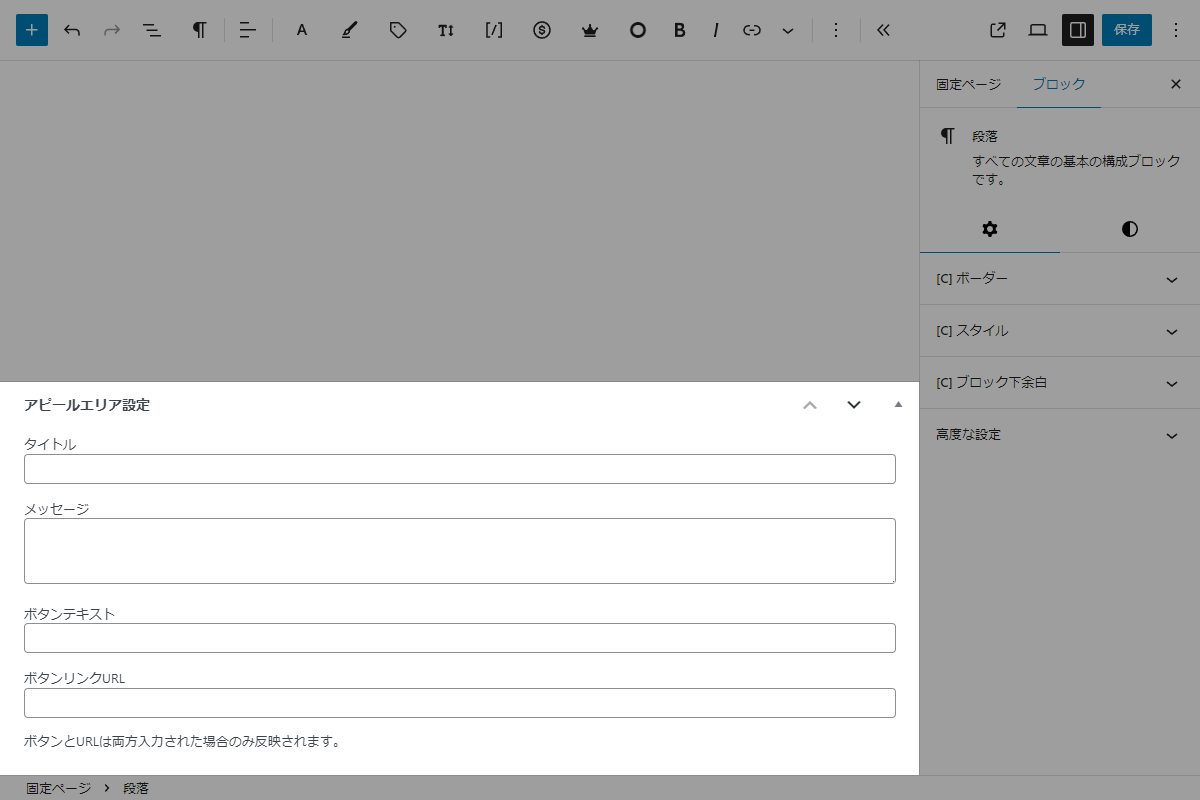
固定ページに独自のメタボックスを追加し、アピールエリア用のタイトル、メッセージ、ボタン、リンクなどの情報を設定します。
完成イメージ
実装手順
以下のコードをfunctions.phpに追加します。
// メタボックスを追加
add_action('add_meta_boxes', function () {
  add_meta_box(
    'appeal_area',
    'アピールエリア設定',
    'render_appeal_area',
    'page',
    'normal',
    'default'
  );
});


/**
 * メタボックスの入力フォームを出力
 *
 * @param WP_Post $post 投稿オブジェクト
 * @return void
 */
if (!function_exists('render_appeal_area')):
function render_appeal_area($post) {
  $options = get_appeal_area_options();

  wp_nonce_field('appeal_area_action', 'appeal_area_nonce');
  ?>
  <?php foreach ($options as $meta_key => $conf): ?>
    <?php
    $value = get_post_meta($post->ID, $meta_key, true) ?? '';
    ?>
    <p>
      <label for="<?= esc_attr($meta_key); ?>"><?= esc_html($conf['label']); ?></label><br>
      <?php if ($conf['type'] === 'textarea'): ?>
        <textarea name="<?= esc_attr($meta_key); ?>" id="<?= esc_attr($meta_key); ?>" class="widefat" rows="<?= esc_attr($conf['rows']); ?>"><?= esc_textarea($value); ?></textarea>
      <?php else: ?>
        <input type="<?= esc_attr($conf['type']); ?>" name="<?= esc_attr($meta_key); ?>" id="<?= esc_attr($meta_key); ?>" value="<?= esc_attr($value); ?>" class="widefat">
      <?php endif; ?>
    </p>
  <?php endforeach; ?>
  <p>ボタンとURLは両方入力された場合のみ反映されます。</p>
  <?php
}
endif;


/**
 * カスタムフィールド定義を管理
 *
 * @return array フィールド定義設定の配列
 */
if (!function_exists('get_appeal_area_options')):
function get_appeal_area_options() {
  return [
    'my_appeal_area_title' => [
      'label'    => 'タイトル',
      'type'     => 'text',
      'sanitize' => 'sanitize_text_field',
    ],
    'my_appeal_area_message' => [
      'label'    => 'メッセージ',
      'type'     => 'textarea',
      'rows'     => 3,
      'sanitize' => 'sanitize_textarea_field',
    ],
    'my_appeal_area_button' => [
      'label'    => 'ボタンテキスト',
      'type'     => 'text',
      'sanitize' => 'sanitize_text_field',
    ],
    'my_appeal_area_url' => [
      'label'    => 'ボタンリンクURL',
      'type'     => 'url',
      'sanitize' => 'esc_url_raw',
    ],
  ];
}
endif;


/**
 * カスタムフィールド情報を取得
 *
 * @return array|null カスタムフィールド情報の配列
 */
if (!function_exists('get_page_appeal_area_data')):
function get_page_appeal_area_data() {
  if (!is_page()) {
    return null;
  }

  $page_id = get_queried_object_id();
  $options = get_appeal_area_options();
  $data    = [];

  foreach ($options as $meta_key => $conf) {
    $data[$meta_key] = get_post_meta($page_id, $meta_key, true) ?? '';
  }

  // 固定ページに設定がある場合
  if ($data['my_appeal_area_title'] !== '' || $data['my_appeal_area_message'] !== '' || ($data['my_appeal_area_button'] !== '' && $data['my_appeal_area_url'] !== '')) {
    $data['display'] = 'page_only';
  }

  return $data;
}
endif;


// 投稿データを保存
add_action('save_post_page', function ($post_id) {
  // nonceチェック
  if (!isset($_POST['appeal_area_nonce']) || !wp_verify_nonce($_POST['appeal_area_nonce'], 'appeal_area_action')) {
    return;
  }

  // 自動保存チェック
  if (defined('DOING_AUTOSAVE') && DOING_AUTOSAVE) {
    return;
  }

  // リビジョンは除外
  if (wp_is_post_revision($post_id)) {
    return;
  }

  // 権限チェック
  if (!current_user_can('edit_page', $post_id)) {
    return;
  }

  $options = get_appeal_area_options();

  foreach ($options as $meta_key => $conf) {
    if (!isset($_POST[$meta_key])) {
      continue;
    }

    $raw_value     = $_POST[$meta_key];
    $sanitize_func = $conf['sanitize'];

    $value = function_exists($sanitize_func) ? $sanitize_func($raw_value) : sanitize_text_field($raw_value);

    update_post_meta($post_id, $meta_key, $value);
  }
});


// Cocoon設定(アピールエリア)の表示を変更
add_filter('theme_mod_appeal_area_display_type', function ($current_mod) {
  $data = get_page_appeal_area_data();

  return (!empty($data['display'])) ? $data['display'] : $current_mod;
});


// Cocoon設定(アピールエリア)のタイトルを変更
add_filter('theme_mod_appeal_area_title', function ($current_mod) {
  $data = get_page_appeal_area_data();

  return (!empty($data['display'])) ? $data['my_appeal_area_title'] : $current_mod;
});


// Cocoon設定(アピールエリア)のメッセージを変更
add_filter('theme_mod_appeal_area_message', function ($current_mod) {
  $data = get_page_appeal_area_data();

  return (!empty($data['display'])) ? $data['my_appeal_area_message'] : $current_mod;
});


// Cocoon設定(アピールエリア)のボタンメッセージを変更
add_filter('theme_mod_appeal_area_button_message', function ($current_mod) {
  $data = get_page_appeal_area_data();

  return (!empty($data['display'])) ? $data['my_appeal_area_button'] : $current_mod;
});


// Cocoon設定(アピールエリア)のボタンリンク先を変更
add_filter('theme_mod_appeal_area_button_url', function ($current_mod) {
  $data = get_page_appeal_area_data();

  return (!empty($data['display'])) ? $data['my_appeal_area_url'] : $current_mod;
});
さいごに
今回紹介した方法を使えば、固定ページごとにアピールエリアの情報を簡単に切り替えることができます。
特定の固定ページに合わせた誘導リンクを設置したい場合に、ぜひ活用してください。