
はじめに
以下をCocoonで実現します。

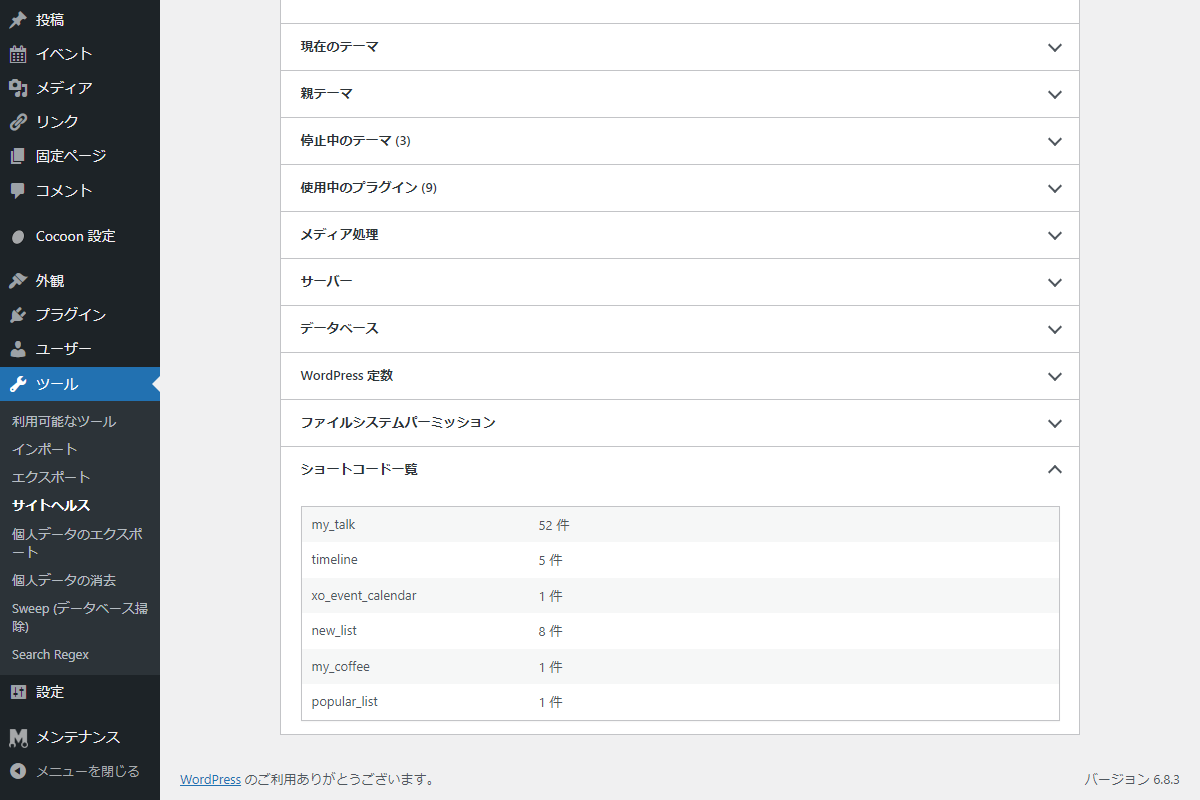
ツール→サイトヘルスに投稿や固定ページの本文で使われているショートコードの一覧を表示します。
完成イメージ
実装手順
以下のコードをfunctions.phpに追加します。
// サイトヘルスのデバッグ情報に追加
add_filter('debug_information', function ($args) {
  $counts = get_shortcode_counts_for_debug();

  if (empty($counts)) {
    return $args;
  }

  $fields = [];
  foreach ($counts as $shortcode => $count) {
    $fields[$shortcode] = [
      'label' => $shortcode,
      'value' => $count . ' 件',
    ];
  }

  $args['shortcode_counts'] = [
    'label'  => 'ショートコード一覧',
    'fields' => $fields,
  ];

  return $args;
});


/**
 * 投稿・固定ページの本文からショートコードの出現件数を取得
 *
 * @return array ショートコード名をキー、出現件数を値とした連想配列
 */
if (!function_exists('get_shortcode_counts_for_debug')):
function get_shortcode_counts_for_debug() {
  global $wpdb;

  // 公開済みの投稿と固定ページの本文を取得
  $results = $wpdb->get_col("
    SELECT post_content
    FROM {$wpdb->posts}
    WHERE post_status = 'publish'
      AND post_type IN ('post', 'page')
  ");

  if (empty($results)) {
    return [];
  }

  $shortcode_counts = [];

  // WordPress標準のショートコード正規表現
  $pattern = get_shortcode_regex();

  foreach ($results as $content) {
    // 空または文字列でない場合は除外
    if (!is_string($content) || $content === '') {
      continue;
    }

    // ショートコードが含まれていない場合は処理対象外
    if (!preg_match_all('/' . $pattern . '/s', $content, $matches)) {
      continue;
    }

    foreach ($matches[0] as $index => $full_match) {
      $shortcode_name = $matches[2][$index];

      // [[shortcode]] のようなエスケープされたショートコードは処理対象外
      if (str_starts_with($full_match, '[[') && str_ends_with($full_match, ']]')) {
        continue;
      }

      // ショートコードの使用件数を設定
      $shortcode_counts[$shortcode_name] = ($shortcode_counts[$shortcode_name] ?? 0) + 1;
    }
  }

  return $shortcode_counts;
}
endif;
さいごに
今回紹介した方法を使えば、サイトヘルス画面に本文内で使われているショートコードの一覧と件数を簡単に表示できます。
これにより、使用中のショートコードを把握して管理しやすくなり、サイトのメンテナンス性が向上します。

