等高線からサーフェイスを作る
2019年3月6日
はじめに
等高線からサーフェイスを作りたい。要するに地形データがサーフェイスとして欲しい。ParaView でコンター図を盛り上げることができて、それを STL ファイルで書き出せるので、これが使えるのではないか? そのためには、等高線から高さ分布のコンター図を作る必要がある。
いるもの
- Anaconda 3
- ParaView
- GIMP や Blender
等高線からサーフェイスを作る
次のような線図 (lines.png) があるとする。
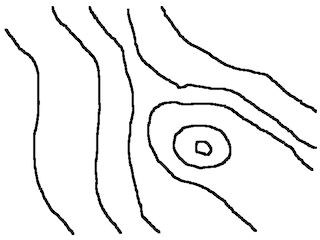
本当の等高線図だとこんなに単純なものではないが、GIMP かなにかで必要な線だけ取り出してこんな感じにするものとする。
VTK に変換する
Python で読み込む。
from PIL import Image
image = Image.open("lines.png")
image = image.convert("1")
2値化している。必要に応じてサイズも調整する。
w, h = image.size
image = image.resize((w*0.5, h*0.5), Image.LANCZOS)
線を lines として取り出す。
import sys
sys.setrecursionlimit(10000)

def search_line(image, x, y, flag, line):
    w, h = image.size

    if x < 0 or y < 0 or x >= w or y >= h:
        return

    if flag[x, y]:
        return

    flag[x, y] = True

    if image.getpixel((x, y)) != 0:
        return

    line.append((x, y))

    # 上を探索
    search_line(image, x, y-1, flag, line)
    # 左上
    search_line(image, x-1, y-1, flag, line)
    # 左
    search_line(image, x-1, y, flag, line)
    # 左下
    search_line(image, x-1, y-1, flag, line)
    # 下
    search_line(image, x, y+1, flag, line)
    # 右下
    search_line(image, x+1, y+1, flag, line)
    # 右
    search_line(image, x+1, y, flag, line)

w, h = image.size
flag = np.zeros((w, h), dtype=bool)
lines = []

for x in range(w):
    for y in range(h):
        if not flag[x, y]:
            c = image.getpixel((x, y))
            if c == 0:
                line = []
                search_line(image, x, y, flag, line)
                lines.append(line)
黒をたどって行けるところまで探索している。単純に再帰で実装しており、再帰が深くなるので再帰の最大数を大きく設定している。あまり画像が大きいと再帰が深すぎて Python がエラーで止まるか、落ちる。
線を構成する点を CSV として書き出す。
i = 0
with open("contour.csv", "w") as f:
    f.write("x,y,c\n")
    flag = np.zeros((w, h), dtype=bool)
    for line in lines:
        for p in line:
            x, y = p
            f.write("{},{},{}\n".format(x, w-y, i))
        i += 1
こちら を参考にしてサーフェイスを作ればよい。csvToVTK.py で CSV を VTK に変換する。
csvToVTK.py
# csvToVtk

import sys
import os

def main():
    if len(sys.argv) < 2:
        print("csvToVtk ")
        sys.exit()

    # input
    filename = sys.argv[1]

    with open(filename, "r") as f:
        f.readline()

        x = []
        y = []
        value = []

        for line0 in f:
            line = line0[0:len(line0)-1]
            item = line.split(",")
            x.append(item[0])
            y.append(item[1])
            value.append(item[2])

    # output
    basename = os.path.splitext(filename)[0]

    with open(basename + ".vtk", "w") as f:
        f.write("# vtk DataFile Version 2.0\n")
        f.write(basename + "\n")
        f.write("ASCII\n")
        f.write("DATASET UNSTRUCTURED_GRID\n")

        f.write("POINTS %d float\n" % len(x))

        num = len(x)

        for i in range(0, num):
            f.write(x[i] + " " + y[i] + " 0\n")

        f.write("CELLS %d %d\n" % (num, 2*num))

        for i in range(0, num):
            f.write("1 %d\n" % i)

        f.write("CELL_TYPES %d\n" % num)

        for i in range(0, num):
            f.write("1\n")

        f.write("POINT_DATA %d\n" % num)
        f.write("SCALARS point_scalars float\n")
        f.write("LOOKUP_TABLE default\n")

        for i in range(0, num):
            f.write(value[i] + "\n")

if __name__ == "__main__":
    main()
$ python csvToVTK.py contour.csv
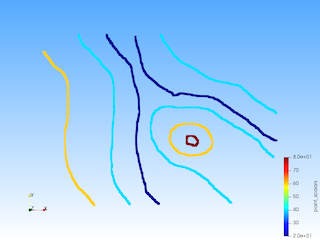
ParaView で VTK ファイルを開く。

ここでは線 (正確には線を表す点の集合) の値は、lines に入っている順番に割り振った ID である。これをもとにそれぞれの線に高さ情報を割り当てていく (いっぱいあるとめんどくさいが)。
id_map = {
    0 : 60,
    1 : 40,
    2 : 20,
    3 : 20,
    4 : 40,
    5 : 40,
    6 : 60,
    7 : 80,
}

i = 0
with open("contour2.csv", "w") as f:
    f.write("x,y,c\n")
    flag = np.zeros((w, h), dtype=bool)
    for line in lines:
        for p in line:
            x, y = p
            f.write("{},{},{}\n".format(x, w-y, id_map[i]))
        i += 1
サーフェイスの作成
ParaView のフィルター Delaunay 2D を適用して、面を作る。
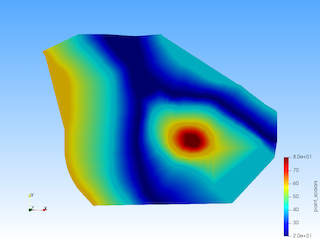
これだと端が切れたようになるので、情報を足す。
boundary_point = [
    (0, 0, 60),
    (640, 0, 40),
    (0, 240, 60),
    (640, 240, 40),
    (0, 480, 60),
    (640, 480, 40)
]

i = 0
with open("contour2_2.csv", "w") as f:
    f.write("x,y,c\n")
    flag = np.zeros((w, h), dtype=bool)
    for line in lines:
        for p in line:
            x, y = p
            f.write("{},{},{}\n".format(x, w-y, id_map[i]))
        i += 1
    for p in boundary_point:
        x, y, c = p
        f.write("{},{},{}\n".format(x, w-y, c))

最初の線図の時点で周囲に点をいくつか置いておくとよいかもしれない。
フィルター Wrap By Scalar で盛り上げる。
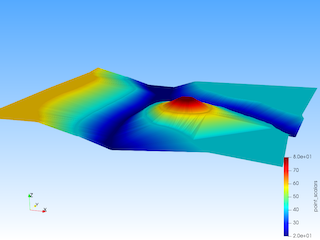
これを STL で書き出せばよい。領域を拡張したい場合は、Blender で編集してやればよい。