領域分割
2015年1月27日
使用バージョン
OpenFOAM 2.3.1
はじめに
OpenFOAM で並列計算を行う際の領域分割について。
領域分割
例として interFoam のチュートリアルケース damBreak を使用する。
$ cp -r $FOAM_TUTORIALS/multiphase/interFoam/laminar/damBreak/ .
$ cd damBreak
$ blockMesh
領域分割は decomposePar で行う。
$ decomposePar
領域分割されたデータが格納された processor* ディレクトリが分割数分だけ作成される。processor* ディレクトリがある状態では decomposePar は実行できない。その場合は processor* ディレクトリを削除するか、オプション "-force" を付けて強制的に実行する。
設定は system/decomposeParDict で行う。
decomposeParDict
FoamFile
{
    version     2.0;
    format      ascii;
    class       dictionary;
    location    "system";
    object      decomposeParDict;
}

numberOfSubdomains 4;

method          simple;

simpleCoeffs
{
    n               ( 2 2 1 );
    delta           0.001;
}

distributed     no;

roots           ( );
method で領域分割の手法を選択し、"
- hierarchical
- manual
- multiLevel
- scotch
- simple
- structured
- none
"metis" も設定できるようになっているが、ライブラリを用意する必要がある。
領域分割の確認
領域分割を確認するには、function objects の processorField を用いる。
system/controlDict
libs
(
    "libfieldFunctionObjects.so"
);

functions
{
    func
    {
        type processorField;
        outputControl outputTime;
        outputInterval 1;
    }
}
ソルバーを実行してもよいが、領域分割を確認したいだけなので、execFlowFunctionObjects を実行する。
$ mpirun -np 4 execFlowFunctionObjects -noFlow -parallel
processor 番号で領域を分けられたフィールドファイルが得られるので、ParaView で分割を確認することができる。
分割手法
scotch
numberOfSubdomains 4;

method          scotch;

特に設定は必要なく、もっとも使いやすい。
設定で各領域に重みを指定することができる。
scotchCoeffs
{
    processorWeights
    (
        2
        1
        1
        1
    );
}

simple
numberOfSubdomains 4;

method          simple;

simpleCoeffs
{
    n               ( 2 2 1 );
    delta           0.001;
}
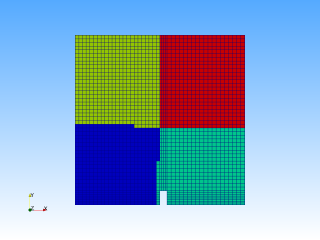
xyz 方向に分割するもので、分かりやすい。場合によっては scotch による分割よりも計算が速くなったり安定化したりする。
設定では、n で xyz それぞれの分割数を指定する。上記の例では、x 方向 2 分割、y 方向 2 分割の 4 分割を指定している。
hierarchical
numberOfSubdomains 4;

method          hierarchical;

hierarchicalCoeffs
{
    n               ( 2 2 1 );
    delta           0.001;
    order           xyz;
}

設定の n は simple と同じ。order で xyz の分割の順番を決めているっぽい。
manual
numberOfSubdomains 4;

method          manual;

manualCoeffs
{
    dataFile        "cellDecomposition";
}
分割の仕方を自分で決めることができる。設定の dataFile で分割方法を示すデータを入れたファイルを指定する (constant の中にあることが想定されている)。このファイルの例は、decomposePar をオプション "-cellDist" を付けて実行すれば得られる。
constant/cellDecomposition
FoamFile
{
    version     2.0;
    format      ascii;
    class       labelList;
    location    "constant";
    object      cellDecomposition;
}

2268
(
0
0
0
0
0

...

3
3
3
3
3
)
数字はセルごとの processor 番号を表している。
たとえば、scotch で作った cellDecomposition を使って manual で分割を行うと、当然 scotch と同じ分割が得られる。
multiLevel
numberOfSubdomains 4;

method          multiLevel;

multiLevelCoeffs
{
    level0
    {
        numberOfSubdomains  2;
        method simple;
        simpleCoeffs
        {
            n           (2 1 1);
            delta       0.001;
        }
    }
    level1
    {
        numberOfSubdomains  2;
        method scotch;
    }
}

多段階でさまざまな手法で分割を行うものらしい。
structure
numberOfSubdomains 4;

method            structured;

structuredCoeffs
{
    // Patches to do 2D decomposition on. Structured mesh only; cells have
    // to be in 'columns' on top of patches.
    patches     (atmosphere);

    // Method to use on the 2D subset
    method      scotch;
}
指定したパッチに沿ってきれいに分割するものらしい。たとえば、damBreak の例では、パッチに "atmosphere" (上面) を指定した場合はつぎのようになる。
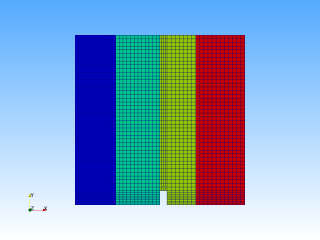
パッチ "leftWall" (左側面) の場合はつぎのようになる。

none
numberOfSubdomains 4;

method            none;
processor* ディレクトリは作成するが、分割は行わず、データはすべて processor0 に格納される。
面の分割を避ける設定
preservePatches で指定したパッチは、owner と neighbour を同じ領域内に入れてくれるらしい。cyclic 面で用いる。
//- Keep owner and neighbour on same processor for faces in patches:
//  (makes sense only for cyclic patches)
preservePatches (internal-wall internal-wall-shadow);
他にも似たような設定があるらしい。
//- Keep owner and neighbour on same processor for faces in zones:
preserveFaceZones (heater solid1 solid3);

//- Keep all of faceSet on a single processor. This puts all cells
//  connected with a point, edge or face on the same processor.
//  (just having face connected cells might not guarantee a balanced
//  decomposition)
// The processor can be -1 (the decompositionMethod chooses the processor
// for a good load balance) or explicitly provided (upsets balance).
singleProcessorFaceSets ((f0 -1));


//- Keep owner and neighbour of baffles on same processor (i.e. keep it
//  detectable as a baffle). Baffles are two boundary face sharing the
//  same points.
preserveBaffles true;
参考
- $FOAM_UTILS/parallelProcessing/decomposePar/decomposeParDict
- manualキーワードでのdecomposeParによる分割 (OpenFOAM Google グループ)