FiPy を使う
2017年8月8日
はじめに
Python の有限体積法モジュール FiPy を使ってみる。
動機
FLUENT や OpenFOAM に物理モデルを組み込むときに、もっと単純な環境で作り込んでから実装に移れたらよいのにと思ったのだが、そのために自分でソルバーを実装するのもそれはそれでめんどうだし、適当なものはないかと探してみたら、これにたどり着いた。
利用環境
- FiPy 3.1.3
- Ubuntu 14.04 LTS
- Anaconda (Python 3.x)
FiPy 自体は Python 2.x で動く。
セットアップ
ここ のおすすめ (Recommended Method) にあるように、conda で FiPy 用環境を作って Python 2.x ごとインストールしたほうがよい。
$ conda create --name MYFIPYENV --channel guyer --channel conda-forge fipy
使うときは以下のようにする。
$ source activate MYFIPYENV
使い終わったら以下のようにする。
$ source deactivate
熱伝導計算
2D の熱伝導計算 (というか拡散計算) は、次のように書ける。
heat.py
#!/bin/env python

from fipy import Grid2D, CellVariable, Viewer
from fipy import DiffusionTerm

nx = 100
ny = 1
L = 1.
dx = L/nx
dy = L/ny

mesh = Grid2D(dx=dx, dy=dy, nx=nx, ny=ny)
phi = CellVariable(name='phi', mesh=mesh, value=0.)

D = 1.
phi1 = 500.
phi2 = 300.

phi.constrain(phi1, mesh.facesLeft)
phi.constrain(phi2, mesh.facesRight)

eq = DiffusionTerm(coeff=D) == 0

eq.solve(var=phi)

viewer = Viewer(vars=phi)
viewer.plot()
raw_input('Press <return>')
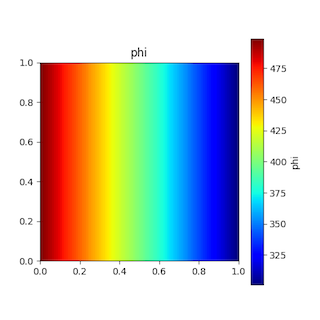
Grid2D() でメッシュを作成、CellVariable() で変数 phi を定義。phi.constrain() で境界条件を設定。DiffusionTerm() を使って方程式 eq を定義し、eq.solve() で方程式を解く。Viewer() で phi の分布を描画する。plot() の後に raw_input() を入れないとコードが終わってしまい、分布を見れない。
見ての通り、OpenFOAM よりもずっと単純である。
変数の値を変更する
拡散係数に分布を持たせてみたい。その前に、変数の値を変更する方法を確認しておく。
set_value.py
#!/bin/env python

from fipy import Grid2D, CellVariable, Viewer
from fipy import DiffusionTerm

nx = 100
ny = 1
L = 1.
dx = L/nx
dy = L/ny

mesh = Grid2D(dx=dx, dy=dy, nx=nx, ny=ny)
phi = CellVariable(name='phi', mesh=mesh, value=0.)

phi1 = 500.
phi2 = 300.

X, Y = mesh.cellCenters
for i in xrange(phi.value.size):
    if X[i] < L/2.:
        phi[i] = phi1
    else:
        phi[i] = phi2

viewer = Viewer(vars=phi)
viewer.plot()
raw_input('Press <return>')
"phi[i]" といった形で変数のセルの値にアクセスできる。mesh.cellCenters でメッシュのセル中心座標が得られるので、位置によって変数の値を変えることができる。
拡散係数 D の値に分布を持たせてみよう。
heat2.py
#!/bin/env python

from fipy import Grid2D, CellVariable, Viewer
from fipy import DiffusionTerm

nx = 100
ny = 1
L = 1.
dx = L/nx
dy = L/ny

mesh = Grid2D(dx=dx, dy=dy, nx=nx, ny=ny)
phi = CellVariable(name='phi', mesh=mesh, value=0.)
D = CellVariable(name='D', mesh=mesh, value=0.)

D1 = 1.
D2 = 2.

X, Y = mesh.cellCenters
for i in xrange(D.value.size):
    if X[i] < L/2.:
        D[i] = D1
    else:
        D[i] = D2

phi1 = 500.
phi2 = 300.

phi.constrain(phi1, mesh.facesLeft)
phi.constrain(phi2, mesh.facesRight)

eq = DiffusionTerm(coeff=D) == 0

eq.solve(var=phi)

viewer = Viewer(vars=phi)
viewer.plot()
raw_input('Press <return>')
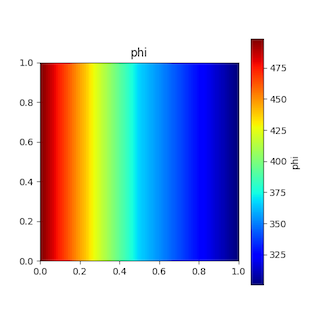
D をセル変数にし、場所によって値を変えている。それ以外は定数の場合と同じである。
セル界面の拡散係数の補間に調和平均を使いたい場合は、次のようにする。
eq = DiffusionTerm(coeff=D.harmonicFaceValue) == 0
自分でセル界面の計算をすることもできる。たとえば、拡散係数 D1 と D2 の領域の界面で熱伝達係数を設定したい場合は、次のように書ける。
h = 1.
faceValue = D.faceValue
for i in xrange(faceValue.value.size):
    if faceValue[i] < D1 and faceValue[i] > D2:
        faceValue[i] = h*dx

...

eq = DiffusionTerm(coeff=faceValue) == 0
対流
対流を考慮してみる。
heat3.py
#!/bin/env python

from fipy import Grid2D, CellVariable, Viewer
from fipy import DiffusionTerm, UpwindConvectionTerm

nx = 100
ny = 1
L = 1.
dx = L/nx
dy = L/ny

mesh = Grid2D(dx=dx, dy=dy, nx=nx, ny=ny)
phi = CellVariable(name='phi', mesh=mesh, value=0.)

D = 1.
U = (3., 0.)
phi1 = 500.
phi2 = 300.

phi.constrain(phi1, mesh.facesLeft)
phi.constrain(phi2, mesh.facesRight)

eq = UpwindConvectionTerm(coeff=U) == DiffusionTerm(coeff=D)

eq.solve(var=phi)

viewer = Viewer(vars=phi)
viewer.plot()
raw_input('Press <return>')
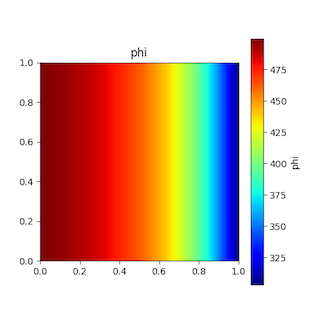
UpwindConvectionTerm() で方程式に対流項を入れただけである。
非定常計算
非定常計算を行うには、TransientTerm() で方程式に非定常項を入れる。
heat4.py
#!/bin/env python

from fipy import Grid2D, CellVariable, Viewer
from fipy import DiffusionTerm, UpwindConvectionTerm, TransientTerm

nx = 100
ny = 100
L = 1.
dx = L/nx
dy = L/ny

mesh = Grid2D(dx=dx, dy=dy, nx=nx, ny=ny)
phi = CellVariable(name='phi', mesh=mesh, value=300.)

D = 1.
U = (0., 1.)
phi1 = 500.
phi2 = 300.

phi.constrain(phi1, mesh.facesLeft)
phi.constrain(phi2, mesh.facesRight)

eq = TransientTerm() + UpwindConvectionTerm(coeff=U) == DiffusionTerm(coeff=D)

viewer = Viewer(vars=phi)

steps = 10
dt = 0.1
for step in range(1, steps+1):
    print('step = %d' % step)
    eq.solve(var=phi, dt=dt)
    viewer.plot()
    raw_input('Press <return>')

固体・流体熱伝導
固体・流体熱伝導計算は、つぎのように書ける。
heat5.py
#!/bin/env python

from fipy import Grid2D, CellVariable, Viewer
from fipy import DiffusionTerm, UpwindConvectionTerm, TransientTerm
from time import sleep

nx = 100
ny = 100
L = 1.
dx = L/nx
dy = L/ny

mesh = Grid2D(dx=dx, dy=dy, nx=nx, ny=ny)
phi = CellVariable(name='phi', mesh=mesh, value=300.)
D = CellVariable(name='D', mesh=mesh, value=0.)
U = CellVariable(name='U', mesh=mesh, value=(0., 0.))

D1 = 1.
D2 = 0.01
U1 = (0., 0.)
U2 = (0., 0.01)
phi1 = 500.
phi2 = 300.

X, Y = mesh.cellCenters
for i in xrange(phi.value.size):
    if X[i] < L/2.:
        D[i] = D1
        U[0, i], U[1, i] = U1
        phi[i] = phi1
    else:
        D[i] = D2
        U[0, i], U[1, i] = U2
        phi[i] = phi2

X, Y = mesh.faceCenters
phi.constrain(phi1, mesh.facesBottom & (X < L/2.))
phi.constrain(phi2, mesh.facesBottom & (X >= L/2.))

eq = TransientTerm() + UpwindConvectionTerm(coeff=U) == DiffusionTerm(coeff=D)

viewer = Viewer(vars=phi, datamin=phi2, datamax=phi1)

viewer.plot()

steps = 10
dt = 0.1
for step in range(1, steps+1):
    print('step = %d, time = %g' % (step, dt*step))
    eq.solve(var=phi, dt=dt)
    viewer.plot()
    sleep(0.1)

raw_input('Press <return>')

固体に相当するところは速度を 0 に設定している。
密度の考慮
密度まで考慮した方程式を表すには、つぎのようにすればよい。
rho = CellVariable(name='rho', mesh=mesh, value=1.)
...
eq = TransientTerm(coeff=rho) + UpwindConvectionTerm(coeff=rho*U) == DiffusionTerm(coeff=D)
メッシュ情報
セルやセルフェイスを巡回するには、つぎのようにする。
X, Y = mesh.cellCenters  # セル中心座標
Xf, Yf = mesh.faceCenters  # フェイス中心座標

for i in xrange(phi.value.size):
    cellFaceIDs = mesh.cellFaceIDs[:, i]  # セルフェイス ID

    for j in xrange(cellFaceIDs.size):
        f = cellFaceIDs[j]
        x, y = Xf[f], Yf[f]
        ...
        if mesh.faceCellIDs[1][f]:
            c1, c2 = mesh.faceCellIDs[:, f]  # フェイスセル ID
            if c1 == i:
                cn = c2
            else:
                cn = c1
            ...
境界条件
メッシュ底面の x < 0.5 の範囲に境界条件を与えたい場合は、つぎのようにする。
Xf, Yf = mesh.faceCenters
phi.constrain(phi1, mesh.facesBottom & (Xf <= 0.5))
画像の保存
分布図を画像に保存するには、plot() でファイル名を指定すればよい。
viewer.plot('fig.png')