Dakota の流体解析への適用
2015年11月3日
はじめに
Dakota を流体解析の問題に適用してみる。
バージョン
Dakota 6.2 Windows 版, Code_Saturne 4.0 Windows 版
ファイル
問題
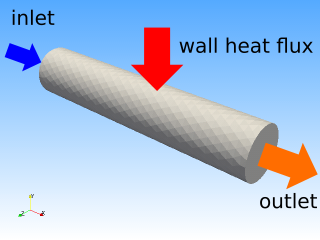
- 径 0.2 m、長さ 1 m の配管
- inlet : 0.1 m/s、300 K
上記の系で、出口の平均温度が 600 K となるような壁面熱流束を求めたい。
解き方
壁面熱流束を与えたら出口平均温度を計算して目標温度との差をとって返す関数があると考えて、それの絶対値に対して最小化を行う。最小化には conmin_frcg を用いる。Dakota の入力ファイルは以下のようになる。
pipe.in
environment

method
  conmin_frcg
    max_iterations = 10
    convergence_tolerance = 1e-6

model
  single

variables
  continuous_design = 1
    initial_point     1.0
    lower_bounds      0.0
    upper_bounds      10.0
    descriptors       'x'

interface
  system
    analysis_driver = 'run.py'
    parameters_file = 'params.in'
    results_file = 'results.out'

responses
  objective_functions = 1
  numerical_gradients
    method_source dakota
    interval_type forward
    fd_gradient_step_size = 1e-3
  no_hessians
ここで、壁面熱流束は Dakota の入力値を 1000 倍して与えるものとしている。つまり、実際の熱流束の範囲は 0~10,000 で、初期値は 1,000 である。Code_Saturne の熱流束は負が加熱のようだが、Dakota からは正の値を与えるようにしている。"fd_gradient_step_size" を適切に指定しないとうまくいかない。
問題は、「壁面熱流束を与えたら出口平均温度を計算して目標温度との差をとって返す」関数である。
import subprocess
import re
import os
import xml.etree.ElementTree as ET
import time


def run(x):
    def create_case_file(x):
        tree = ET.parse('case1.xml')
        root = tree.getroot()

        for child in root.find('boundary_conditions'):
            if (child.tag, child.attrib) == ('wall', {'label' : 'BC_3'}):
                bc3 = child
                scalar = bc3.find('scalar')
                neumann = scalar.find('neumann')
                neumann.text = str(x)

        tree.write('run.xml')

    def run_code_saturne():
        command = "code_saturne run --param run.xml"
        p = subprocess.Popen(command, stdout=subprocess.PIPE,
                stderr=subprocess.PIPE)

        stdout, stderr = p.communicate()
        lines = stdout.split("\n")

        found = False
        for l in lines:
            if found:
                resultDir = l.lstrip().rstrip()
                break
            if re.search('Result directory:', l):
                found = True

        resultFile = 'profile1_0100.csv'
        resultPath = os.path.join(resultDir, resultFile)

        return resultPath

    def calc_result(resultPath):
        f = open(resultPath, 'r')

        f.readline()

        temp = 0.
        n = 0
        for l in f:
            l = l[:-1]
            temp += float(l.split(',')[4])
            n += 1

        if n != 0:
            temp /= n

        f.close()

        return temp

    create_case_file(-x*1000.)
    resultPath = run_code_saturne()
    temp = calc_result(resultPath)

    return (temp - 600.)/600.


f = open('params.in', 'r')

l = f.readline()
l = f.readline()
x = float(l.split()[0])

f.close()


f = open('results.out', 'w')

f.write('%.15e' % abs(run(x)))

f.close()

time.sleep(60)
まず、ベースの設定は済ませておく。ここでは "BC_3" が壁面である。Dakota の入力値に対して -1000 をかけて壁面の熱流束として設定する。Code_Saturne の入力ファイルは XML なので、Python の XML モジュールを使って編集している。
出口平均温度は、ほんとうは面で面積平均を取りたいが、ここでは簡単に、出口上の直線で profile を出力するようにしておいて ("profile1" としている)、その点の個数平均を取っている。計算ステップは 100 を想定している。Dakota に返す値は、出口平均温度と目標温度との差ではなく、目標温度に対する差の割合にしている。
スクリプトの最後で 1 分間スリープしているが、これは Code_Saturne が結果ディレクトリの名前として時刻 (分まで) を用いるため、うっかり同一時刻に連続して計算すると結果ディレクトリ名が重複して計算できないので、それを避けるためである。
Dakota の実行結果を以下に示す。
<<<<< Best parameters          =
                     1.2557394875e+000 x
<<<<< Best objective function  =
                     7.7500000000e-005
このときの出口平均温度は 599.954 K である。