Ideogram v4による画像生成
2026年8月30日
はじめに
画像生成AIのIdeogram(アイデオグラム)について。
環境
- Ubuntu 22.04 LTS
- Intel Core i9-14900K、メモリ 32GB
- NVIDIA GeForce RTX 4090 (24GB)
- ComfyUI 0.33
Ideogram v4のセットアップ
ComfyUIを起動。
テンプレートで “ideogram” と検索して、「Ideogram v4: テキストから画像へ」を選択(速度が必要ならINT8版を選ぶ)。
エラーで不足しているモデルが出ているので、それらをダウンロードする。
- vae/flux2-vae.safetensors
- text_encoders/qwen3vl_8b_fp8_scaled.safetensors
- diffusion_models/ideogram4_fp8_scaled.safetensors
- diffusion_models/ideogram4_unconditional_fp8_scaled.safetensors
ComfyUIのディレクトリのmodels/の中にloras、vae、text_encoders、diffusion_modelsというディレクトリがあるはずなので、上記のファイルを対応するディレクトリに入れる。
ComfiyUIを再起動する。エラーが出ていなければOK。
[実行する] をクリックして、絵が出てくれば完了。
Ideogram v4のプロンプト
Ideogram v4のプロンプトについては ここ に記述があるが、structured JSON captionsと呼ばれている(Gemma 4 翻訳版)。
JSONでなくてもいけなくはない。
Ideogram4 Caption Prompt Templateの利用
作りたいネタを考える。
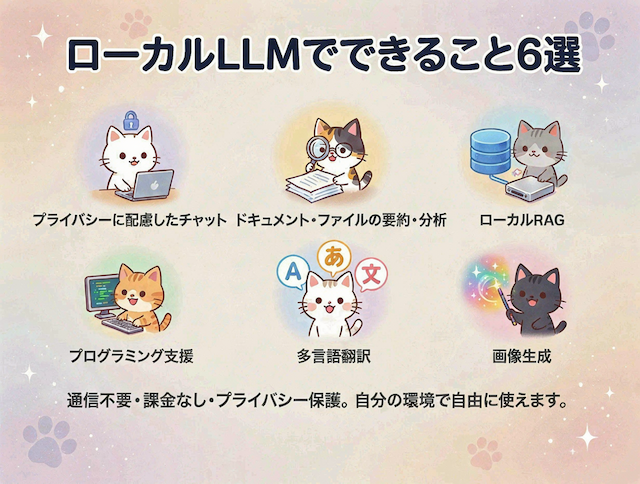
# ローカルLLMでできること6選

## タイトル(上部)
「ローカルLLMでできること6選」

## ローカルLLMでできること6選
- プライバシーに配慮したチャット
- ドキュメント・ファイルの要約・分析
- ローカルRAG
- プログラミング支援
- 多言語翻訳
- 画像生成

## コメント(下部)
「通信不要・課金なし・プライバシー保護。自分の環境で自由に使えます。」

## スタイル
- かわいいにゃんこスタイル
- やわらかい色のイラスト

## レイアウト
- 上部にタイトル、下部にコメント、中央に2行3列で6つの事例を画像で表現解像度セレクターでアスペクト比を4:3に設定。
上記のネタをIdeogram4 Caption Prompt Templateに入れる。Text to imageと画像を保存をそれぞれ選んでCtrl-Bで無効化して [実行する] をクリック。プレビューに出てきた文字列を手持ちのLLMに投げる。たとえば、Gemma 4 2.6B A4Bでは以下のように出てきた。
{
  "aspect_ratio": "1184:896",
  "high_level_description": "A soft-colored anime-style infographic titled 'ローカルLLMでできること6選' featuring six cute cats performing various AI tasks in a 2x3 grid on a pastel background.",
  "compositional_deconstruction": {
    "background": "A soft pastel cream background with subtle, floating white sparkles and faint, light-blue paw print patterns.",
    "elements": [
      {
        "type": "text",
        "bbox": [50, 100, 150, 1084],
        "text": "ローカルLLMでできること6選",
        "desc": "Large, bold, rounded sans-serif Japanese text in a dark navy blue color, centered at the top of the frame."
      },
      {
        "type": "text",
        "bbox": [800, 100, 880, 1084],
        "text": "通信不要・課金なし・プライバシー保護。自分の環境で自由に使えます。",
        "desc": "Medium-sized, regular-weight sans-serif Japanese text in a soft dark grey, centered at the bottom of the frame."
      },
      {
        "type": "obj",
        "bbox": [220, 50, 450, 380],
        "desc": "A cute, round-faced white cat sitting at a small laptop, a small blue lock icon floating above the screen."
      },
      {
        "type": "text",
        "bbox": [450, 50, 500, 380],
        "text": "プライバシーに配慮したチャット",
        "desc": "Small, medium-weight sans-serif Japanese text centered beneath the cat."
      },
      {
        "type": "obj",
        "bbox": [220, 380, 450, 700],
        "desc": "A cute calico cat wearing small spectacles, peering through a magnifying glass at a stack of white papers."
      },
      {
        "type": "text",
        "bbox": [450, 380, 500, 700],
        "text": "ドキュメント・ファイルの要約・分析",
        "desc": "Small, medium-weight sans-serif Japanese text centered beneath the cat."
      },
      {
        "type": "obj",
        "bbox": [220, 700, 450, 1034],
        "desc": "A cute grey cat looking at a glowing blue database cylinder icon connected to a small, silver hard drive."
      },
      {
        "type": "text",
        "bbox": [450, 700, 500, 1034],
        "text": "ローカルRAG",
        "desc": "Small, medium-weight sans-serif Japanese text centered beneath the cat."
      },
      {
        "type": "obj",
        "bbox": [470, 50, 700, 380],
        "desc": "A cute orange tabby cat typing enthusiastically on a small keyboard, with green lines of code scrolling on a tiny monitor."
      },
      {
        "type": "text",
        "bbox": [700, 50, 750, 380],
        "text": "プログラミング支援",
        "desc": "Small, medium-weight sans-serif Japanese text centered beneath the cat."
      },
      {
        "type": "obj",
        "bbox": [470, 380, 700, 700],
        "desc": "A cute white cat surrounded by three speech bubbles containing the characters 'A', 'あ', and '文' in different colors."
      },
      {
        "type": "text",
        "bbox": [700, 380, 750, 700],
        "text": "多言語翻訳",
        "desc": "Small, medium-weight sans-serif Japanese text centered beneath the cat."
      },
      {
        "type": "obj",
        "bbox": [470, 700, 700, 1034],
        "desc": "A cute black cat holding a colorful magic wand, with a vibrant, swirling cloud of rainbow-colored sparkles emerging from the tip."
      },
      {
        "type": "text",
        "bbox": [700, 700, 750, 1034],
        "text": "画像生成",
        "desc": "Small, medium-weight sans-serif Japanese text centered beneath the cat."
      }
    ]
  }
}これをText to Imageに入れて [実行する] をクリック。
フィルター問題
フィルターを回避したモデルもあり、以下のような画像も出力できるようになる(そもそもなんでこの程度でフィルターに引っかかるのかは謎)。ここではIdeogram_Instant-NSFWというものを使用(詳細は割愛)。
実写、雨の日、1匹の座る黒猫と、しゃがんで猫の頭を撫でる傘をさした女の子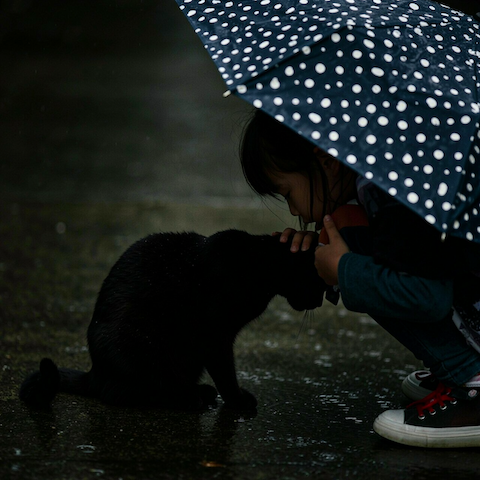
付録: Ideogram 4 プロンプトガイド(要約)
Ideogram 4は、構造化されたJSON形式のキャプション(structured JSON captions)を用いて学習されており、この形式で指示を出すことで、構図、スタイル、色の再現性を最大限に高めることができる。
1. プロンプトの基本:プレーンテキストとJSON
Ideogram 4では、単なる文章(プレーンテキスト)よりも、構造化されたJSONプロンプトの方が圧倒的に高い精度を発揮する。といっても、必ずしもJSONを手書きする必要はない。「マジックプロンプト」機能を利用すれば、短い文章から詳細なJSONプロンプトへ自動的に拡張してくれるため、初心者でも簡単に高品質な画像が生成可能である。
なお、マジックプロンプト用システムプロンプトはIdeogram4 Caption Prompt Templateを使ったときにプレビューに出てくるあれらしい。
2. JSONキャプションの構成要素
より細かく制御したい場合は、以下の3つの要素で構成されるJSONスキーマを理解することが重要である。
① 全体記述 (high_level_description)
画像全体の要約を1〜2文で記述する。すべてのプロンプトに含めることが強く推奨される。
- 例:
"A futuristic city with flying cars at night."(夜、空飛ぶ車が飛び交う未来都市)
② スタイル記述 (style_description)
視覚的なスタイル、照明、媒体を制御する。
| 項目 | 内容・実例 | 備考 |
|---|---|---|
| aesthetics | 美学的キーワード(例: "cinematic", "minimal", "vibrant") |
必須 |
| lighting | 照明の状態(例: "golden hour", "soft studio light", "neon glow") |
必須 |
| medium | 媒体(例: "photograph", "illustration", "3d_render", "painting") |
必須 |
| photo | 写真の場合の詳細(例: "35mm lens, f/1.8, bokeh") |
写真の時のみ必須 |
| art_style | アートの場合の詳細(例: "flat vector art", "oil painting") |
アートの時のみ必須 |
| color_palette | 16進数カラーコードのリスト(例: ["#FF0000", "#0000FF"]) |
任意(最後に追加) |
③ 構成の分解 (compositional_deconstruction)
画像のレイアウトを詳細に指定する。
- background (必須): 環境や背景の詳細を記述する。
- 例:
"A starry night sky over a calm ocean."
- 例:
- elements (必須): 登場させる物体やテキストを個別に定義する。
- 物体 (
"type": "obj"): 詳細な説明(desc)を記述。 - 文字 (
"type": "text"): 表示させたい文字列(text)と、その説明(desc)を記述。 - 範囲指定 (
bbox) :座標を指定することで、配置場所をコントロールできる(任意)。[y_min, x_min, y_max, x_max]の形式で、0–1000 の正規化座標(原点は左上)。
- 物体 (
3. カラーパレットによる色制御
Ideogram 4の強力な機能の一つが、色の直接指定である。
- 形式: 必ず大文字の
#RRGGBB形式で指定すること(例:#FFFFFF◯ /#fff✕)。 - 全体指定:
style_descriptionの中で最大16色まで指定可能。 - 個別指定:
elementsの中で、特定の物体だけに最大5色まで指定可能。
4. 実例
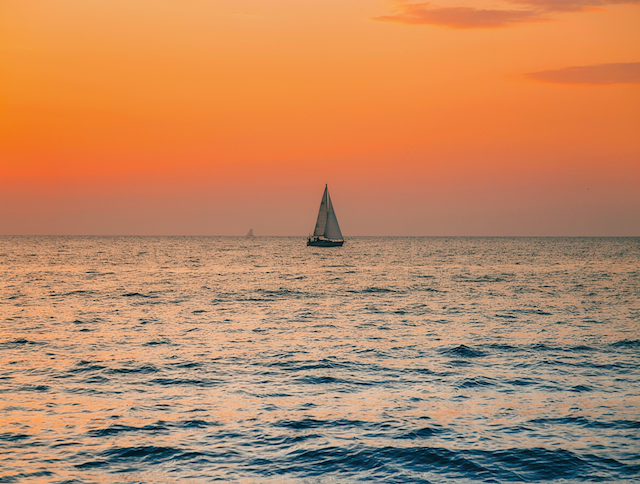
暖かい夕日の風景写真
{
  "high_level_description": "A lone sailboat on calm water at sunset.",
  "style_description": {
    "aesthetics": "serene, warm",
    "lighting": "golden hour backlighting",
    "photo": "wide angle, f/8",
    "medium": "photograph",
    "color_palette": ["#FF6B35", "#F7C59F", "#004E89"]
  },
  "compositional_deconstruction": {
    "background": "A calm ocean stretching to a low horizon, sky washed in orange.",
    "elements": [
      {"type": "obj", "desc": "A single sailboat with a white triangular sail."}
    ]
  }
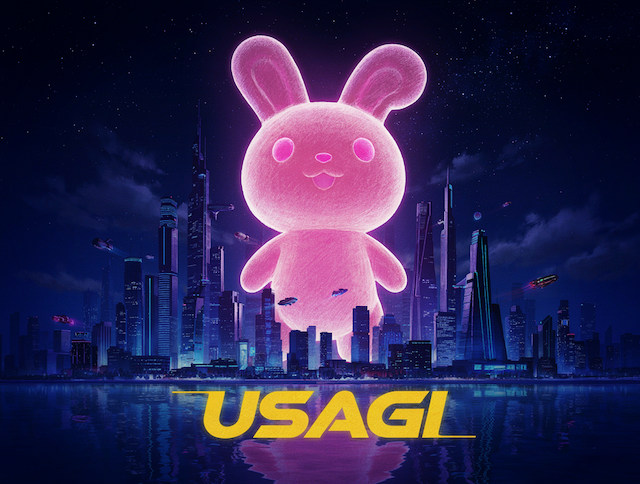
サンバーパンク風デザイン(文字あり)
{
    "aspect_ratio": "1184:896",
    "high_level_description": "A cinematic wide shot of a futuristic metropolis at night under a starry sky over calm ocean waters, dominated by a giant glowing pink crayon-style 3D animated bipedal rabbit with textured hand-drawn aesthetics looming from behind the skyline.",
    "compositional_deconstruction": {
        "background": "A deep indigo starry night sky with scattered clouds reflecting faintly on the surface of a calm dark blue ocean below. The horizon line is low, emphasizing the scale of the foreground subjects. Soft ambient lighting creates a dreamy nighttime atmosphere with subtle texture reminiscent of crayon strokes.",
        "elements": [
            {
                "type": "obj",
                "bbox": [200, 0, 800, 1000],
                "desc": "A sprawling futuristic metropolis skyline composed of tall sleek skyscrapers with neon lights in cool blue and purple tones, featuring flying vehicles moving through the air between buildings. The city has a clean, polished 3D animated aesthetic with subtle crayon-like texture overlay that gives it a hand-drawn quality rather than photorealistic detail."
            },
            {
                "type": "obj",
                "bbox": [50, 0, 950, 1000],
                "desc": "A massive bipedal rabbit figure with a cute crayon-style 3D animated character design, glowing with pink neon light. The rabbit has rounded soft features, and a friendly personified mascot appearance. Its entire body emits a soft glowing illumination in a vibrant pink hue that contrasts against the cool-toned city background. The texture resembles colored pencil or crayon strokes rendered in 3D space, giving it a tactile hand-drawn quality while maintaining three-dimensional form."
            },
            {
                "type": "text",
                "bbox": [800, 300, 900, 700],
                "desc": "A large stylized text reading 'USAGI' in bold yellow font with a sci-fi glow effect and slight 3D depth, positioned at the bottom center of the frame. The typography has rounded edges matching the cute anime aesthetic with subtle crayon-like texture to maintain visual consistency."
            }
        ]
    }
}
ComryUIのIdeogram4 Caption Prompt TemplateとLM Studio/qwen3.5-9b-uncensored-hauhaucs-aggressiveを使用。