
はじめに
Cocoonの設定画面などには、多くのチェックボックスが配置されています。
デフォルトでは標準の四角いチェックボックスですが、Cocoon設定画面を最近のデザイン傾向に合わせて、ON/OFFが直感的にわかるトグルスイッチ風に変更します。
この記事では、この方法について説明します。
完成イメージ
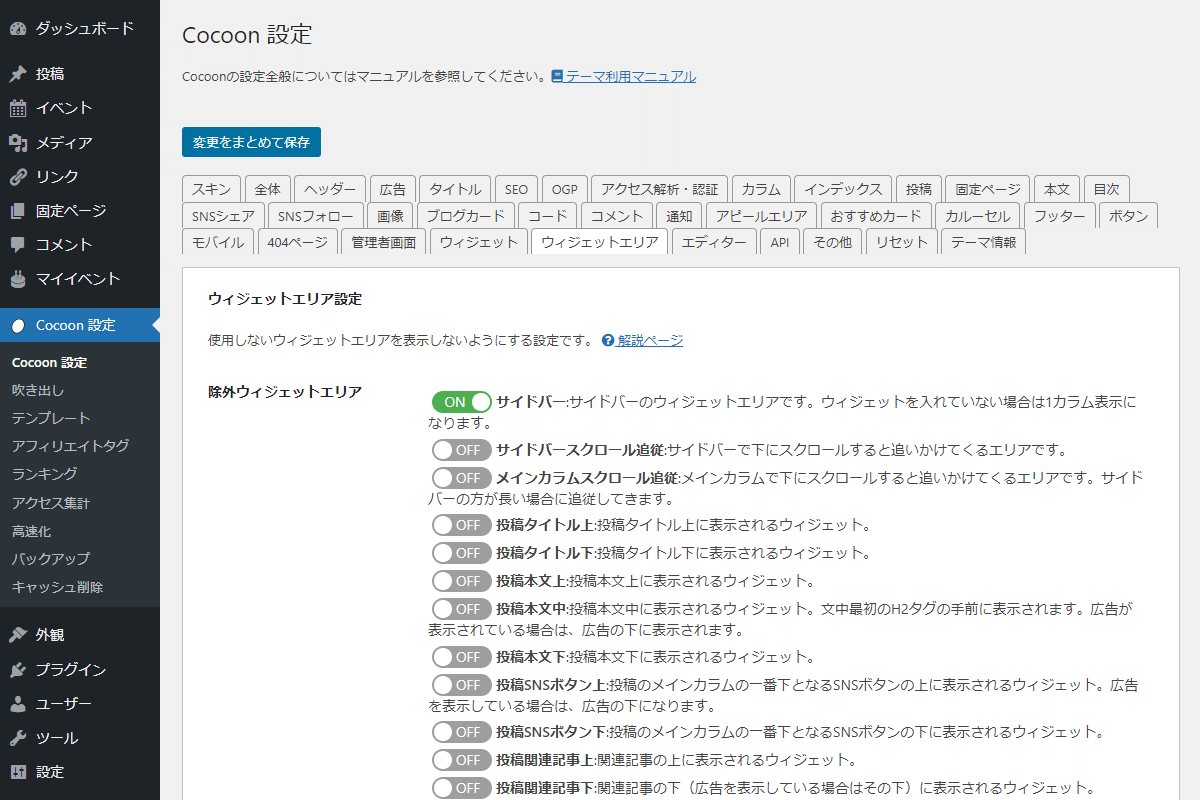
実装手順
以下のコードをfunctions.phpに追加します。
add_action('admin_enqueue_scripts', function ($hook_suffix) {
  $page_hook = get_plugin_page_hookname('theme-settings', '');

  if ($hook_suffix !== $page_hook) {
    return;
  }

  ob_start();
  ?>
  #tab-widget-area-content input[type='checkbox'] {
    background-color: unset;
    border: 0;
    box-shadow: none;
    height: 22px;
    margin: 0 4px;
    position: relative;
    width: 60px;
  }

  /* 丸ボタン */
  #tab-widget-area-content input[type='checkbox']::before {
    background-color: #fff;
    border-radius: 50%;
    content: '';
    height: 18px;
    left: 2px;
    margin: 0;
    position: absolute;
    top: 50%;
    transform: translateY(-50%);
    transition: 0.2s ease, left 0.2s ease;
    width: 18px;
  }

  /* ON時の丸ボタン位置 */
  #tab-widget-area-content input[type='checkbox']:checked::before {
    left: 40px;
  }

  /* スライダー背景 */
  #tab-widget-area-content input[type='checkbox']::after {
    background-color: #9e9e9e;
    border-radius: 100px;
    color: #fff;
    content: 'OFF';
    display: block;
    line-height: 22px;
    text-indent: 12px;
    transition: 0.2s ease, background-color 0.2s ease, content 0.2s ease;
  }

  /* ON時のスライダー背景 */
  #tab-widget-area-content input[type='checkbox']:checked::after {
    background-color: #4caf50;
    content: 'ON';
    text-indent: -14px;
  }
  <?php
  wp_add_inline_style('wp-admin', ob_get_clean());
});
さいごに
今回紹介した方法を使えば、Cocoon設定画面のチェックボックスを、ON/OFFが直感的にわかるトグルスイッチ風に変更できます。
管理画面の見た目がわかりやすくなるだけでなく、ユーザーが設定状態を瞬時に判断できるようになるため、操作性の向上にもつながります。
現在はSafari のみの対応ですが、今後、他ブラウザにもcheckboxにswitch属性が追加されれば、標準でトグルスイッチが可能となるでしょう。