
はじめに
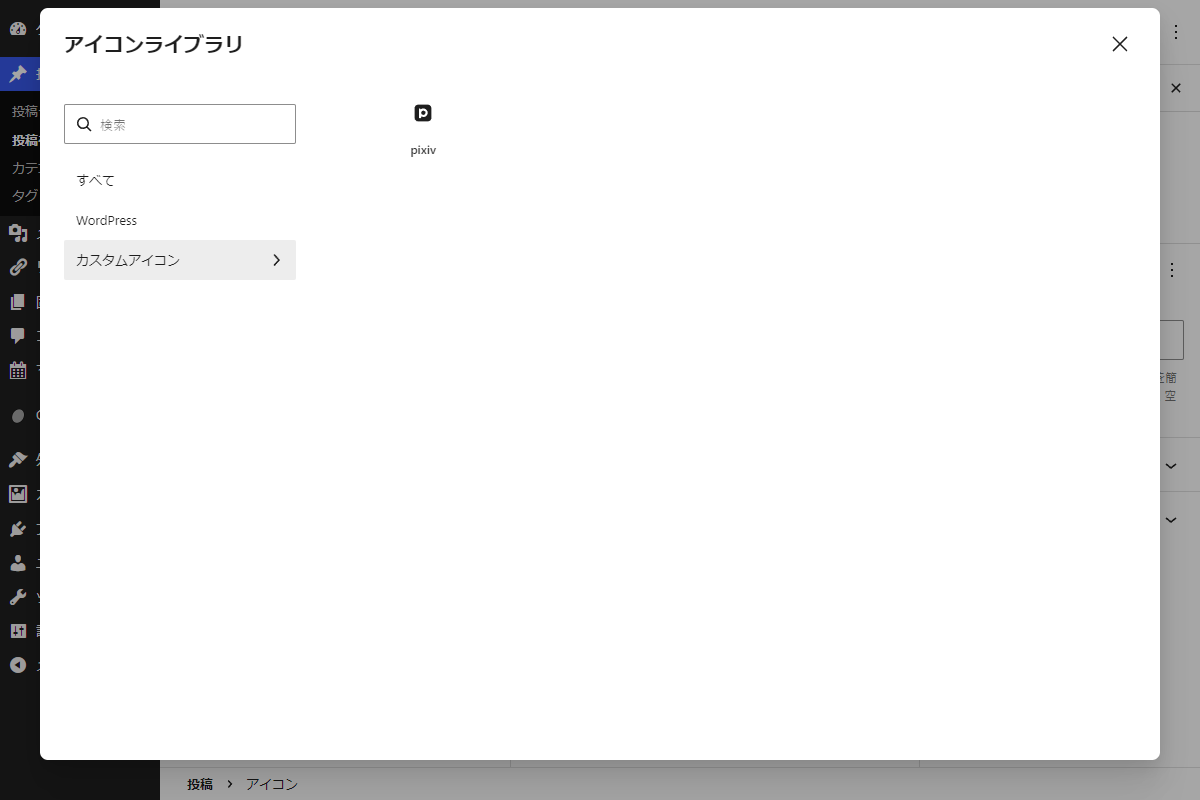
WordPress 7.0でアイコンブロックが追加され、さらにWordPress 7.1では独自のSVGアイコンを追加できる仕組みが実装されました。
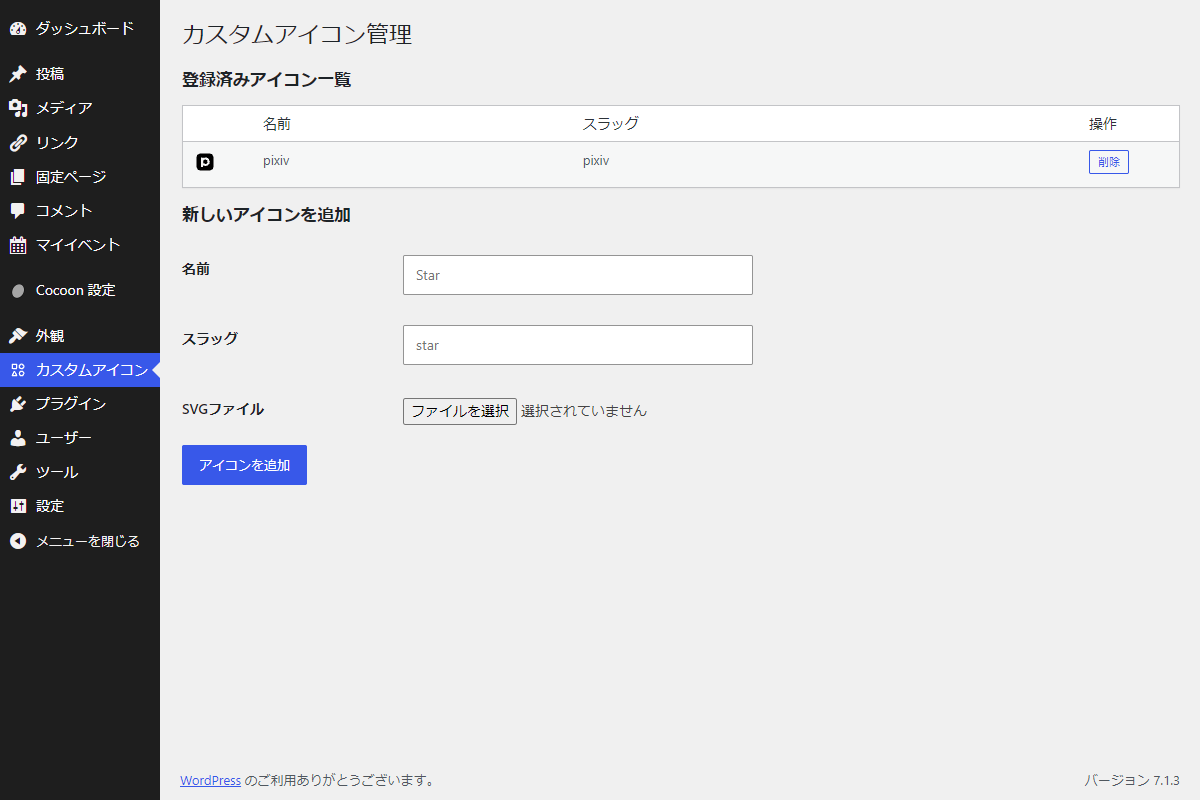
そこで、自作のSVGアイコンを管理画面から手軽に登録してエディター内で利用できるようにします。
この記事では、この方法について説明します。
完成イメージ
実装手順
以下のコードをfunctions.phpに追加します。
// 管理画面にメニューを追加
add_action('admin_menu', function () {
  $gutenberg_icon_svg = '<svg xmlns="http://www.w3.org/2000/svg" width="24" height="24" fill="none" aria-hidden="true" focusable="false"><path fill="currentColor" d="M6 9.5h3.5V6H6v3.5Zm5 .5a1 1 0 0 1-.898.995L10 11H5.5l-.103-.005a1 1 0 0 1-.892-.893L4.5 10V5.5a1 1 0 0 1 1-1H10a1 1 0 0 1 1 1V10ZM18.25 7.75a2 2 0 1 0-4 0 2 2 0 0 0 4 0Zm1.5 0a3.5 3.5 0 1 1-7 0 3.5 3.5 0 0 1 7 0ZM6.88 13.535a1 1 0 0 1 1.74 0l2.534 4.472a1 1 0 0 1-.87 1.493H5.216a1 1 0 0 1-.87-1.493l2.534-4.472ZM6.074 18h3.352L7.75 15.041l-1.676 2.96ZM14.952 13h2.596a1 1 0 0 1 .866.5l1.298 2.25a1 1 0 0 1 0 1L18.414 19l-.074.11a1 1 0 0 1-.792.39h-2.596a1 1 0 0 1-.792-.39l-.074-.11-1.298-2.25a1 1 0 0 1 0-1l1.298-2.25a1 1 0 0 1 .866-.5Zm-.72 3.25 1.01 1.75h2.017l1.009-1.75-1.01-1.75h-2.017l-1.01 1.75Z"></path></svg>';

  add_menu_page(
    'カスタムアイコン',
    'カスタムアイコン',
    'manage_options',
    'icons-manage',
    'render_icon_manage',
    'data:image/svg+xml;base64,' . base64_encode($gutenberg_icon_svg),
    60
  );
});


/**
 * 管理画面ページを出力
 *
 * @return void
 */
if (!function_exists('render_icon_manage')):
function render_icon_manage() {
  // ラベル情報(slug => label)
  $labels = (array) get_option('my_custom_icons_labels', []);
  $files = glob(icon_manage_dir() . '*.svg') ?: [];
  $action_url = admin_url('admin-post.php');
  ?>
  <div class="wrap">
    <h1>カスタムアイコン管理</h1>


    <h2>登録済みアイコン一覧</h2>

    <?php if (empty($files) === false) : ?>
      <table class="widefat striped" style="width: 100%;">
        <thead>
          <tr>
            <th style="width:50px;"></th>
            <th>名前</th>
            <th>スラッグ</th>
            <th style="width:80px;">操作</th>
          </tr>
        </thead>
        <tbody>
          <?php foreach ($files as $path) :
            $slug = basename($path, '.svg');
            $name = 'custom/' . $slug;
            $label = $labels[$slug] ?? $slug;
          ?>
            <tr>
              <td>
                <?php if (function_exists('wp_get_icon')) { echo wp_get_icon($name, ['size' => 24]); } ?>
              </td>
              <td><?php echo esc_html($label); ?></td>
              <td><?php echo esc_html($slug); ?></td>
              <td>
                <form method="post" action="<?php echo esc_url($action_url); ?>" onsubmit="return confirm('「<?php echo esc_js($label); ?>」を削除しますか?\n(使用中のアイコンブロックは表示されなくなります)');">
                  <?php wp_nonce_field('icon_manage_action', 'icon_manage_nonce'); ?>
                  <input type="hidden" name="action" value="my_custom_icons">
                  <input type="hidden" name="task" value="delete_icon">
                  <input type="hidden" name="icon_slug" value="<?php echo esc_attr($slug); ?>">
                  <button type="submit" class="button button-secondary button-small">削除</button>
                </form>
              </td>
            </tr>
          <?php endforeach; ?>
        </tbody>
      </table>
    <?php else : ?>
      <p>登録されているアイコンはありません。</p>
    <?php endif; ?>

    <h3>新しいアイコンを追加</h3>

    <form method="post" action="<?php echo esc_url($action_url); ?>" enctype="multipart/form-data">
      <input type="hidden" name="action" value="my_custom_icons">
      <input type="hidden" name="task" value="add_icon">

      <?php wp_nonce_field('icon_manage_action', 'icon_manage_nonce'); ?>

      <table class="form-table">
        <tr>
          <th>名前</th>
          <td><input type="text" name="label" class="regular-text" placeholder="Star" required></td>
        </tr>
        <tr>
          <th>スラッグ</th>
          <td>
            <input type="text" name="icon_slug" class="regular-text" placeholder="star" required>
          </td>
        </tr>
        <tr>
          <th>SVGファイル</th>
          <td>
            <input type="file" name="icon_file" accept=".svg,image/svg+xml" required>
          </td>
        </tr>
      </table>

      <?php submit_button('アイコンを追加'); ?>
    </form>
  </div>
  <?php
}
endif;


// 管理画面からの設定データ更新
add_action('init', function () {
  if (function_exists('wp_register_icon') === false) {
    return;
  }

  $files = glob(icon_manage_dir() . '*.svg') ?: [];

  if (empty($files) === true) {
    return;
  }

  $labels = (array) get_option('my_custom_icons_labels', []);

  wp_register_icon_collection('custom', [
    'label' => 'カスタムアイコン',
    'description' => 'サイト独自のアイコンセット',
  ]);

  foreach ($files as $path) {
    $slug = basename($path, '.svg');

    if (preg_match('/^[a-z0-9](?:[a-z0-9_-]*[a-z0-9])?$/', $slug) !== 1) {
      continue;
    }

    wp_register_icon('custom/' . $slug, [
      'label' => (string) ($labels[$slug] ?? $slug),
      'file_path' => $path,
    ]);
  }
});


// アイコンの追加・削除
add_action('admin_post_my_custom_icons', function () {
  if (current_user_can('manage_options') === false) {
    wp_die('権限がありません。');
  }

  $task = isset($_REQUEST['task']) ? sanitize_key(wp_unslash($_REQUEST['task'])) : '';

  switch ($task) {
    case 'add_icon':
      check_admin_referer('icon_manage_action', 'icon_manage_nonce');

      $slug = isset($_POST['icon_slug']) ? sanitize_key(wp_unslash($_POST['icon_slug'])) : '';
      $label = isset($_POST['label']) ? sanitize_text_field(wp_unslash($_POST['label'])) : '';

      if ($slug === '' || preg_match('/^[a-z0-9](?:[a-z0-9_-]*[a-z0-9])?$/', $slug) !== 1) {
        icon_manage_redirect('invalid_slug');
      }

      if ($label === '') {
        icon_manage_redirect('invalid_label');
      }

      $dir = icon_manage_dir();
      $path = $dir . $slug . '.svg';

      // 既に登録されていないかチェック
      if (file_exists($path) === true) {
        icon_manage_redirect('exists_slug');
      }

      // SVGを検証して取得
      $content = icon_manage_validate_and_read_svg();

      // 保存先を作成してファイルを書き込み
      if (wp_mkdir_p($dir) === false || file_put_contents($path, $content) === false) {
        icon_manage_redirect('save_failed');
      }

      // ラベルのみDBに保存
      $labels = (array) get_option('my_custom_icons_labels', []);
      $labels[$slug] = $label;
      update_option('my_custom_icons_labels', $labels);

      icon_manage_redirect('added');
      break;

    case 'delete_icon':
      check_admin_referer('icon_manage_action', 'icon_manage_nonce');

      $slug = isset($_POST['icon_slug']) ? sanitize_key(wp_unslash($_POST['icon_slug'])) : '';

      if ($slug === '' || preg_match('/^[a-z0-9](?:[a-z0-9_-]*[a-z0-9])?$/', $slug) !== 1) {
        icon_manage_redirect('delete_failed');
      }

      $path = icon_manage_dir() . $slug . '.svg';

      if (file_exists($path) === false || unlink($path) === false) {
        icon_manage_redirect('delete_failed');
      }

      $labels = (array) get_option('my_custom_icons_labels', []);
      unset($labels[$slug]);
      update_option('my_custom_icons_labels', $labels);

      icon_manage_redirect('deleted');
      break;

    default:
      icon_manage_redirect('invalid_request');
      break;
  }
});


/**
 * カスタムアイコンのSVG保存先ディレクトリの絶対パスを取得関数
 *
 * @return string 末尾スラッシュ付きの絶対パス(例: /var/www/wp-content/uploads/custom-icons/)
 */
if (!function_exists('icon_manage_dir')):
function icon_manage_dir() {
  $upload = wp_upload_dir();
  return trailingslashit($upload['basedir']) . 'custom-icons/';
}
endif;


/**
 * SVGのバリデーションと読み込み関数
 *
 * @return string 検証・サニタイズ済みのSVGコード文字列
 */
if (!function_exists('icon_manage_validate_and_read_svg')):
function icon_manage_validate_and_read_svg() {
  $file = $_FILES['icon_file'] ?? null;

  // ファイルアップロードの成否チェック
  if (
    is_array($file) === false ||
    empty($file['tmp_name']) === true ||
    (int) ($file['error'] ?? UPLOAD_ERR_NO_FILE) !== UPLOAD_ERR_OK ||
    is_uploaded_file($file['tmp_name']) === false
  ) {
    icon_manage_redirect('file_error');
  }

  // 拡張子をチェック
  $file_name = sanitize_file_name(wp_unslash($file['name']));
  if (strtolower(pathinfo($file_name, PATHINFO_EXTENSION)) !== 'svg') {
    icon_manage_redirect('file_error');
  }

  // サイズチェック(100KBまで)
  if ((int) ($file['size'] ?? 0) > 102400) {
    icon_manage_redirect('file_too_large');
  }

  $content = file_get_contents($file['tmp_name']);

  if ($content === false || trim($content) === '') {
    icon_manage_redirect('file_error');
  }

  // 危険な記述を含むSVGは拒否
  if (preg_match('/<script|<foreignObject|<!DOCTYPE|<!ENTITY|<iframe|<image|\son[a-z]+\s*=|javascript:/i', $content) === 1) {
    icon_manage_redirect('invalid_svg');
  }

  // XMLとして解析でき、ルート要素がsvgであることを確認
  $previous = libxml_use_internal_errors(true);
  $xml = simplexml_load_string($content, 'SimpleXMLElement', LIBXML_NONET);
  libxml_clear_errors();
  libxml_use_internal_errors($previous);

  if ($xml === false || strtolower($xml->getName()) !== 'svg') {
    icon_manage_redirect('invalid_svg');
  }

  return trim($content);
}
endif;


// 通知メッセージを出力
add_action('admin_notices', function () {
  if ($notice = get_transient('my_admin_notice')) {
    echo '<div class="notice notice-' . esc_attr($notice['type']) . ' is-dismissible"><p>' . esc_html($notice['message']) . '</p></div>';
    delete_transient('my_admin_notice');
  }
});


/**
 * 通知メッセージを保存、アイコン管理ページへリダイレクト関数
 *
 * @param string $code 通知コード(icon_manage_get_messages() のキー)。
 * @return never
 */
if (!function_exists('icon_manage_redirect')):
function icon_manage_redirect($code) {
  $messages = icon_manage_get_messages();

  if (isset($messages[$code])) {
    set_transient('my_admin_notice', [
      'type'    => $messages[$code][1],
      'message' => $messages[$code][0],
    ], 30);
  }

  wp_safe_redirect(
    add_query_arg(
      [
        'page' => 'icons-manage',
      ],
      admin_url('admin.php')
    )
  );
  exit;
}
endif;


/**
 * 通知コードに対応するメッセージと種別の一覧を取得関数
 *
 * @return array<string, array{0: string, 1: string}> 通知コードをキーとする連想配列。
 */
if (!function_exists('icon_manage_get_messages')):
function icon_manage_get_messages() {
  return [
    'added'             => ['アイコンを追加しました。'                         , 'success'],
    'deleted'           => ['アイコンを削除しました。'                         , 'success'],
    'invalid_slug'      => ['スラッグの形式が正しくありません。'                 , 'error'],
    'invalid_label'     => ['名前を入力してください。'                         , 'error'],
    'exists_slug'       => ['そのスラッグは既に登録されています。'               , 'error'],
    'file_error'        => ['SVGファイルのアップロードに失敗しました。'          , 'error'],
    'file_too_large'    => ['SVGファイルのサイズが大きすぎます(100KBまで)。'  , 'error'],
    'invalid_svg'       => ['SVGの内容が不正、または使用できない記述を含みます。', 'error'],
    'save_failed'       => ['ファイルの保存に失敗しました。書き込み権限を確認してください。', 'error'],
    'delete_failed'     => ['アイコンの削除に失敗しました。'                     , 'error'],
    'invalid_request'   => ['不正な操作です。'                                 , 'error'],
  ];
}
endif;
さいごに
今回紹介した方法を使えば、WordPress 7.1で新しく追加された仕組みを活用し、自作のSVGアイコンを手軽に管理・追加できるようになります。
管理画面からのアップロードやデータベースへの保存、アイコンコレクションへの登録を一貫してコードで制御できるため、サイトのカスタマイズ性が大きく広がります。