はじめに
以下の質問に回答します。

完成イメージ
本ページに完成イメージを反映させます。
実装手順
以下の手順で実装します。
- ラベルGutenbergエディターでの設定
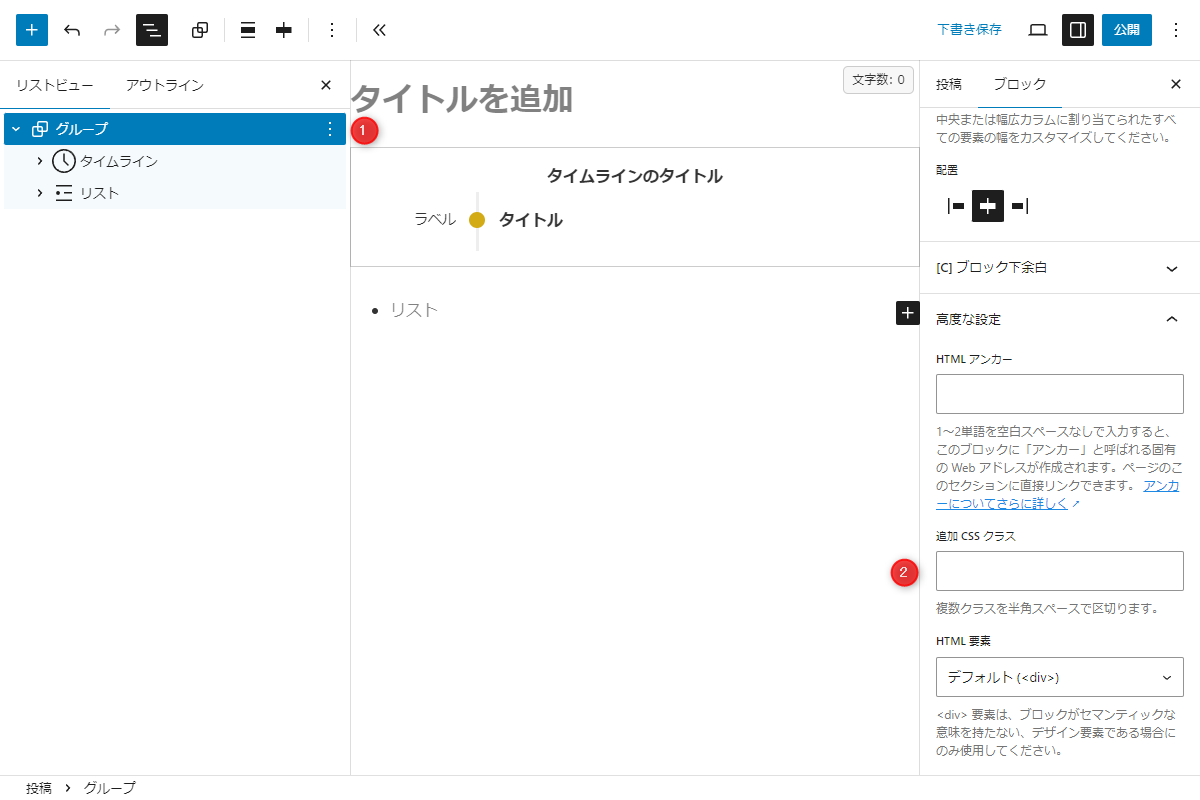
Gutenbergエディター 以下の手順で作成します。
- ブロックを選択し、「グループ」とします。
- 高度な設定→追加CSSクラスに
my-open-closeを入力します。
- ラベルPHPを追加
以下のコードをfunctions.phpに追加します。
add_filter('render_block_core/group', function ($block_content, $block, $instance) { if (!isset($block['attrs']['className']) || strpos($block['attrs']['className'], 'my-open-close') === false) { return $block_content; } // ランダムなユニークIDを生成 $unique_id = esc_attr(uniqid('details-checkbox-')); ob_start(); ?> <div class="details"> <input id="<?= $unique_id; ?>" class="details__checkbox" type="checkbox"> <label class="details__button" for="<?= $unique_id; ?>"></label> <div class="details__content"><?= $block_content; ?></div> </div> <?php return ob_get_clean(); }, 10, 3); - ラベルCSSを追加
以下のコードをstyle.cssに追加します。
.details {
  position: relative;

  .details__checkbox {
    display: none;
  }

  /* 一定高さで折りたたむ */
  .details__content {
    max-height: 300px;
    overflow: hidden;
  }

  /* 閉じたときの表示 */
  .details__button {
    &::before {
      border-bottom: 4px double rgb(104 166 197 / 50%);
      bottom: 0;
      color: rgb(104 166 197 / 50%);
      content: '\f078';
      display: block;
      font-family: 'Font Awesome 5 Free';
      font-size: 30px;
      font-weight: bold;
      left: 0;
      line-height: 1;
      position: absolute;
      text-align: center;
      width: 100%;
      z-index: 2;
    }

    &::after {
      background: linear-gradient(to bottom, rgba(255, 255, 255, 0), #fff 80%);
      bottom: 0;
      content: '';
      display: block;
      height: 50px;
      left: 0;
      position: absolute;
      width: 100%;
      z-index: 1;
    }
  }

  /* 開いたときの表示 */
  .details__checkbox:checked {
    ~ .details__content {
      max-height: unset;
    }

    ~ .details__button::before {
      border-bottom: 0;
      border-top: 4px double rgb(104 166 197 / 50%);
      bottom: -30px;
      content: '\f077';
    }
  }
}
さいごに
今回紹介した方法を使えば、「グループ」ブロックをアコーディオン形式で簡単に折りたたみ表示にできます。
追加CSSクラスを指定するだけで展開・非展開の動作を組み込めます。
特に、一つの章が多くの行を要するような長文コンテンツでは、折りたたみ表示によってページ全体のスクロール量を減らし、ユーザーが目的の章を見つけやすくなるというメリットがあります。
JavaScript不要で軽量なのも大きな魅力です。