
はじめに
WordPressでアップロードされたファイルは通常uploadsフォルダに保存されます。
大量のメディアファイルをバックアップ目的で、これらのファイルをまとめてZIP形式で取得したい場合があります。
そこで、プラグイン「WP File Manager」などを使わずに、uploadsフォルダをZIPファイルにしてダウンロードする機能を追加します。
この記事では、この方法について説明します。
完成イメージ
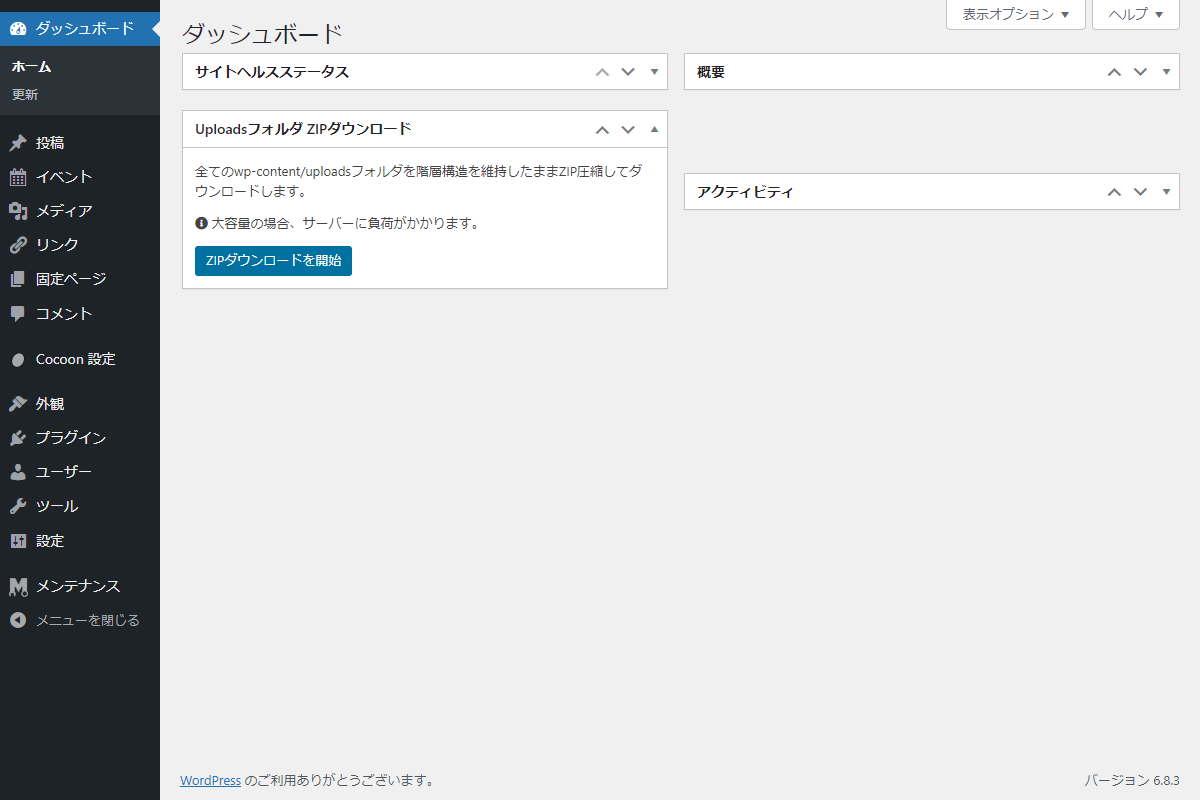
実装手順
以下のコードをfunctions.phpに追加します。
// ダッシュボードウィジェットを追加
add_action('wp_dashboard_setup', function () {
  // 権限チェック
  if (!current_user_can('manage_options')) {
    return;
  }

  wp_add_dashboard_widget(
    'download-uploads-zip',
    'Uploadsフォルダ ZIPダウンロード',
    'render_download_uploads_zip'
  );
});


/**
 * ダッシュボードにウィジェットを出力
 *
 * @return void
 */
if (!function_exists('render_download_uploads_zip')) :
function render_download_uploads_zip() {
  // ZIPダウンロードURLを生成
  $download_url = add_query_arg(
    [
      'download_uploads_zip'       => 'download_uploads_zip',
      'download_uploads_zip_nonce' => wp_create_nonce('download_uploads_zip_action'),
    ],
    admin_url()
  );
  ?>

  <div class="download-uploads-zip">
    <div class="download-uploads-zip__description">
      <p>
        全てのwp-content/uploadsフォルダを階層構造を維持したままZIP圧縮してダウンロードします。
      </p>

      <p class="download-uploads-zip__notice">
        <span class="fas fa-info-circle" aria-hidden="true"></span>
        大容量の場合、サーバーに負荷がかかります。
      </p>
    </div>

    <div class="download-uploads-zip__action">
      <a href="<?= esc_url($download_url); ?>" class="download-uploads-zip__button button button-primary"
        onclick="
          if (!confirm('本当に uploads フォルダのZIPダウンロードを開始しますか?処理中はブラウザを閉じないでください。')) {
            return false;
          }
          this.style.pointerEvents = 'none';
          return true;
        "
      >
        ZIPダウンロードを開始
      </a>
    </div>
  </div>

  <?php
}
endif;


// 対象の処理を実行
add_action('admin_init', function () {
  if (!isset($_GET['download_uploads_zip']) || $_GET['download_uploads_zip'] !== 'download_uploads_zip') {
    return;
  }

  // nonceチェック
  if (!isset($_GET['download_uploads_zip_nonce']) || !wp_verify_nonce($_GET['download_uploads_zip_nonce'], 'download_uploads_zip_action')) {
    return;
  }

  // 権限チェック
  if (!current_user_can('manage_options')) {
    set_transient('my_admin_notice', [
      'message' => 'エラー: この操作を実行する権限がありません。',
      'type'    => 'error',
    ], 30);

    wp_safe_redirect(admin_url());
    exit;
  }

  // タイムアウトを無制限に設定
  // 0 = 無制限(ホスティング側のポリシーで上書きされる場合あり)
  @set_time_limit(0);

  // メモリ上限を1GBに設定
  @ini_set('memory_limit', '1024M');

  // ZIP圧縮とダウンロードを実行
  download_uploads_zip();
});


/**
 * uploadsフォルダをZIP圧縮してダウンロード
 *
 * @return void
 */
if (!function_exists('download_uploads_zip')) :
function download_uploads_zip() {
  $zip_file_name = 'wordpress_uploads_' . date('Ymd_His') . '.zip';
  $temp_dir = download_uploads_zip_temp_dir();
  $zip_path = trailingslashit($temp_dir) . $zip_file_name;

  $upload_dir = wp_upload_dir();
  $source_dir = $upload_dir['basedir'];

  // ZipArchiveクラスの利用可否を確認
  if (!class_exists('ZipArchive')) {
    set_transient('my_admin_notice', [
      'message' => 'サーバーで ZipArchive クラスが利用できません。',
      'type'    => 'error',
    ], 30);

    wp_safe_redirect(admin_url());
    exit;
  }

  $zip = new ZipArchive();

  // ZIPファイルを作成・オープン
  if ($zip->open($zip_path, ZipArchive::CREATE | ZipArchive::OVERWRITE) !== true) {
    set_transient('my_admin_notice', [
      'message' => 'ZIPファイルの作成に失敗しました。一時ディレクトリへの書き込み権限を確認してください。',
      'type'    => 'error',
    ], 30);

    wp_safe_redirect(admin_url());
    exit;
  }

  // uploadsフォルダ内を再帰的に走査
  $files = new RecursiveIteratorIterator(
    new RecursiveDirectoryIterator(
      $source_dir,
      RecursiveDirectoryIterator::SKIP_DOTS
    ),
    RecursiveIteratorIterator::SELF_FIRST
  );

  foreach ($files as $file) {
    if (!$file->isDir()) {
      // uploadsフォルダを基準とした相対パスを取得
      $relative_path = substr(
        $file->getPathname(),
        strlen($source_dir) + 1
      );

      // 一時ディレクトリ自体をZIPに含めない
      if (strpos($relative_path, 'download_uploads_zip_temp') === 0) {
        continue;
      }

      // ファイルをZIPに追加
      if (!$zip->addFile(
        $file->getPathname(),
        $relative_path
      )) {
        error_log('ZIP addFile failed for: ' . $file->getPathname());
      }
    }
  }

  // ZIPファイルをクローズ
  if (!$zip->close()) {
    set_transient('my_admin_notice', [
      'message' => 'ZIPファイルのクローズ処理が失敗しました。',
      'type'    => 'error',
    ], 30);

    wp_safe_redirect(admin_url());
    exit;
  }

  // ZIPファイルの存在とサイズを確認
  if (file_exists($zip_path) && filesize($zip_path) > 0) {

    // ブラウザ切断後も後片付けを実行
    ignore_user_abort(true);

    // 処理終了時にZIPファイルを削除
    register_shutdown_function(function () use ($zip_path) {
      if (file_exists($zip_path)) {
        @unlink($zip_path);
      }
    });

    // 出力バッファを全てクリア
    while (ob_get_level() > 0) {
      ob_end_clean();
    }

    // gzip等の出力圧縮を無効化
    // Content-Lengthとの不整合によるダウンロード破損を防止
    if (function_exists('apache_setenv')) {
      @apache_setenv('no-gzip', 1);
    }

    @ini_set('zlib.output_compression', 'Off');

    // ダウンロード用HTTPヘッダーを送信
    if (!headers_sent()) {
      header('Content-Type: application/zip');
      header(
        'Content-Disposition: attachment; filename="' .
        $zip_file_name .
        '"'
      );
      header('Content-Length: ' . filesize($zip_path));
      header('Content-Transfer-Encoding: binary');
      header(
        'Cache-Control: no-cache, must-revalidate, post-check=0, pre-check=0'
      );
      header('Pragma: public');
      header('Expires: 0');
    } else {
      // HTTPヘッダーが既に送信済みの場合はログに記録
      error_log('download_uploads_zip: headers already sent before download.');
    }

    // ZIPファイルを出力
    readfile($zip_path);

    // ダウンロード完了後にZIPファイルを削除
    // シャットダウン関数でも削除するため二重の安全策
    @unlink($zip_path);

    exit;
  }

  // ZIPファイルが存在しない、またはサイズが0の場合
  set_transient('my_admin_notice', [
    'message' => 'ZIPファイルが見つからないか、サイズ0バイトです。サーバーログを確認してください。',
    'type'    => 'error',
  ], 30);

  wp_safe_redirect(admin_url());
  exit;
}
endif;


/**
 * ZIPファイルの一時保存ディレクトリを作成・取得
 *
 * uploads/download_uploads_zip_temp/を使用し、外部アクセスを禁止
 *
 * @return string 一時ディレクトリのパス
 */
if (!function_exists('download_uploads_zip_temp_dir')) :
function download_uploads_zip_temp_dir() {
  $upload_dir = wp_upload_dir();
  $temp_dir   = trailingslashit($upload_dir['basedir']) . 'download_uploads_zip_temp';

  // 一時ディレクトリが存在しない場合は作成
  if (!is_dir($temp_dir)) {
    wp_mkdir_p($temp_dir);

    // 外部アクセスを禁止する.htaccessを作成
    // Apache 2.2と2.4の両方に対応
    $htaccess_content = "<IfModule mod_authz_core.c>\nRequire all denied\n</IfModule>\n<IfModule !mod_authz_core.c>\nDeny from all\n</IfModule>\n";

    @file_put_contents(
      $temp_dir . '/.htaccess',
      $htaccess_content
    );

    // ディレクトリ一覧表示を防止するindex.phpを作成
    @file_put_contents(
      $temp_dir . '/index.php',
      "<?php\n// Silence is golden.\n"
    );
  }

  return $temp_dir;
}
endif;


// 通知メッセージを出力
add_action('admin_notices', function () {
  if ($notice = get_transient('my_admin_notice')) {
    echo '<div class="download-uploads-zip__admin-notice notice notice-' . esc_attr($notice['type']) . ' is-dismissible"><p>' . esc_html($notice['message']) . '</p></div>';
    delete_transient('my_admin_notice');
  }
});
参考:uploadsフォルダーを一括でダウンロードする方法
ローカル環境へメディアをまとめて取得する際、FTPツールでuploadsフォルダーを直接ダウンロードすると、ファイル数が多い場合に時間がかかってしまいます。
そこで、プラグイン「WP File Manager」を利用すれば、uploadsフォルダーをZIP形式に圧縮してからダウンロードできるため、短時間で効率よく作業を行えます。
手順
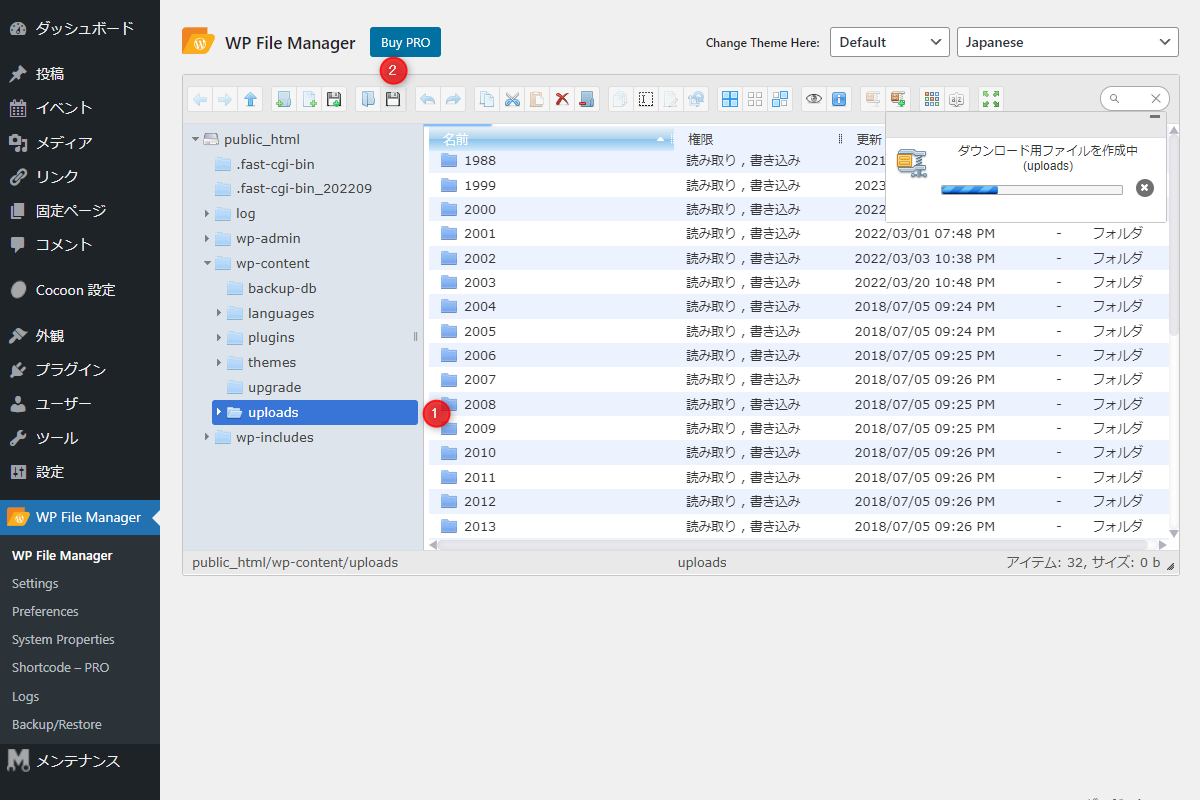
以下の手順で操作します(図1参照)。
- WP File Managerで
uploadsフォルダーを選択する。 - 「ダウンロード」ボタンをクリックする。
さいごに
今回紹介した方法を使えば、プラグインを使わずに、uploadsフォルダにある大量のファイルをZIP形式でまとめてダウンロードできます。
処理時間やサーバー負荷に注意しながら、簡単にバックアップやファイル整理が可能です。

