
はじめに
「新着記事」や「新着情報」に、ユーザーが閲覧した投稿ページを表示できる機能を追加します。
この記事では、この方法について説明します。
使用方法
actionオプションを追加します。
- 新着記事
[new_list action="history"]- 新着情報
[info_list action="history"]実装手順
以下のコードをfunctions.phpに追加します。
// クッキーに保存
add_action('template_redirect', function () {
  // historyパラメータが指定されている場合は保存対象外
  if (isset($_GET['history'])) {
    return;
  }

  // 投稿ページ以外は保存対象外
  if (!is_single()) {
    return;
  }

  $current_post_id = get_the_ID();

  if (!$current_post_id) {
    return;
  }

  // 最大履歴数を5件に設定
  $his_max = 5;

  // クッキーの有効期限を1年後に設定
  $uptime = time() + YEAR_IN_SECONDS;

  $histories = [];
  $set_histories = [];

  // クッキーを取得
  if (isset($_COOKIE['my_post_history'])) {
    $histories = json_decode(stripslashes($_COOKIE['my_post_history']), true);

    // 既存のクッキーの有効期限を更新
    setcookie('my_post_history', $_COOKIE['my_post_history'], [
      'expires'  => $uptime,
      'path'     => '/',
      'secure'   => is_ssl(),
      'httponly' => false,
      'samesite' => 'Lax',
    ]);
  }

  if (!is_array($histories)) {
    $histories = [];
  }

  // 最新の履歴が現在のページと同じ場合は終了
  if (!empty($histories) && $histories[0] == $current_post_id) {
    return;
  }

  // 新しい投稿IDを履歴の先頭に追加
  array_unshift($histories, $current_post_id);

  // 重複する投稿IDを削除してインデックスを整理
  $histories = array_values(array_unique($histories));

  // 最新の5件に制限
  $set_histories = array_slice($histories, 0, $his_max);

  $json_value = json_encode($set_histories);

  // 最新の履歴をクッキーに保存
  setcookie('my_post_history', $json_value, [
    'expires'  => $uptime,
    'path'     => '/',
    'secure'   => is_ssl(),
    'httponly' => false,
    'samesite' => 'Lax',
  ]);

  // $_COOKIEを更新して現在のリクエストに即時反映
  $_COOKIE['my_post_history'] = $json_value;
});


/**
 * 履歴投稿に基づいてウィジェットのクエリ引数を変更
 *
 * @param array $args 現在のウィジェットのクエリ引数
 * @return array 更新されたウィジェットのクエリ引数
 */
if (!function_exists('modify_widget_args')):
function modify_widget_args($args) {
  $is_history = !empty($GLOBALS['history']) || (isset($args['action']) && $args['action'] === 'history');

  if (!$is_history) {
    return $args;
  }

  $ids = [];

  if (isset($_COOKIE['my_post_history'])) {
    $ids = json_decode(stripslashes($_COOKIE['my_post_history']), true);
  }

  if (empty($ids) || !is_array($ids)) {
    $args['post__in'] = [0];
    $args['posts_per_page'] = 0;
  } else {
    $args['post__in'] = array_map('absint', $ids);
    $args['orderby'] = 'post__in';
  }

  $args['ignore_sticky_posts'] = true;

  return $args;
}
endif;


// 新着記事のクエリを設定
add_filter('widget_entries_args', 'modify_widget_args');


// 新着情報のクエリを設定
add_filter('get_info_list_args', 'modify_widget_args');
解説
- 投稿ページを閲覧した際、そのページ情報はクッキーに登録。
ただし、リロードしないと一覧表示には反映されないため、クッキーの情報をセッションにも反映させることでリアルタイムで反映。 - 閲覧した投稿ページはクッキーに登録され、最大で5件まで保存。
そのため、ウィジェットの表示数を6件以上に設定しても、最大で5件しか表示されない。 - クッキーの保存期間は1年に設定。
拡張:ウィジェットにオプションを追加
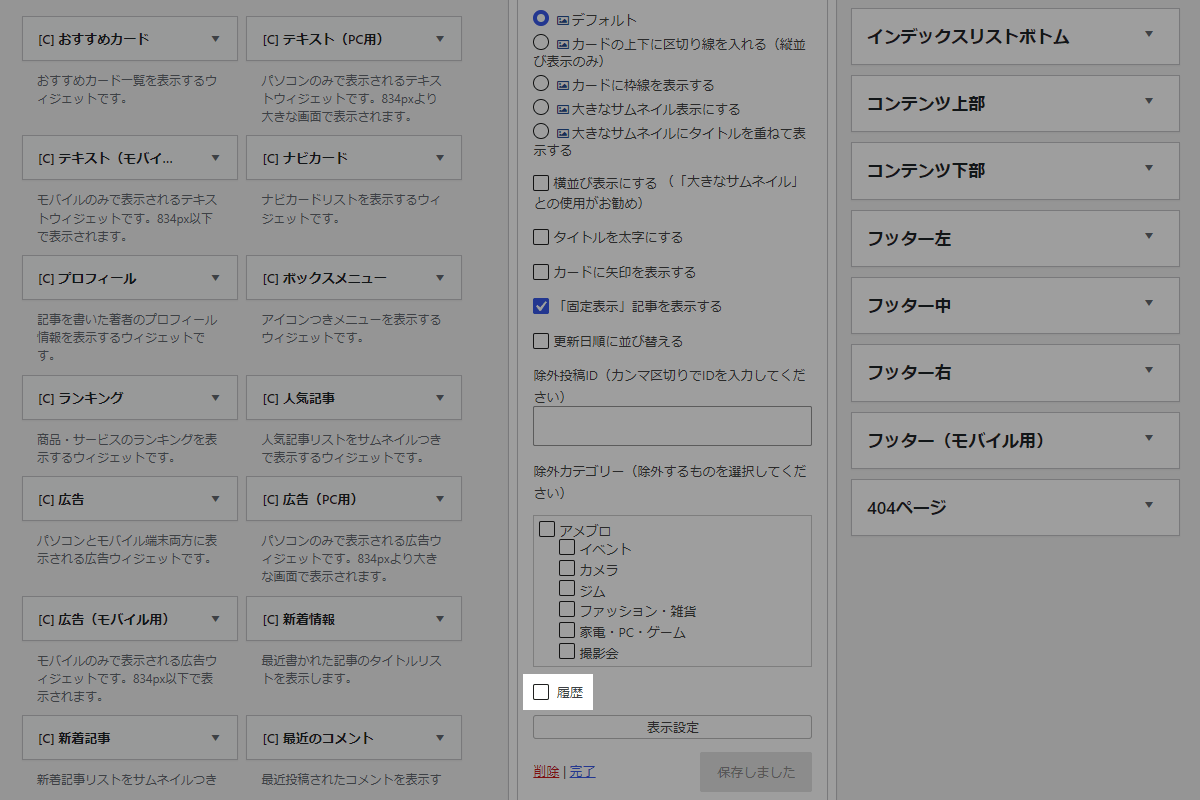
「新着記事」ウィジェットや「新着情報」ウィジェットの設定画面に「履歴」メニューを追加します(図1参照)。
実装手順
以下のコードをfunctions.phpに追加します。
// ウィジェットに設定メニューを追加
add_action('in_widget_form', function ($widget, $return, $instance) {
  // 対象外は終了
  if (!in_array($widget->id_base, ['new_entries', 'info_list'], true)) {
    return;
  }

  $f_id    = $widget->get_field_id('history');
  $f_name  = $widget->get_field_name('history');
  $checked = checked(!empty($instance['history']), true, false);

  ?>
  <p>
    <input type="checkbox" id="<?= esc_attr($f_id); ?>" name="<?= esc_attr($f_name); ?>" value="1" <?= $checked; ?>>
    <label for="<?= esc_attr($f_id); ?>">履歴</label>
  </p>
  <?php
}, 10, 3);


// ウィジェットの入力データを更新
add_filter('widget_update_callback', function ($instance, $new_instance, $old_instance, $widget) {
  // 対象外は終了
  if (!in_array($widget->id_base, ['new_entries', 'info_list'], true)) {
    return $instance;
  }

  $instance['history'] = !empty($new_instance['history']) ? 1 : 0;

  return $instance;
}, 10, 4);


// フロントエンド表示に反映
add_filter('widget_display_callback', function ($instance, $widget, $args) {
  // 対象外は終了
  if (!in_array($widget->id_base, ['new_entries', 'info_list'], true)) {
    return $instance;
  }

  $GLOBALS['history'] = !empty($instance['history']);

  return $instance;
}, 10, 3);


// ウィジェット描画直前に実行
add_action('dynamic_sidebar', function ($widget) {
  $GLOBALS['history'] = false;
}, 1);


// ウィジェットエリア出力直後に実行
add_action('dynamic_sidebar_after', function ($index, $has_widget) {
  $GLOBALS['history'] = false;
}, 10, 2);
拡張:「閲覧履歴をリセット」ボタンを追加
「閲覧履歴」機能を拡張し、「閲覧履歴をリセット」ボタンを追加します。
使用方法
以下にショートコードを示します。
[my_clear_history_button]実装手順
以下のコードをfunctions.phpに追加します。
add_shortcode('my_clear_history_button', function () {
  ob_start();
  ?>
  <style>
  .history-clear {
    text-align: center;
  }

  .history-clear__button {
    background-color: #ccc;
    border-color: #ccc;
    pointer-events: none;
  }

  .history-clear__button.is-active {
    background-color: #ff0000;
    border-color: #ff0000;
    cursor: pointer;
    pointer-events: auto;
  }
  </style>

  <script>
  jQuery(function ($) {
    const cookieHistoryKey = 'my_post_history';

    /**
     * 指定されたキーのクッキー値を取得
     *
     * @param {string} key 取得したいクッキーのキー名
     * @return {string} クッキーの値(存在しない場合は空文字)
     */
    function getHistoryCookie(key) {
      const cookies = document.cookie.split('; ');

      for (let i = 0; i < cookies.length; i++) {
        const parts = cookies[i].split('=');

        if (parts[0] === key) {
          return decodeURIComponent(parts[1]);
        }
      }

      return '';
    }

    /**
     * 閲覧履歴クッキーの有無を判定し、リセットボタンの活性・非活性状態を切り替える
     *
     * @return {void}
     */
    function checkHistoryCookie() {
      const cookieVal = getHistoryCookie(cookieHistoryKey);
      let hasHistory = false;

      try {
        if (cookieVal && JSON.parse(cookieVal).length > 0) {
          hasHistory = true;
        }
      } catch (e) {}

      if (hasHistory) {
        $('.history-clear__button').addClass('is-active');
      } else {
        $('.history-clear__button').removeClass('is-active');
      }
    }

    checkHistoryCookie();

    $(document).on('click', '.history-clear__button', function () {
      // クッキーを削除
      document.cookie = cookieHistoryKey + '=; expires=Thu, 01 Jan 1970 00:00:00 GMT; path=/;';

      // ボタンの活性化を解除
      $(this).removeClass('is-active');

      // ページをリロード
      location.href = location.pathname + '?history=' + Date.now();
    });
  });
  </script>

  <div class="history-clear">
    <button class="history-clear__button btn">閲覧履歴をリセット</button>
  </div>
  <?php
  return ob_get_clean();
});
さいごに
今回紹介した方法を使えば、閲覧した投稿ページを簡単にクッキーに記録し、リアルタイムで履歴を反映する機能を実装できます。
この機能を活用することで、ユーザーの利便性を向上させ、より魅力的なウェブサイトを構築することができます。

