はじめに
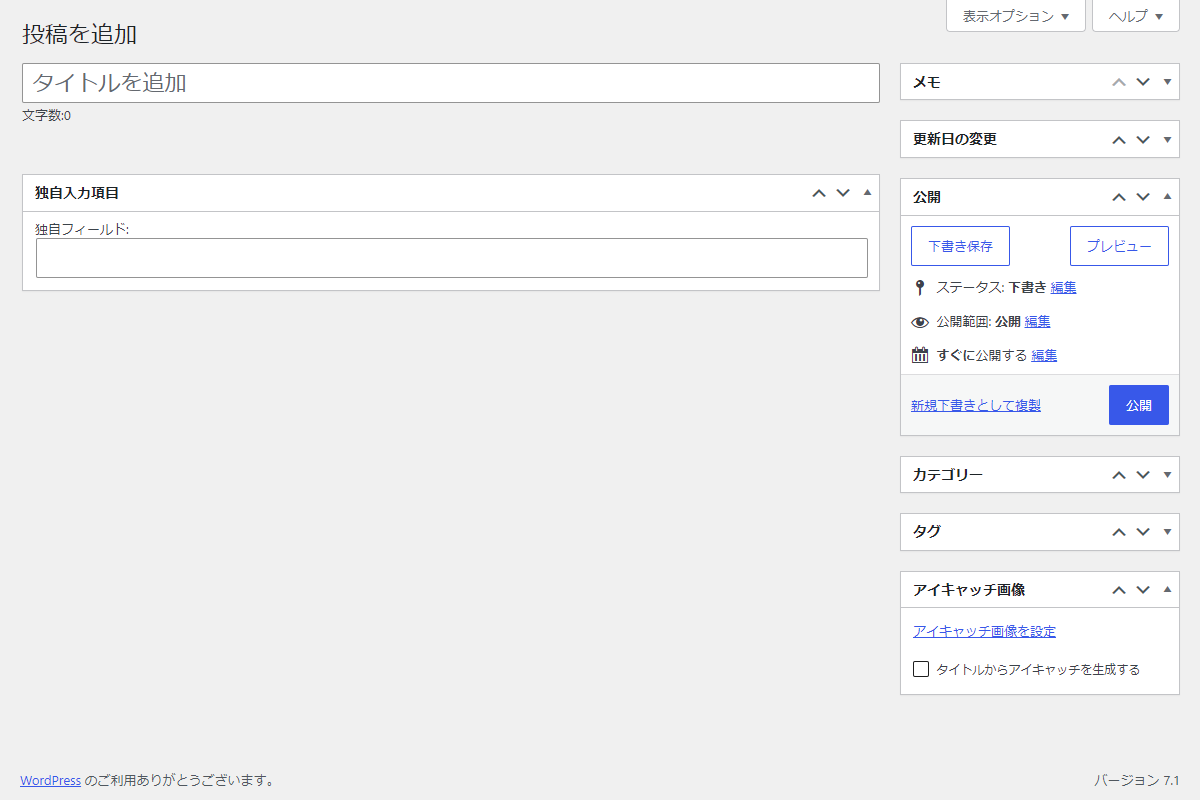
投稿編集画面に標準で本文エディターが表示されますが、サイトによっては「タイトルと独自の入力項目だけを使いたい」場合があります。
この記事では、この方法について説明します。
完成イメージ
実装手順
以下のコードをfunctions.phpに追加します。
// エディターを無効化
add_action('init', function () {
  remove_post_type_support('post', 'editor');
});


// メタボックスを追加
add_action('add_meta_boxes', function () {
  add_meta_box(
    'custom_box',
    '独自入力項目',
    'render_custom_box',
    'post',
    'normal',
    'high'
  );
});


/**
 * メタボックスの入力フォームを出力
 *
 * @param WP_Post $post 投稿オブジェクト
 * @return void
 */
if (!function_exists('render_custom_box')):
function render_custom_box($post) {
  $value = get_post_meta($post->ID, 'my_custom_field', true);

  wp_nonce_field('custom_box_action', 'custom_box_nonce');
  ?>
  <label for="my_custom_field">独自フィールド:</label>
  <input type="text" id="my_custom_field" name="my_custom_field" value="<?= esc_attr($value); ?>" style="width:100%;">
  <?php
}
endif;


// 投稿データを保存
add_action('save_post', function ($post_id) {
  // nonceチェック
  if (!isset($_POST['custom_box_nonce']) || !wp_verify_nonce($_POST['custom_box_nonce'], 'custom_box_action')) {
    return;
  }

  // 自動保存チェック
  if (defined('DOING_AUTOSAVE') && DOING_AUTOSAVE) {
    return;
  }

  // リビジョンは除外
  if (wp_is_post_revision($post_id)) {
    return;
  }

  // 権限チェック
  if (!current_user_can('edit_post', $post_id)) {
    return;
  }

  // 値を保存
  if (isset($_POST['my_custom_field'])) {
    update_post_meta($post_id, 'my_custom_field', sanitize_text_field($_POST['my_custom_field']));
  }
});
さいごに
今回紹介した方法を使えば、投稿編集画面で本文エディターを無効化し、タイトルと独自メタボックスだけで投稿管理が可能になります。
これにより、余計なUIを排除してシンプルに投稿を入力でき、固定文を自動で本文にセットすることもできます。
サイト運営者が効率よく投稿管理を行うのに最適な方法です。