
はじめに
コメント欄では、長文コメントが投稿されるとページが縦に長くなり、閲覧者にとって読みづらくなることがあります。
そこで、コメント本文を一定文字数で短縮表示し、「全文を表示」ボタンをクリックすると全文に切り替え表示させます。
この記事では、この方法について説明します。
完成イメージ
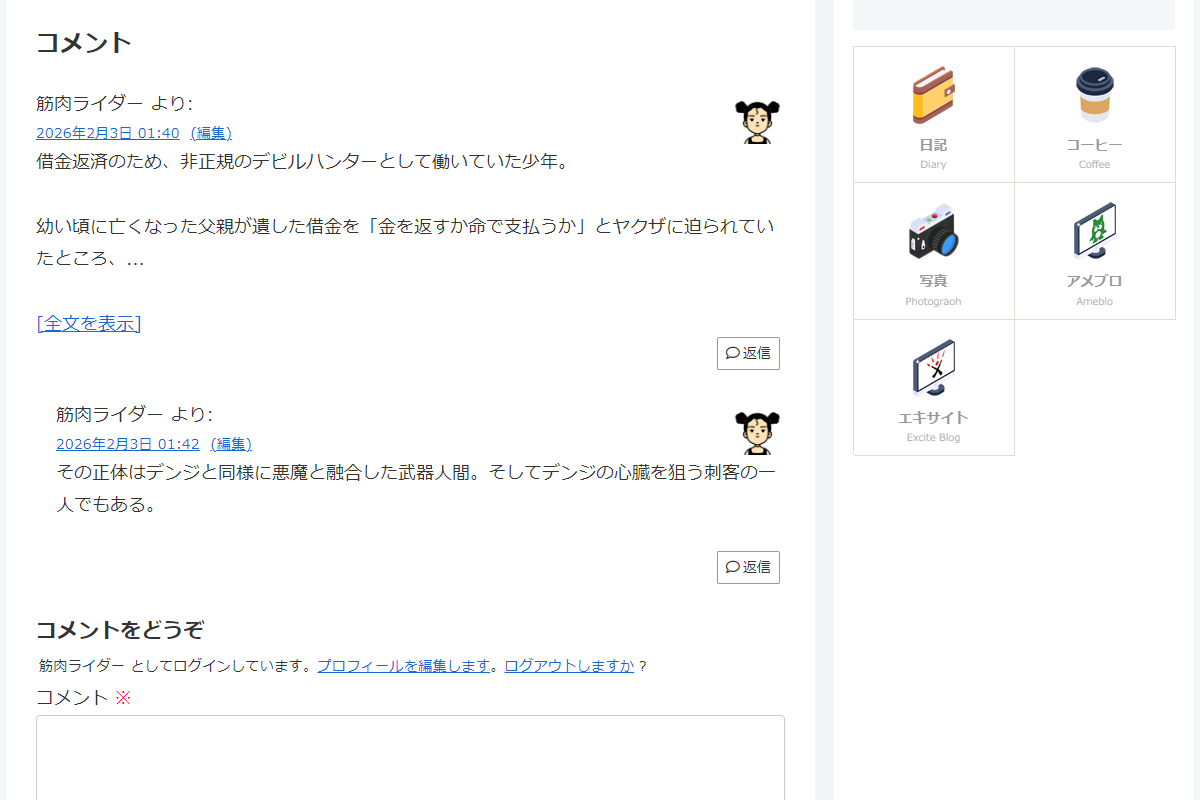
実装手順
以下の手順で実装します。
- ラベルPHPを追加
以下のコードをfunctions.phpに追加します。
add_filter('comment_text', function ($content, $comment) { // 省略表示の閾値となる文字数を設定 $shorten_length = 100; $raw_content = $comment->comment_content; // コメントの文字数が閾値以下の場合は処理対象外 if (mb_strlen($raw_content) <= $shorten_length) { return $content; } // コメントIDを取得 $comment_id = (int) $comment->comment_ID; // 省略文字列を取得 $excerpt_more = get_entry_card_excerpt_more(); // 省略表示用のテキストを生成 $short_text = mb_substr($raw_content, 0, $shorten_length) . $excerpt_more; // 省略表示用のHTMLを生成 $short_html = wpautop(esc_html($short_text)); // 全文表示用のHTMLを生成 $full_html = wpautop(esc_html($raw_content)); ob_start(); ?> <div class="comment-toggle"> <input type="checkbox" id="comment-toggle-<?= esc_attr($comment_id); ?>" class="comment-toggle__input"> <div class="comment-toggle__short"><?= $short_html; ?></div> <div class="comment-toggle__full"><?= $full_html; ?></div> <label for="comment-toggle-<?= esc_attr($comment_id); ?>" class="comment-toggle__label" data-more="[全文を表示]" data-less="[閉じる]"></label> </div> <?php return ob_get_clean(); }, 99, 2); - ラベルCSSを追加
以下のコードをstyle.cssに追加します。
.comment-toggle {
  /* チェックボックス本体を非表示 */
  .comment-toggle__input {
    display: none;

    /* チェック時に短縮文を非表示 */
    &:checked ~ .comment-toggle__short {
      display: none;
    }

    /* チェック時に全文コメントを表示 */
    &:checked ~ .comment-toggle__full {
      display: block;
    }

    /* チェック時のラベル文言 */
    &:checked ~ .comment-toggle__label::before {
      content: attr(data-less);
    }
  }

  /* 初期状態では全文コメントを非表示 */
  .comment-toggle__full {
    display: none;
  }

  /* 「全文を表示 / 閉じる」リンク */
  .comment-toggle__label {
    color: #0073aa;
    cursor: pointer;
    display: inline-block;
    margin-top: 5px;
    text-decoration: underline;

    &::before {
      content: attr(data-more);
    }
  }
}
さいごに
今回紹介した方法を使えば、長文コメントでもページの縦スクロールが長くならず、閲覧者にとって見やすいコメント欄を実現できます。
短縮文字数やボタン文言は自由にカスタマイズできるので、テーマやサイトのデザインに合わせて最適化可能です。
