
はじめに
以下の質問に回答します。

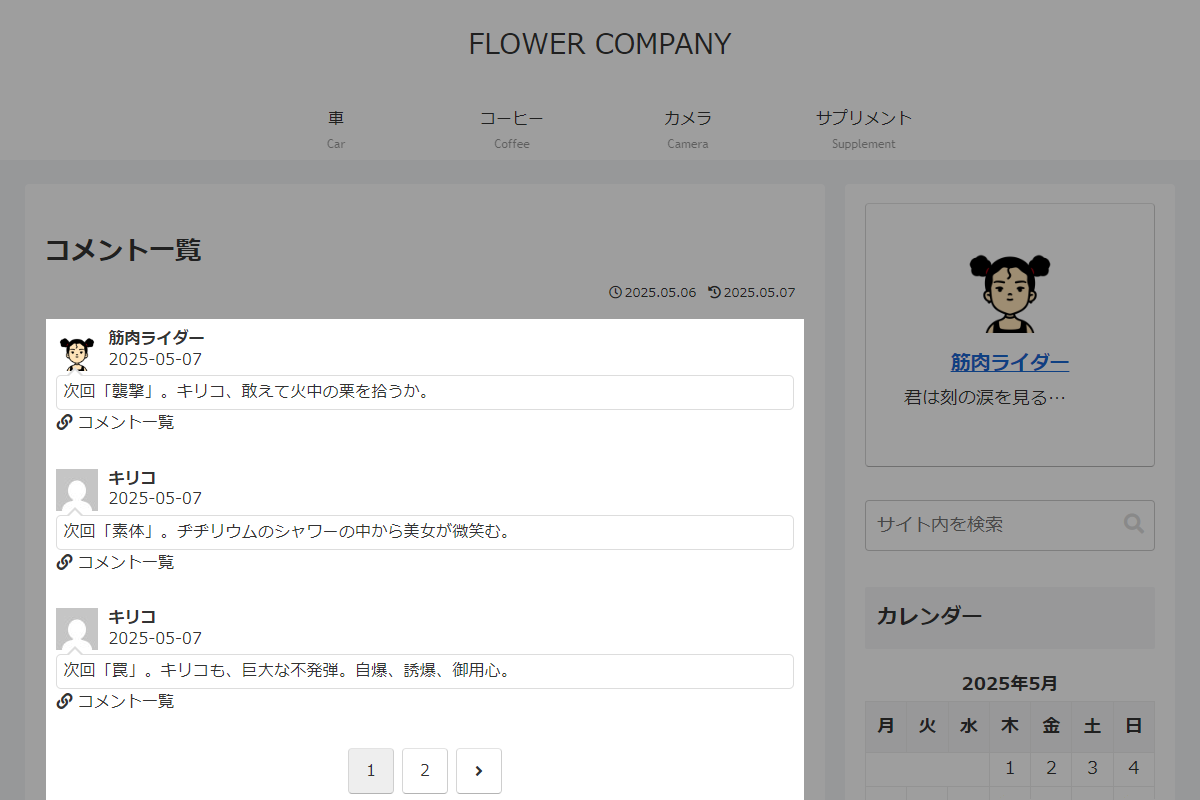
独自のショートコードを使用して、コメント一覧を「最近のコメント」ウィジェットと同じ形式で表示します。
この記事では、この方法について説明します。
完成イメージ
使用方法
以下にショートコードを示します。
[my_recent_comments]| オプション | 説明 | 値 | 初期値 |
|---|---|---|---|
| count | 1ページに表示するコメント数 | 5 | |
| str_count | コメント文字数 | 100 | |
| author_not_in | 管理者の除外 | 0=表示 / 1=非表示 | 0 |
実装手順
以下のコードをfunctions.phpに追加します。
add_shortcode('my_recent_comments', function ($atts) {
  $atts = shortcode_atts([
    'count'         => 5,
    'str_count'     => 100,
    'author_not_in' => 0,
  ], $atts);

  $per_page      = (int) $atts['count'];
  $str_count     = (int) $atts['str_count'];
  $exclude_admin = (bool) $atts['author_not_in'];

  $paged  = isset($_GET['comment_page']) ? max(1, (int) $_GET['comment_page']) : 1;
  $offset = ($paged - 1) * $per_page;

  $args_base = [
    'author__not_in' => $exclude_admin ? [1] : [],
    'status'         => 'approve',
    'type'           => 'comment',
  ];

  // 件数を取得
  $count_query = new WP_Comment_Query(array_merge($args_base, [
    'count' => true,
  ]));
  $total_comments = $count_query->get_comments();
  $total_pages = ceil($total_comments / $per_page);

  // コメントデータを取得
  $comments_query = new WP_Comment_Query(array_merge($args_base, [
    'number' => $per_page,
    'offset' => $offset,
  ]));
  $comments = $comments_query->get_comments();

  ob_start();
  ?>
  <?php if ($comments): ?>
    <div class="recent-comments">
      <?php foreach ($comments as $comment): ?>
        <?php
          $url    = get_permalink($comment->comment_post_ID) . '#comment-' . $comment->comment_ID;
          $title  = get_the_title($comment->comment_post_ID);
          $avatar = get_avatar($comment, 42);
          $author = get_comment_author($comment->comment_ID);
          $date   = get_comment_date(get_option('date_format'), $comment->comment_ID);
          $comment_content = strip_tags($comment->comment_content);
          $comment_content = str_replace(["\r\n", "\r", "\n"], '', $comment_content);

          if (mb_strlen($comment_content, 'UTF-8') > $str_count) {
            $comment_content = mb_substr($comment_content, 0, $str_count) . '...';
          }
        ?>
        <a class="recent-comment-link a-wrap cf" href="<?= esc_url($url); ?>" title="<?= esc_attr($title); ?>">
          <div class="recent-comment cf">
            <div class="recent-comment-info cf">
              <figure class="recent-comment-avatar"><?= $avatar; ?></figure>
              <div class="recent-comment-author"><?= esc_html($author); ?></div>
              <div class="recent-comment-date"><?= esc_html($date); ?></div>
            </div>
            <div class="recent-comment-content"><?= esc_html($comment_content); ?></div>
            <div class="recent-comment-article">
              <span class="fa fa-link" aria-hidden="true"></span> <?= esc_html($title); ?>
            </div>
          </div>
        </a>
      <?php endforeach; ?>
    </div>
  <?php else: ?>
    <p>コメントなし</p>
  <?php endif; ?>

  <?php if ($total_pages > 1): ?>
    <div class="pagination">
      <?php
        echo paginate_links([
          'base'      => add_query_arg('comment_page', '%#%'),
          'current'   => $paged,
          'format'    => '',
          'total'     => $total_pages,
          'prev_text' => '<span class="screen-reader-text">前へ</span><span class="fas fa-angle-left" aria-hidden="true"></span>',
          'next_text' => '<span class="screen-reader-text">次へ</span><span class="fas fa-angle-right" aria-hidden="true"></span>',
        ]);
      ?>
    </div>
  <?php endif; ?>
  <?php
  return ob_get_clean();
});
さいごに
今回紹介した方法を使えば、サイト内の全コメント一覧をページネーション付きで簡単に表示することができます。
ショートコードを活用することで、管理者以外のコメントも除外でき、表示件数やコメントの文字数も柔軟に調整できるので、サイトのデザインや機能性を向上させるのに役立ちます。

