はじめに
「アーカイブ」ウィジェットは、通常その年月に投稿された全ての記事を一覧表示します。
しかし、標準機能では特定のカテゴリーに絞って表示することはできません。
そこで、「アーカイブ」ウィジェットにカテゴリー選択機能を追加し、特定のカテゴリーに限定して投稿を表示します。
この記事では、この方法について説明します。
完成イメージ

実装手順
以下のコードをfunctions.phpに追加します。
// ウィジェットを追加
add_action('widgets_init', function () {
unregister_widget('WP_Widget_Archives');
register_widget('WP_Widget_Archives_By_Category');
});
/**
* ウィジェットクラスを定義
*/
class WP_Widget_Archives_By_Category extends WP_Widget_Archives {
/**
* ウィジェットを表示
*
* @param array $args ウィジェット引数
* @param array $instance 保存された値
* @return void
*/
public function widget($args, $instance) {
// タイトル取得
$title = apply_filters(
'widget_title',
empty($instance['title']) ? __('Archives') : $instance['title'],
$instance,
$this->id_base
);
// 選択されたカテゴリーと表示設定を取得
$cat_id = !empty($instance['cat']) ? (int) $instance['cat'] : 0;
$year_only = !empty($instance['year_only']);
// 投稿数とドロップダウンの表示設定を取得
$show_post_count = !empty($instance['count']);
$use_dropdown = !empty($instance['dropdown']);
// カテゴリー未選択で年表示も無効の場合は親クラスの処理を実行
if ($cat_id <= 0 && !$year_only) {
parent::widget($args, $instance);
return;
}
// 投稿取得用のクエリパラメータを設定
$query_args = [
'posts_per_page' => -1,
'post_status' => 'publish',
'fields' => 'ids',
'no_found_rows' => true,
];
if ($cat_id > 0) {
$query_args['cat'] = $cat_id;
}
// 条件に該当する投稿を取得
$query = new WP_Query($query_args);
// 投稿がない場合は処理対象外
if (!$query->have_posts()) {
echo $args['before_widget'];
if ($title) {
echo $args['before_title'] . $title . $args['after_title'];
}
echo '<p>該当する投稿はありません。</p>';
echo $args['after_widget'];
return;
}
// 年または年月ごとに投稿数を集計
$months = [];
foreach ($query->posts as $post_id) {
$ym = get_the_date($year_only ? 'Y' : 'Y-m', $post_id);
if (!isset($months[$ym])) {
$months[$ym] = 0;
}
$months[$ym]++;
}
krsort($months);
// 現在のアーカイブ年月を取得
$current_year = get_query_var('year');
$current_month = get_query_var('monthnum');
// ウィジェットを出力
echo $args['before_widget'];
if ($title) {
echo $args['before_title'] . $title . $args['after_title'];
}
// 設定に応じてドロップダウンまたはリストを出力
if ($use_dropdown) {
$this->render_dropdown($months, $cat_id, $show_post_count, $title, $current_year, $current_month, $year_only);
} else {
$this->render_list($months, $cat_id, $show_post_count, $current_year, $current_month, $year_only);
}
echo $args['after_widget'];
}
/**
* ドロップダウン表示を出力
*
* @param array $months
* @param int $cat_id
* @param bool $show_post_count
* @param string $title
* @param int $current_year
* @param int $current_month
* @param bool $year_only
* @return void
*/
private function render_dropdown($months, $cat_id, $show_post_count, $title, $current_year, $current_month, $year_only) {
ob_start();
?>
<label class="screen-reader-text"><?= esc_html($title); ?></label>
<select name="archive-dropdown" onchange="document.location.href=this.options[this.selectedIndex].value;">
<option value=""><?= esc_html__('Select Month'); ?></option>
<?php foreach ($months as $ym => $count) :
if ($year_only) {
$year = $ym;
$month = 0;
$url = get_year_link($year);
$label = $year . '年';
} else {
list($year, $month) = explode('-', $ym);
$month = (int) $month;
$url = get_month_link($year, $month);
$label = $year . '年' . $month . '月';
}
// カテゴリーが指定されている場合のみクエリパラメータを付与
if ($cat_id > 0) {
$url = add_query_arg('cat', $cat_id, $url);
}
if ($show_post_count) {
$label .= ' (' . (int) $count . ')';
}
$selected_attr = ($year == $current_year && (!$year_only && $month == $current_month)) ? ' selected' : '';
?>
<option value="<?= esc_url($url); ?>" <?= $selected_attr; ?>><?= esc_html($label); ?></option>
<?php endforeach; ?>
</select>
<?php
echo ob_get_clean();
}
/**
* リスト表示を出力
*
* @param array $months
* @param int $cat_id
* @param bool $show_post_count
* @param int $current_year
* @param int $current_month
* @param bool $year_only
* @return void
*/
private function render_list($months, $cat_id, $show_post_count, $current_year, $current_month, $year_only) {
ob_start();
?>
<ul>
<?php foreach ($months as $ym => $count) :
if ($year_only) {
$year = $ym;
$url = get_year_link($year);
$label = $year . '年';
} else {
list($year, $month) = explode('-', $ym);
$month = (int) $month;
$url = get_month_link($year, $month);
$label = $year . '年' . $month . '月';
}
// カテゴリーが指定されている場合のみクエリパラメータを付与
if ($cat_id > 0) {
$url = add_query_arg('cat', $cat_id, $url);
}
?>
<li>
<a href="<?= esc_url($url); ?>">
<span class="list-item-caption"><?= esc_html($label); ?></span>
<?php if ($show_post_count) : ?>
<span class="post-count"><?= (int) $count; ?></span>
<?php endif; ?>
</a>
</li>
<?php endforeach; ?>
</ul>
<?php
echo ob_get_clean();
}
/**
* ウィジェットの設定フォーム
*
* @param array $instance 保存された値
* @return void
*/
public function form($instance) {
$cat_id = !empty($instance['cat']) ? (int) $instance['cat'] : 0;
$year_only = !empty($instance['year_only']);
// 親クラスのフォームを出力
parent::form($instance);
// カテゴリ取得(非表示も含む)
$categories = get_categories([
'hide_empty' => false,
'orderby' => 'name',
'order' => 'ASC',
]);
$cat_tree = $this->build_category_tree($categories);
ob_start();
?>
<p>
<label for="<?= esc_attr($this->get_field_id('cat')); ?>">カテゴリー:</label><br>
<select class="widefat" id="<?= esc_attr($this->get_field_id('cat')); ?>" name="<?= esc_attr($this->get_field_name('cat')); ?>">
<option value="0">全て</option>
<?php $this->print_category_options($cat_tree, $cat_id); ?>
</select>
</p>
<p>
<input class="checkbox" type="checkbox" <?php checked($year_only); ?> id="<?= esc_attr($this->get_field_id('year_only')); ?>" name="<?= esc_attr($this->get_field_name('year_only')); ?>" />
<label for="<?= esc_attr($this->get_field_id('year_only')); ?>">年で表示</label>
</p>
<?php
echo ob_get_clean();
}
/**
* ウィジェットの設定を保存
*
* @param array $new_instance 新しい値
* @param array $old_instance 古い値
* @return array 保存する値
*/
public function update($new_instance, $old_instance) {
$instance = parent::update($new_instance, $old_instance);
$instance['cat'] = !empty($new_instance['cat']) ? (int) $new_instance['cat'] : 0;
$instance['year_only'] = !empty($new_instance['year_only']);
return $instance;
}
/**
* カテゴリーの階層構造を構築
*
* @param array $categories カテゴリーオブジェクトの配列
* @return array 階層化されたカテゴリー配列
*/
private function build_category_tree($categories) {
$tree = [];
$refs = [];
foreach ($categories as $cat) {
$cat->children = [];
$refs[$cat->term_id] = $cat;
}
foreach ($refs as $cat_id => $cat) {
if ($cat->parent && isset($refs[$cat->parent])) {
$refs[$cat->parent]->children[$cat_id] = $cat;
} else {
$tree[$cat_id] = $cat;
}
}
return $tree;
}
/**
* 階層構造のカテゴリーから<option>要素を再帰的に出力
*
* @param array $categories 階層化されたカテゴリー配列
* @param int $selected 選択中のカテゴリーID
* @param int $depth 階層の深さ
* @return void
*/
private function print_category_options($categories, $selected = 0, $depth = 0) {
foreach ($categories as $cat) {
$indent = str_repeat(' ', $depth);
ob_start();
?>
<option value="<?= esc_attr($cat->term_id); ?>" <?= selected($selected, $cat->term_id, false); ?>>
<?= $indent . esc_html($cat->name); ?>
</option>
<?php
echo ob_get_clean();
if (!empty($cat->children)) {
$this->print_category_options($cat->children, $selected, $depth + 1);
}
}
}
}解説
WordPressの動作仕様で、例えば、2025年の投稿一覧のURLは以下の形式になります。
https://example.com/2025/このURLに?cat=1を追加すると、特定のカテゴリー(ID=1)の投稿に絞り込まれた一覧が表示されます。
https://example.com/2025/?cat=1拡張:アーカイブタイトルに年月を追加する方法
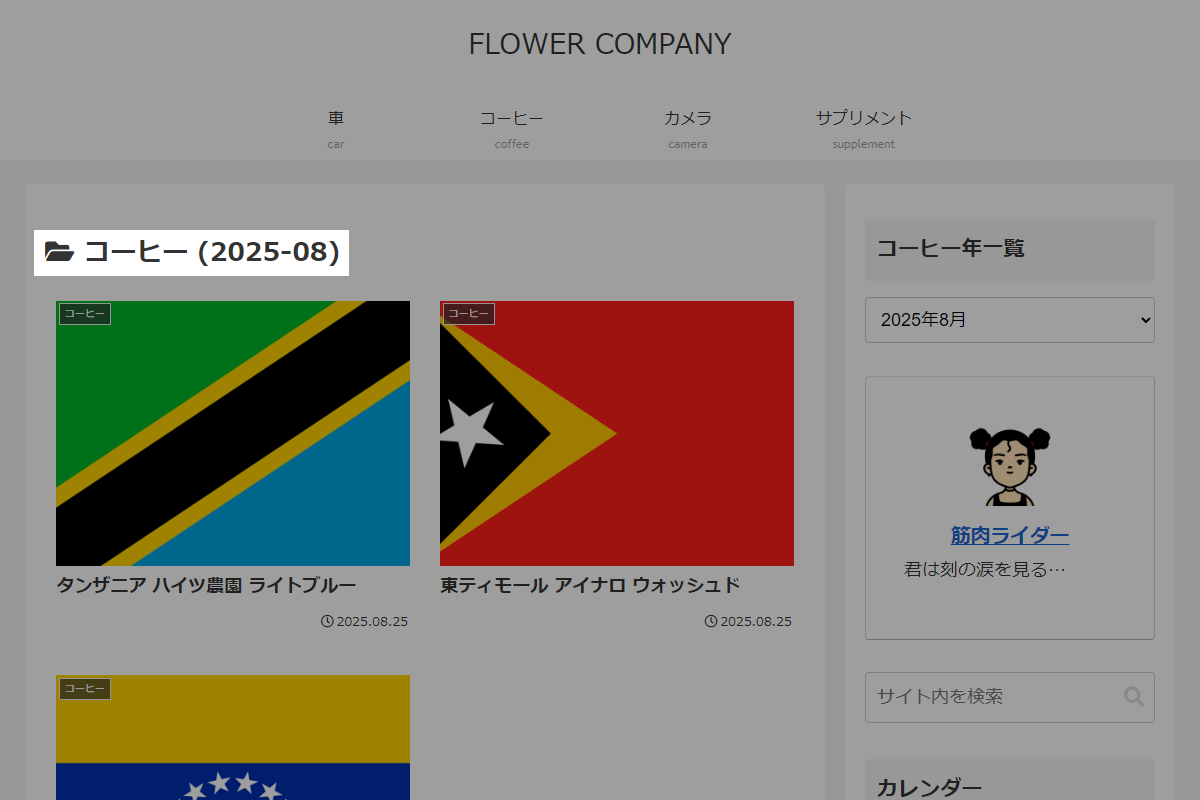
デフォルトではアーカイブタイトルにカテゴリー名のみが表示されます。
そこで、選択した年月をタイトルに追加し、より詳細な情報を表示できるように変更します。
完成イメージ
実装手順
前述のコードに加え、以下のコードをfunctions.phpに追加します。
add_filter('get_archive_chapter_title', function ($chapter_title) {
  $cat = get_query_var('cat');
  if ($cat) {

    // 年月を取得
    $year  = get_query_var('year');
    $month = get_query_var('monthnum');

    if ($year) {
      if ($month) {
        // 月を2桁に統一
        $month = str_pad($month, 2, '0', STR_PAD_LEFT);
        $chapter_title .= " ({$year}-{$month})";
      } else {
        $chapter_title .= " ({$year})";
      }
    }
  }

  return $chapter_title;
});
さいごに
今回紹介した方法を使えば、「アーカイブ」ウィジェットにカテゴリー選択機能を追加し、特定のカテゴリーに絞った投稿一覧を簡単に表示できます。
これにより、読者にとってより目的に沿った情報提供が可能となり、サイトの利便性と使いやすさを向上させることができます。