
はじめに
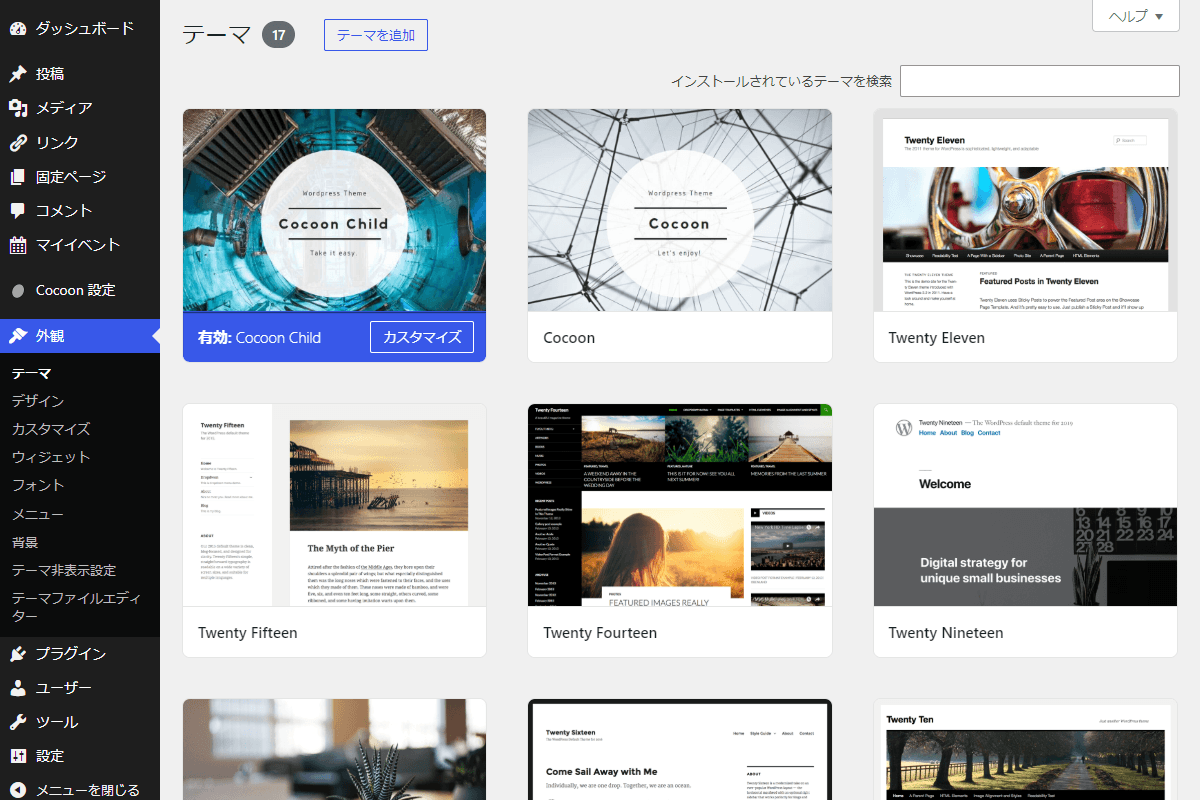
WordPressサイトを運用していると、インストール時に自動追加される標準テーマや、検証・バックアップ用のテーマがサーバー上に増えてしまいがちです(図1参照)。
これらのテーマは保管しておきたいものの、管理画面にずらりと並んでしまうと、現在使いたいテーマが一目で見つかりにくく、作業効率の低下につながります。
そこで、誤操作を防止するために、外観→テーマから特定のテーマだけを非表示にします。
この記事では、この方法について説明します。
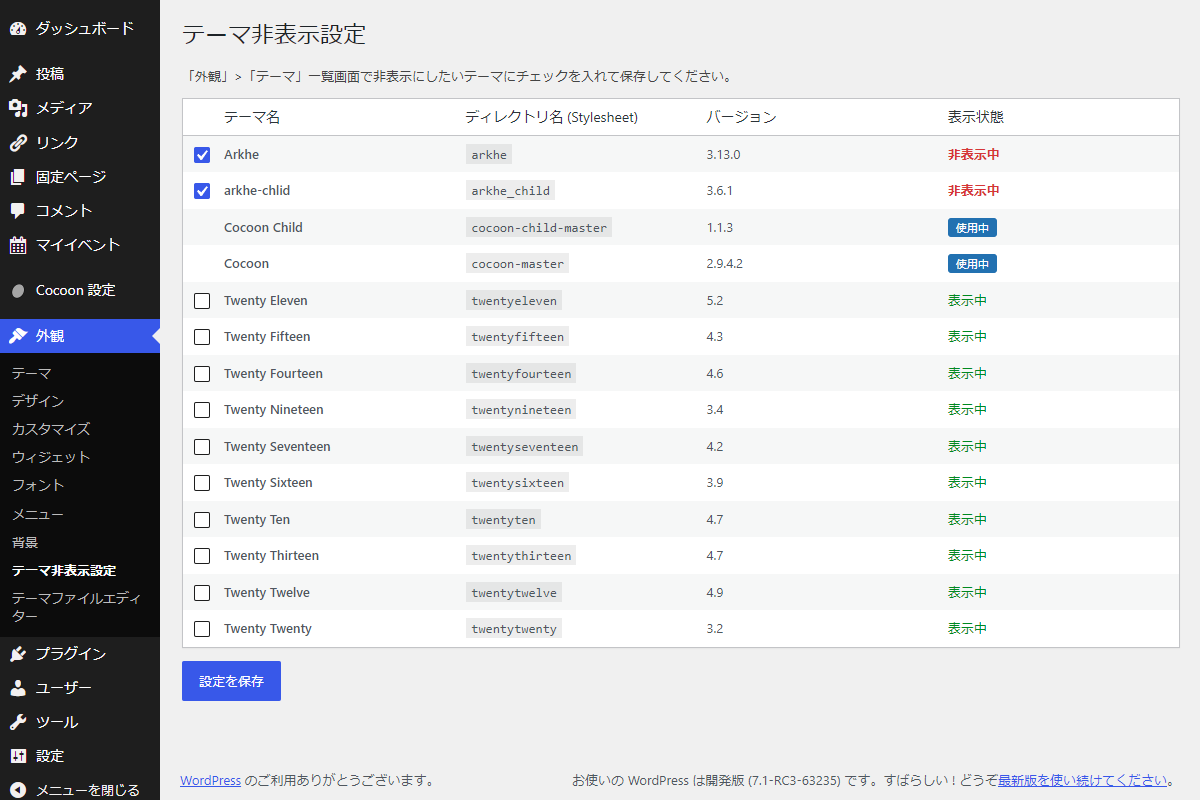
完成イメージ
実装手順
以下のコードをfunctions.phpに追加します。
// 管理画面メニューを追加
add_action('admin_menu', function () {
add_theme_page(
'テーマ非表示設定',
'テーマ非表示設定',
'switch_themes',
'theme-hide',
'render_theme_hide'
);
});
/**
* 管理画面ページを出力
*
* @return void
*/
if (!function_exists('render_theme_hide')):
function render_theme_hide() {
// 権限チェック
if (!current_user_can('switch_themes')) {
wp_die('このページにアクセスする権限がありません。');
}
// 現在設定されている非表示テーマリストを取得
$current_hidden_themes = get_option('my_hidden_themes', []);
// インストールされている全テーマ情報を取得
$all_themes = wp_get_themes();
// 現在有効化されているメインテーマの情報を取得
$current_theme = wp_get_theme();
// 保護対象となる有効化中のテーマを配列に保持
$active_stylesheets = [$current_theme->get_stylesheet()];
// 親テーマが存在する場合は親テーマも保護対象に追加
if ($current_theme->parent()) {
$active_stylesheets[] = $current_theme->parent()->get_stylesheet();
}
?>
<div class="wrap theme-hide">
<h1>テーマ非表示設定</h1>
<p>「外観」>「テーマ」一覧画面で非表示にしたいテーマにチェックを入れて保存してください。</p>
<?php settings_errors('theme_hide_msg'); ?>
<form method="post" action="">
<?php wp_nonce_field('theme_hide_action', 'theme_hide_nonce'); ?>
<table class="wp-list-table widefat fixed striped">
<thead>
<tr>
<td class="manage-column column-cb check-column"></td>
<th>テーマ名</th>
<th>ディレクトリ名 (Stylesheet)</th>
<th>バージョン</th>
<th>表示状態</th>
</tr>
</thead>
<tbody>
<?php foreach ($all_themes as $stylesheet => $theme): ?>
<?php
$is_active = in_array($stylesheet, $active_stylesheets, true);
$is_hidden = in_array($stylesheet, $current_hidden_themes, true);
?>
<tr>
<th scope="row" class="check-column">
<?php if (!$is_active): ?>
<input type="checkbox" name="hidden_themes[]" value="<?php echo esc_attr($stylesheet); ?>" class="theme-checkbox" <?php checked($is_hidden); ?>>
<?php endif; ?>
</th>
<td><strong><?php echo esc_html($theme->get('Name')); ?></strong></td>
<td><code><?php echo esc_html($stylesheet); ?></code></td>
<td><?php echo esc_html($theme->get('Version')); ?></td>
<td>
<?php if ($is_active): ?>
<span class="badge theme-hide__status--active">使用中</span>
<?php elseif ($is_hidden): ?>
<span class="theme-hide__status--hidden">非表示中</span>
<?php else: ?>
<span class="theme-hide__status--visible">表示中</span>
<?php endif; ?>
</td>
</tr>
<?php endforeach; ?>
</tbody>
</table>
<p>
<input type="submit" name="theme_hide" class="button button-primary" value="設定を保存">
</p>
</form>
</div>
<?php
}endif;
// 管理画面からの設定データ更新
add_action('admin_init', function () {
if ('POST' !== $_SERVER['REQUEST_METHOD'] || !isset($_POST['theme_hide'])) {
return;
}
// nonceチェック
check_admin_referer('theme_hide_action', 'theme_hide_nonce');
// 権限チェック
if (!current_user_can('switch_themes')) {
wp_die('この操作を行う権限がありません。');
}
// 選択されたチェックボックスの値を取得
$hidden_themes = isset($_POST['hidden_themes']) && is_array($_POST['hidden_themes'])
? array_map('sanitize_text_field', $_POST['hidden_themes'])
: [];
update_option('my_hidden_themes', $hidden_themes);
// 保存完了メッセージの登録
add_settings_error('theme_hide_msg', 'settings_updated', '非表示設定を保存しました。', 'updated');
});
// 指定のテーマを非表示
add_filter('wp_prepare_themes_for_js', function ($prepared_themes) {
// 非表示対象テーマリストを取得
$hidden_themes = get_option('my_hidden_themes', []);
if (empty($hidden_themes) || !is_array($hidden_themes)) {
return $prepared_themes;
}
// 非表示対象リストに含まれるテーマを除外
foreach ($hidden_themes as $theme_slug) {
if (isset($prepared_themes[$theme_slug])) {
if (empty($prepared_themes[$theme_slug]['active'])) {
unset($prepared_themes[$theme_slug]);
}
}
}
return $prepared_themes;
});
// 管理画面用JS・CSSを追加
add_action('admin_enqueue_scripts', function () {
if (($_GET['page'] ?? '') !== 'theme-hide') {
return;
}
ob_start();
?>
.theme-hide .column-cb {
width: 2em;
}
.theme-hide__status--active {
background-color: #2271b1;
color: #fff;
padding: 2px 8px;
border-radius: 3px;
font-size: 11px;
}
.theme-hide__status--hidden {
color: #d63638;
font-weight: bold;
}
.theme-hide__status--visible {
color: #008a20;
}
<?php
wp_add_inline_style('wp-admin', ob_get_clean());
});さいごに
今回紹介した方法を使えば、サーバー上にテーマファイルを残したまま、管理画面上の「テーマ一覧」から不要なテーマだけを安全に非表示にできます。
クライアントや運用担当者の誤操作を未然に防ぐことが可能です。
現場でのサイト保守や納品前のカスタマイズに、ぜひ活用してみてください。