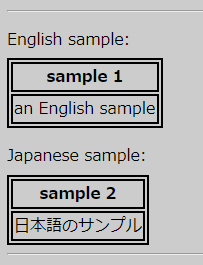
Screenshot when the zoom is 100%:
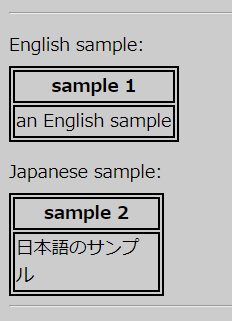
Screenshot when the zoom is 110%:
Normally, the width of the table is automatically determined from the width of the contents of <th> or <td>, but if you specify border property in CSS for <th> or <td>, the rendering of table width becomes unstable.
Specifically, when changing the display zoom of the page, the rendering width seems to be slightly smaller than the actual character string width depending on the zoom, and the last letter is unnecessarily breaked and wrapped onto the next line.
This bug is hard to happen in English. The 'Sample 2' below is when the content of <td> is Japanese, and the bug occurs like the screen shot. In these samples, the CSS of 'border: 2px solid black' is applied to the <td> elements. In this case, the last letter 'ル' of the string '日本語のサンプル' is unnecessarily wrapped onto the next line.
Note: Changing the zoom of the page according to the percentage is a function of desktop version of Chrome.
This page is related to Issue 768322.
Postscript: To our joy, this bug has been fixed since Chrome 64.
English sample:
| sample 1 |
|---|
| an English sample |
Japanese sample:
| sample 2 |
|---|
| 日本語のサンプル |
Screenshot when the zoom is 100%:
Screenshot when the zoom is 110%: